Quick answer
To paint Frosted Ice Hills scenery, start with a dark blue-grey base, layer up to pale blue highlights, and finish with a dry brush of white to create a realistic frost effect.
Why the Frosted Ice Hills are a Good Canvas
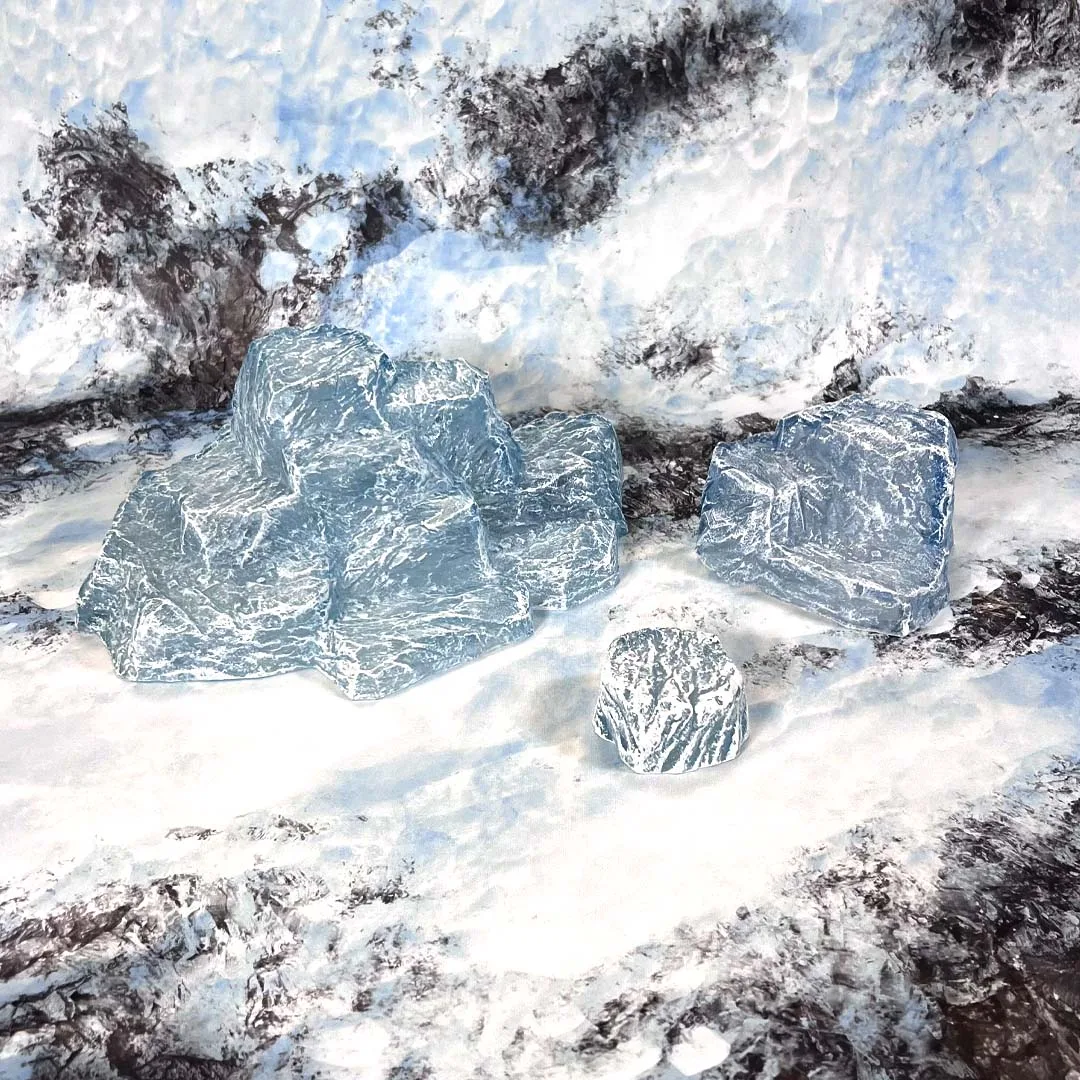
The Frosted Ice Hills set gives you a large multi-level hill, a medium multi-layer hill, and a small snowy rock model. The wide, flat surfaces are ideal for practicing smooth gradients, while the multi-layer steps let you test edge highlighting without much risk. Because the set is designed to fit two hills together, you can also plan your paint scheme so the joined edges blend naturally—paint the sheer back before assembly to avoid missed spots.
Choosing a Palette That Reads as Ice
Ice reads as cold, so stick to blues, whites, and pale violets. Avoid warm browns or yellows unless you want a sunset or alien look. A simple three-tone approach—dark blue base, mid-tone blue, and white highlight—gives the hills depth without needing advanced blending.
Painting Frosted Ice Hills: Step-by-Step
- Prepare the surface: Clean the hills with warm soapy water, rinse, and let dry completely. Apply a primer—a light gray or white primer works best for icy tones. Check that the primer covers all crevices and flat surfaces evenly. If the primer pools in recesses, gently wick away excess with a brush before it dries.
- Base coat the ice: Apply a base coat of pale blue or off-white to the entire hill. Use thin layers to avoid obscuring the sculpted rock details. Let each layer dry before adding the next. Keep the base coat slightly lighter than your intended final color—this makes the later shading pop.
- Add shadows and depth: Mix a darker blue or teal wash and apply it to the crevices and lower slopes. This creates the illusion of deep ice and adds contrast. Wipe off excess with a damp brush to avoid pooling. Don't let the wash pool on flat surfaces; pull it toward the recesses.
- Dry brush the highlights: Dry brush a light blue or white over the raised edges and flat tops. This brings out the multi-level hill details and makes the ice look polished. Use a nearly dry brush to avoid streaks; build up in thin layers.
- Apply the frost effect: Mix white paint with a little matte medium or water and stipple it onto the upper surfaces. Add a light dusting of white pigment powder for extra frost. Less is more—build the frost in thin layers to keep the effect natural.
- Seal and protect: Spray a matte varnish over the painted hills to lock in the frost effect and protect the paint from wear during games. Test the varnish on a small area first to confirm it doesn't dull the icy highlights too much.
Scenery to work with
-
Frosted Ice Hills: The Frosted Ice Hills set includes one large multi-level hill, one medium multi-layer hill, and a small snowy rock model. The varied sizes give you practice on different surface areas, so you can test your frost effects on the small rock before committing to the large hill.
Frosted Ice Hills