Photographing anime statues is a rewarding way to share your collection with the world, whether you're posting on social media or simply preserving memories. But capturing the intricate details and vibrant colors of a high-quality statue can be challenging, especially for beginners. You might have spent hours perfecting your display, only to have your photos come out blurry, dark, or lacking the wow factor you see from other collectors.
The good news is that you don't need a professional studio or expensive gear to take stunning anime statue photos. With a few basic techniques and a bit of practice, you can dramatically improve your results. This guide covers everything from choosing the right lighting to mastering camera settings and editing, so you can showcase your prized figures like a pro.
Why Photography Matters for Collectors
Your anime statues are more than just plastic and paint; they're works of art that represent your passion. High-quality photos allow you to share that passion with others, whether you're documenting your collection, selling a piece, or joining online communities. A well-taken photo can highlight the craftsmanship of a statue, making it look even more impressive than it does in person.
Moreover, good photography can help you appreciate your collection on a deeper level. When you take the time to photograph a statue, you notice details you might have overlooked—the subtle shading, the delicate paintwork, the dynamic pose. This guide will help you capture those details and create images you'll be proud to share.
Essential Equipment for Anime Statue Photography
You don't need a top-of-the-line DSLR to start. Even a smartphone with a decent camera can produce great results if you follow the right techniques. However, having a few basic tools can make a significant difference. A tripod is essential for keeping your camera steady, especially in low light. A remote shutter release or your camera's self-timer can prevent camera shake.
For lighting, natural window light is a great starting point, but you can also use inexpensive LED panels or desk lamps. A simple lightbox or a piece of white poster board can help diffuse light and eliminate harsh shadows. If you're serious about macro details, consider a clip-on macro lens for your phone or a dedicated macro lens for your camera.
- Use a tripod to avoid blurry images.
- Diffuse light with a white sheet or tracing paper.
- Try a macro lens for close-up details.
Setting Up Your Photo Studio at Home
You don't need a dedicated room to create a mini photo studio. A desk or table near a window can work perfectly. Clear the area and set up a neutral background, such as a sheet of white or black paper, to make your statue stand out. If you're using a backdrop, make sure it's wrinkle-free to avoid distracting lines.
Position your statue at eye level or slightly above, and place your lights at 45-degree angles on either side. This classic setup reduces harsh shadows and brings out the details. If you're photographing a large statue, like the [Pre-Order] Loiter Studio - Statue - Seven Ninja Swordsmen of the Mist Naruto, you may need to step back and use a wider angle to capture the entire piece.
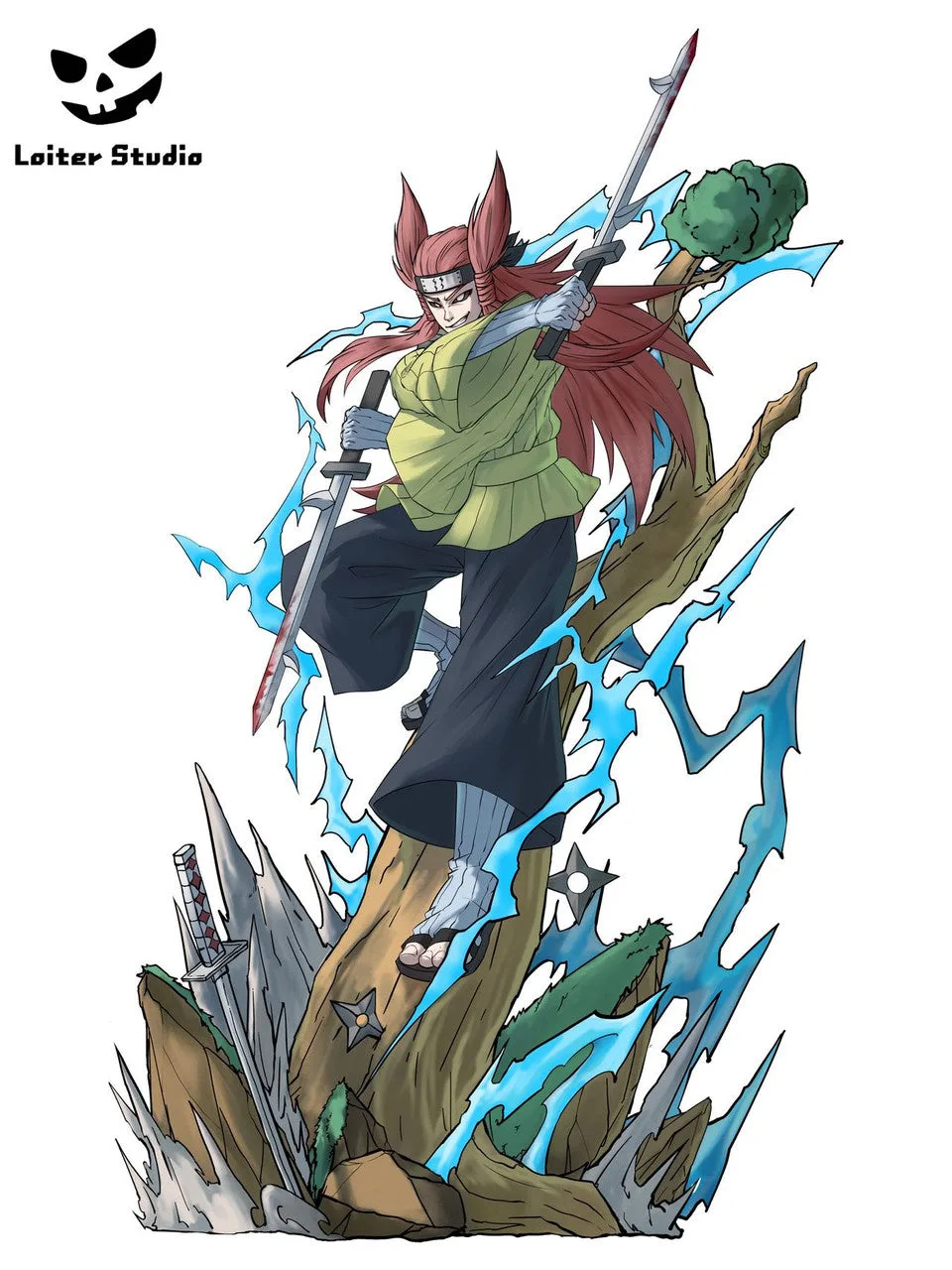
[Pre-Order] Loiter Studio - Statue - Seven Ninja Swordsmen of the Mist Naruto
- Use a clean, neutral backdrop.
- Place lights at 45 degrees on each side.
- Adjust height to shoot at eye level.
Mastering Lighting for Figure Photography
Lighting is the most critical element in anime statue photography. Poor lighting can wash out colors or create unflattering shadows. Natural light from a window is soft and flattering, but it can change throughout the day. For consistent results, consider using artificial lights, such as LED panels or desk lamps with daylight bulbs.
Experiment with the direction of light. Side lighting can emphasize textures and details, while backlighting can create a dramatic silhouette. If you're photographing a shiny or reflective statue, like the [Warehouse in Stock] TriEagles Studio - Statue - Destiny Child Zephyros (Licensed), you may need to diffuse the light more to avoid glare. A simple piece of parchment paper taped over the light can work wonders.
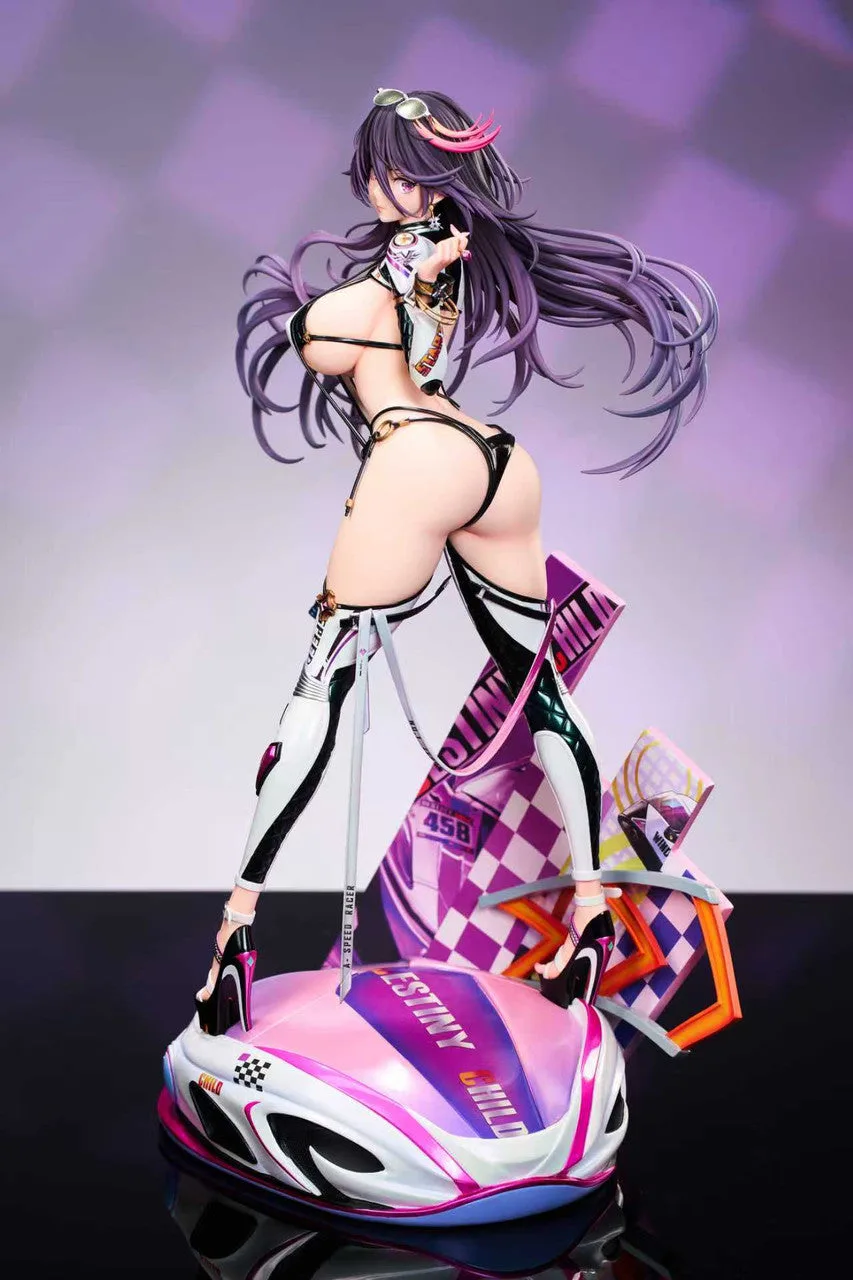
[Warehouse in Stock] TriEagles Studio - Statue - Destiny Child Zephyros (Licensed)
Camera Settings: Aperture, Shutter Speed, and ISO
Understanding your camera's settings is key to getting sharp, well-exposed photos. Aperture controls the depth of field—a lower f-stop (like f/2.8) blurs the background, making your statue pop, while a higher f-stop (like f/8) keeps more of the statue in focus. For full-body shots, an aperture of f/5.6 to f/8 is often ideal.
Shutter speed determines how long the camera's sensor is exposed to light. A fast shutter speed (1/125s or faster) is essential to freeze any movement, but since your statue is static, you can use a slower speed if you have a tripod. ISO controls the sensor's sensitivity to light; keep it as low as possible (ISO 100-200) to avoid grain, but increase it if you're shooting in low light.
Composition Tips to Make Your Statues Shine
Good composition draws the viewer's eye to your statue. The rule of thirds is a classic technique: imagine your frame divided into nine equal parts, and place your statue along those lines or at their intersections. This creates a more dynamic and interesting photo than centering the subject.
Also, consider the angle. Shooting from a low angle can make your statue look more imposing, while a high angle can make it seem more approachable. For statues with intricate bases, like the [Warehouse in Stock] Zodiakos Studio - Statue - Saint Seiya - Gold Saint Virgo cloth (Licensed), a slight tilt can add drama. Don't be afraid to experiment with different perspectives.
Editing Your Photos: Basic Enhancements
Post-processing can take your photos from good to great. Even simple adjustments like cropping, straightening, and adjusting exposure can make a big difference. Free software like GIMP or mobile apps like Snapseed offer powerful tools without a steep learning curve.
Start by adjusting the white balance to ensure colors are accurate, then tweak contrast and saturation to make your statue pop. Be careful not to over-edit, as oversaturation can make the photo look unnatural. If you're photographing a statue with delicate paintwork, like the [Pre-Order] Scarlet Studio - Statue - Frieren: Beyond Journey's End - Frieren wedding dress, subtle edits will preserve the elegance of the piece.
Common Mistakes to Avoid
One of the most common mistakes is using the camera's built-in flash, which creates harsh shadows and reflections. Turn it off and use external lighting or natural light instead. Another mistake is neglecting the background—cluttered or distracting backgrounds can ruin an otherwise great photo.
Also, avoid shooting in auto mode if you can. Learning to control your camera settings gives you more creative freedom. Finally, don't forget to clean your statue before photographing it. Dust and fingerprints are very visible in close-up shots. A soft brush or microfiber cloth can work wonders.
Photographing anime statues is a skill that improves with practice. Start with the basics—good lighting, a stable camera, and thoughtful composition—and soon you'll be capturing images that do justice to your collection. For your next photoshoot, consider a stunning piece like the [Warehouse in Stock] Dodomo Studio - Statue - Chainsaw Man - 1/6 Makima to put these tips into action. Happy shooting!
![[Warehouse in Stock] Dodomo Studio - Statue - Chainsaw Man - 1/6 Makima](https://xilands.com/api/media/sync/0c/0ccf54e2f3fd026c630ef2d6bb9b2718c720707fdc1a8ac8619424617bec5853.webp)
![[Warehouse in Stock] Zodiakos Studio - Statue - Saint Seiya - Gold Saint Virgo cloth (Licensed)](https://xilands.com/api/media/sync/c2/c2df53487abf77600a3048582ce38a69382469a316f038455fb531d0517d4a2a.webp)