Quick Answer
To replace a clipper blade, first remove the old blade by unscrewing the screws, then clean the clipper head, attach the new blade, and adjust the tension and alignment. Always use the correct blade type for your clipper model and zero-gap carefully to avoid skin irritation.
Replacing a clipper blade is a routine maintenance task that keeps your tools cutting cleanly and prevents pulling or discomfort for your clients. Whether you're swapping a worn blade or upgrading to a sharper one, the process is straightforward if you follow the right steps.
This guide walks you through the entire process—from removing the old blade to installing and testing the new one. We'll also highlight common mistakes to avoid, so you get a smooth, precise cut every time.
Before You Start: Know Your Clipper and Blade Type
Before you begin, make sure you have the correct replacement blade for your clipper model. Blades vary in size, tooth configuration, and mounting style. For example, a fade blade has a flat cutting surface, while a taper blade has a slight angle that helps lift hair. Using the wrong blade can lead to poor cutting performance or even damage your clipper.
Check your clipper's manual or the manufacturer's website to confirm the blade model. If you're unsure, look for the blade size printed on the existing blade or measure the width. Common sizes include 40mm and 41mm wide blades. It's also a good idea to have a small screwdriver (usually a Phillips or flathead) and a cleaning brush on hand.
- Always unplug the clipper or remove the battery before handling the blade.
- Take a photo of the blade orientation before removal to make reinstallation easier.
Remove the Old Blade
Start by removing the screws that secure the blade to the clipper. Most clippers have two screws, but some may have four. Place the screws in a safe spot so you don't lose them. Once the screws are out, gently lift the blade away from the clipper. If it's stuck, use a flathead screwdriver to pry it off carefully, but avoid damaging the clipper head.
A common mistake is forcing the blade off without loosening all screws, which can bend the blade or strip the screw heads. Another mistake is not cleaning the clipper head after removing the old blade—hair and debris can accumulate and affect the new blade's performance.
- Use a magnetic screw tray to keep screws from rolling away.
- Inspect the old blade for wear—if it's dull or chipped, replacement is the right call.
Clean the Clipper Head and Blade Area
With the blade removed, use a brush to sweep away hair, dust, and debris from the clipper head. Pay attention to the area around the drive pin and the blade mounting surface. If there's built-up oil or grime, wipe it with a dry cloth. Avoid using water or liquid cleaners unless the clipper is specifically designed for it, as moisture can damage the motor.
Cleaning is often overlooked, but it's essential for the new blade to sit flush and cut properly. A dirty surface can cause the blade to vibrate or misalign, leading to uneven cuts or excessive noise. Take a few extra seconds to ensure the area is spotless.
- Use a small brush or a can of compressed air to remove stubborn debris.
- Check the drive pin for wear—if it's worn, consider replacing it while you're in there.
Install the New Blade
Position the new blade over the clipper head, aligning the screw holes with the posts. Make sure the blade's teeth face the same direction as the original. For blades with a mounting bracket, slide the bracket into place before securing the screws. Tighten the screws evenly—don't overtighten, as this can warp the blade or strip the threads.
After the blade is secure, manually move the blade side to side to ensure it's seated correctly. If it feels loose, tighten the screws a bit more. A common mistake is installing the blade upside down or backward, which prevents the clipper from cutting altogether. Double-check the orientation before tightening fully.
- If your clipper has a lever, attach it after the blade is in place.
- Use a torque screwdriver if you have one, to avoid overtightening.
Adjust Tension and Zero-Gap (Optional)
Many clippers allow you to adjust the blade tension or set the blade to zero-gap for a closer cut. Zero-gapping means adjusting the moving blade so it sits as close as possible to the stationary blade without touching. This is popular for fades and line work, but it requires precision—if set too close, the blade can chatter or nick the skin.
To zero-gap, loosen the screws slightly, adjust the blade position, and re-tighten. Test on a small area of hair or a piece of paper to check the cut. If you're not comfortable doing this, many barbers skip it and rely on the factory setting. A common mistake is setting the gap too tight, which can cause the blade to overheat or pull hair.
- Always test the blade on a low setting before using it on a client.
- If the blade chatters, loosen the screws slightly and readjust.
Test the New Blade and Oil It
Before using the clipper on a client, turn it on and run it for a few seconds to check for unusual noise or vibration. A smooth, quiet operation indicates the blade is installed correctly. Then, apply a few drops of clipper oil to the blade's teeth and moving parts. Oil reduces friction, prevents rust, and keeps the blade cool during use.
A common mistake is skipping the oiling step, which leads to premature blade wear and overheating. Another is applying too much oil, which can attract hair and debris. A thin, even coat is all you need. After oiling, run the clipper for a few seconds to distribute the oil.
- Use a high-quality clipper oil—never use household oil or WD-40.
- Wipe off any excess oil with a clean cloth.
Step-by-Step: Replacing Your Clipper Blade
- Prepare your tools: Gather a screwdriver, cleaning brush, and new blade. Ensure the clipper is unplugged or battery removed. Checkpoint: Confirm you have the correct blade model before starting.
- Remove the old blade: Unscrew all screws and lift the blade off. Keep screws safe. Common mistake: Forcing the blade off before removing all screws can damage the clipper.
- Clean the clipper head: Brush away hair and debris from the mounting surface and drive pin. Checkpoint: A clean surface ensures the new blade sits flush.
- Install the new blade: Align the blade, insert screws, and tighten evenly without overtightening. Common mistake: Installing the blade backward—double-check orientation.
- Adjust tension or zero-gap: If desired, adjust the blade position for a closer cut. Test carefully. Checkpoint: If the blade chatters, loosen and readjust.
- Oil and test: Apply clipper oil to the blade and run the clipper to check operation. Common mistake: Skipping oil leads to overheating and premature wear.
Product Recommendations
- Japanese Stainless Steel Ace Trimmer Blade & Deep Tooth Cutter: Specialized Japanese Stainless Steel blade is perfectly balanced with superior sharpness. The moving Deep Tooth blade has longer teeth and wider gaps ideal for bulk removal. If you do a lot of bulk cutting or work with thick hair, this blade's deep teeth help remove hair faster and reduce pulling, making it a solid upgrade for your trimmer.
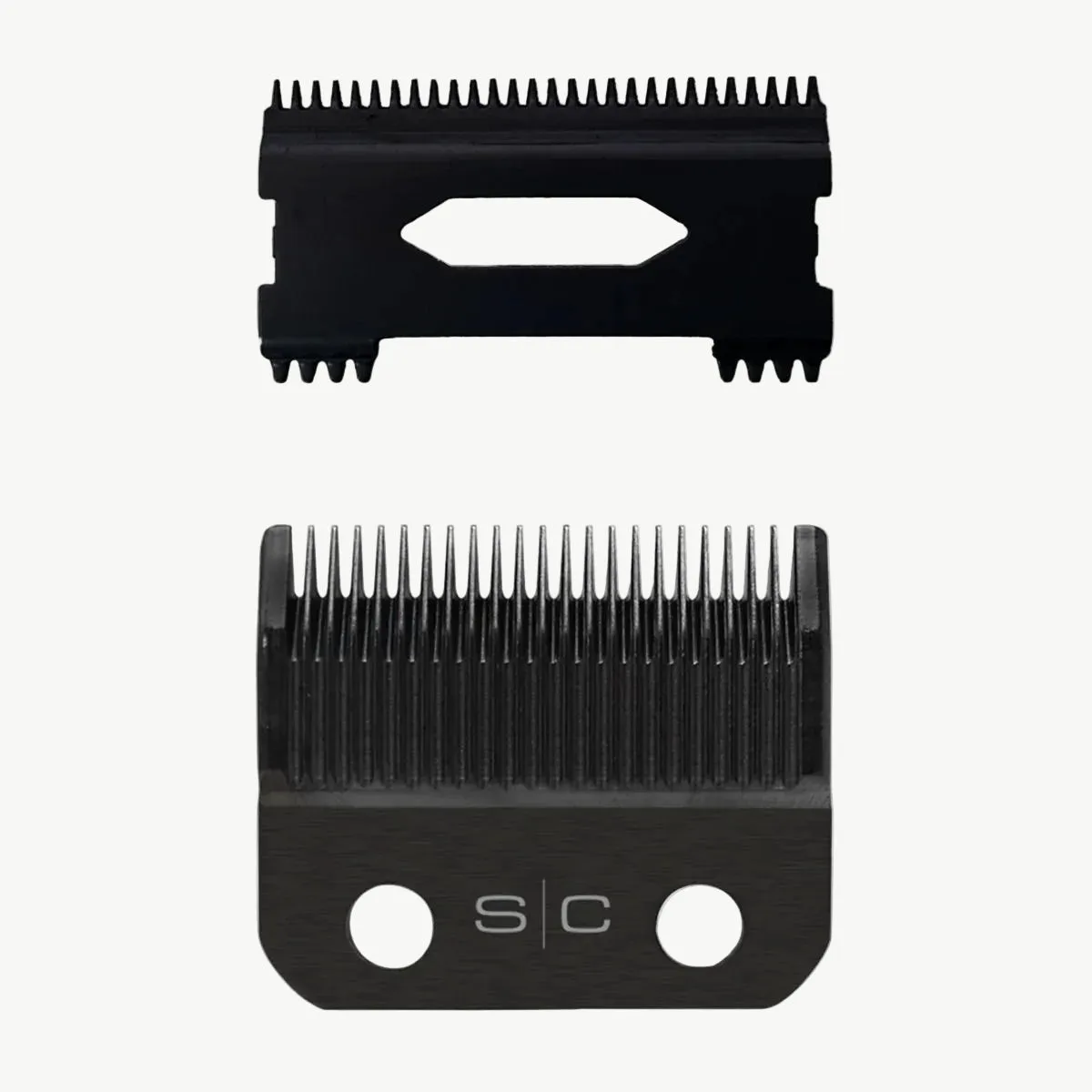
- Black DLC Taper Clipper Blade and Shallow Tooth 2.0 Cutter: Premium Black Diamond Carbon DLC Taper fixed blade is rust and corrosion impermeable, self-sharpening, stays cooler and sharper longer. The fixed Taper blade has a slight angle where the tips of the blade slope down to help lift the hair when cutting. For barbers who need a blade that stays sharp and resists rust, this taper blade is a durable choice that also helps lift hair for easier bulk cutting—ideal for everyday use.
Replacing a clipper blade is a simple task that can dramatically improve your cutting performance. By following these steps and avoiding common mistakes, you'll keep your tools in top shape and deliver clean, comfortable cuts. When it's time for a new blade, consider a high-quality option like the Japanese Stainless Steel Ace Trimmer Blade or the Black DLC Taper Clipper Blade to get the best results.