Quick Answer
To set up a bow chronograph for accurate speed, place it 3-5 feet downrange from the bow, align it with your arrow's flight path, ensure consistent lighting, and follow the manufacturer's pairing process to log data.
Why Accurate Arrow Speed Matters
Arrow speed directly affects trajectory, kinetic energy, and point of impact. A chronograph gives you the real velocity instead of relying on a bow's advertised IBO rating, which is measured under ideal lab conditions that rarely match your setup. Knowing your actual speed lets you build more accurate drop charts for hunting or target archery.
Common Setup Mistakes
Many archers place the chronograph too close to the bow, where string vibration or arrow paradox can cause false readings. Others fail to account for indoor lighting flicker, which confuses optical sensors. The Garmin Xero C1 Pro uses radar, avoiding most lighting issues, but positioning still matters for consistent results.
How to Set Up a Bow Chronograph
- Position the Chronograph Downrange: Place the chronograph 3 to 5 feet in front of the bow's riser, centered on your shooting lane. For a compound bow, this distance avoids interference from string oscillation. For a traditional bow, stay far enough to clear the arrow's fletching pass. Checkpoint: Too close can cause erratic readings; too far risks missing the sensor zone.
- Align with Your Arrow's Flight Path: If using an optical chronograph, ensure the arrow will pass through the center of the sensor opening. For the Garmin Xero C1 Pro, point the radar cone toward the target, roughly level with the arrow's expected trajectory. A slight downward angle from the shooting position helps capture the full flight. Checkpoint: With radar units, avoid aiming the device directly at the bow to prevent false triggers from the bow's movement.
- Set Up Stable Lighting (Optical Units Only): If you're using a traditional optical chronograph, shoot under consistent overhead light or use an artificial light source. Fluorescent or LED flicker can cause missed or double readings. The Garmin Xero C1 Pro's radar avoids this issue entirely. Checkpoint: For radar models, skip this step—just ensure the device has a clear line of sight to the arrow's path.
- Pair with the ShotView App (Garmin Xero C1 Pro): Turn on the chronograph, open the ShotView app on your smartphone, and follow the pairing instructions. The app logs every shot's speed, allows you to label arrows, and calculates averages. This data is essential for tuning your bow or building a ballistic profile. Checkpoint: Keep the app updated for reliable Bluetooth connectivity and data sync.
- Shoot a Test Group and Check Consistency: Fire at least three arrows at the same target and note the speeds. A well-tuned bow should show less than 3 fps variation between shots. Larger spreads may indicate a tuning issue, inconsistent release, or arrow weight differences. Checkpoint: If speeds vary more than 5 fps, check your bow's timing, cam lean, or arrow spine before adjusting your sight pins.
- Record and Apply the Data: Use the average speed from your test group to update your sight tape, ballistic solver, or rangefinder. For hunting, note the speed difference between a bare shaft and a broadhead-tipped arrow—broadheads often fly slower due to drag. Checkpoint: Recheck speed after any bow adjustment or change in arrow components like vanes or nocks.
Recommended Gear
-
Garmin Xero C1 Pro Chronograph: The Garmin Xero C1 Pro measures projectile speeds from 100 fps to 5,000 fps and pairs with the ShotView smartphone app to track data. Its radar-based design eliminates the need for alignment with optical gates, making setup simpler and readings more reliable than traditional chronographs.
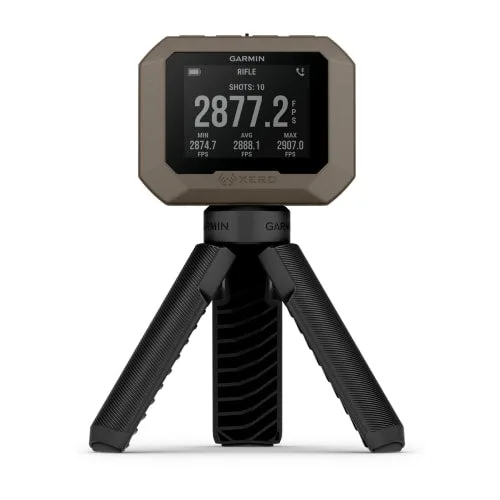
Garmin Xero C1 Pro Chronograph


