Quick answer
Unpack the lamp carefully, insert fresh batteries, and place it near your bed or desk so the sound sensor picks up claps or noise to trigger the LED.
Why the sound sensor needs a clear path
The Yamato lamp uses a built-in microphone to detect sound. Soft claps, footsteps, or even a door closing can activate the LED. If the sensor is blocked by thick fabric or placed inside a glass cabinet, it may not respond reliably. A spot on an open shelf or nightstand works best.
Battery compartment and power tips
The lamp runs on batteries (not included). Check the compartment orientation before inserting. Weak or mismatched batteries can cause dim LED output or intermittent sound activation. Replace them with fresh alkaline cells for consistent performance.
Step-by-step setup
- Unbox and inspect: Open the packaging and remove the Yamato figure and base. Check for any protective film or tape on the LED lens and sound sensor hole. Peel them off carefully. Missing this step can dim the light or block the microphone.
- Insert batteries: Locate the battery compartment on the base. Insert fresh batteries following the polarity marks (+/-). Close the cover securely. Use alkaline batteries; rechargeable ones may not provide enough voltage for full brightness.
- Test the sound activation: Place the lamp on a flat surface. Clap once near the sensor area (usually a small hole on the base or figure). The LED should light up for a few seconds and then turn off. If it doesn't respond, check battery orientation and remove any remaining protective film over the sensor.
- Position for best effect: Set the lamp on an open shelf, nightstand, or desk where sound can reach it easily. Avoid enclosing it in a cabinet or behind thick curtains. A clear line of sight to the room's ambient noise improves responsiveness.
Product details
-
Licensed Devil Fruit Series Yamato Sound-Activated Night Lamp with LED - ONE PIECE Statue - HAPPY LIFE Studio: Made from ABS + PVC + Soft Vinyl; dimensions H11cm × W8cm × D8cm; packaging H15 × W12 × D9cm. The compact size fits easily on a nightstand or desk, but the soft vinyl parts need gentle handling during assembly to avoid bending.
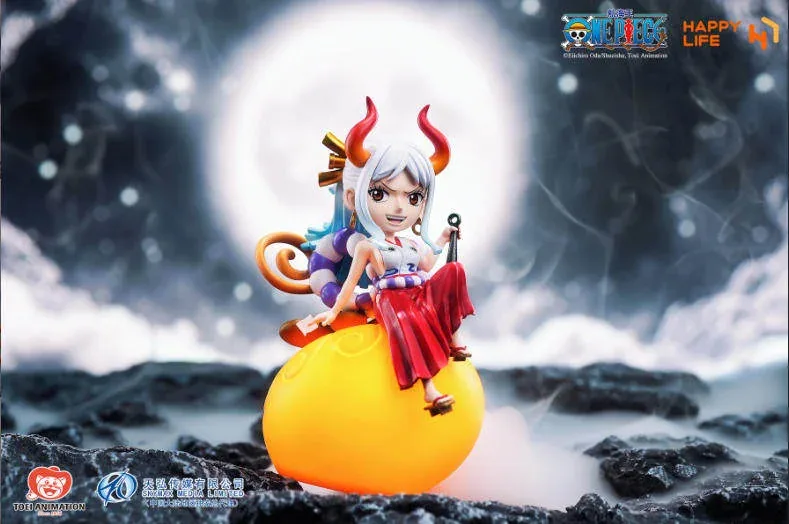
Licensed Devil Fruit Series Yamato Sound-Activated Night Lamp with LED - ONE PIECE Statue - HAPPY LIFE Studio