What to Expect from a Pre-Owned Wii Remote
A pre-owned Wii Remote, such as the OEM Nintendo Wii/Wii U Remote Controller BLACK RVL-003, can work perfectly with your console if you know what to check. This guide walks you through the key tests after receiving the remote, covering sync, battery compartment condition, and button responsiveness. The supplied listing confirms the remote is genuine, but it does not include batteries or a sensor bar, so you will need those on hand.
Step-by-Step Testing Process
Perform these checks in order to identify any issues quickly. You will need a Wii or Wii U console, a sensor bar, and fresh AA batteries.
- Check the Battery Compartment: Open the battery cover on the back of the remote. Look for corrosion, rust, or loose battery contacts. The listing does not specify the condition of the compartment, so a visual check is essential. If the contacts are clean, insert fresh AA batteries (not included). The remote will not power on without them.
- Test the Sync with Your Console: On a Wii console, press the SYNC button on the console (inside the SD card slot door) and then press the red SYNC button inside the remote's battery compartment. On a Wii U, use the Wii U menu's controller sync option. The remote's Player LED will blink and then stay solid when synced. If the LED does not respond, try fresh batteries or repeat the sync process.
- Verify Button Response: Once synced, point the remote at the sensor bar and press each button: A, B, plus and minus, Home, and the directional pad. The on-screen pointer should move smoothly when you point the remote. If any button feels stuck or unresponsive, the remote may need internal repair. The listing does not guarantee button function, so this test is critical.
- Check the Sensor Bar Connection: The remote communicates with the sensor bar, which plugs into the back of the console. Ensure the sensor bar is properly connected and not obstructed. If the pointer is jittery or unresponsive, try repositioning the sensor bar or cleaning its surface. The remote itself may be fine, but a dirty or misaligned sensor bar can cause issues.
Key Details from the Listing
-
[Pre-Owned/Refurbished] OEM Nintendo Wii/Wii U Remote Controller BLACK RVL-003 Genuine game console: The remote is an OEM Nintendo Wii/Wii U Remote Controller BLACK RVL-003, genuine. A genuine OEM remote should sync and work reliably with any Wii or Wii U console. Third-party remotes may have compatibility quirks.
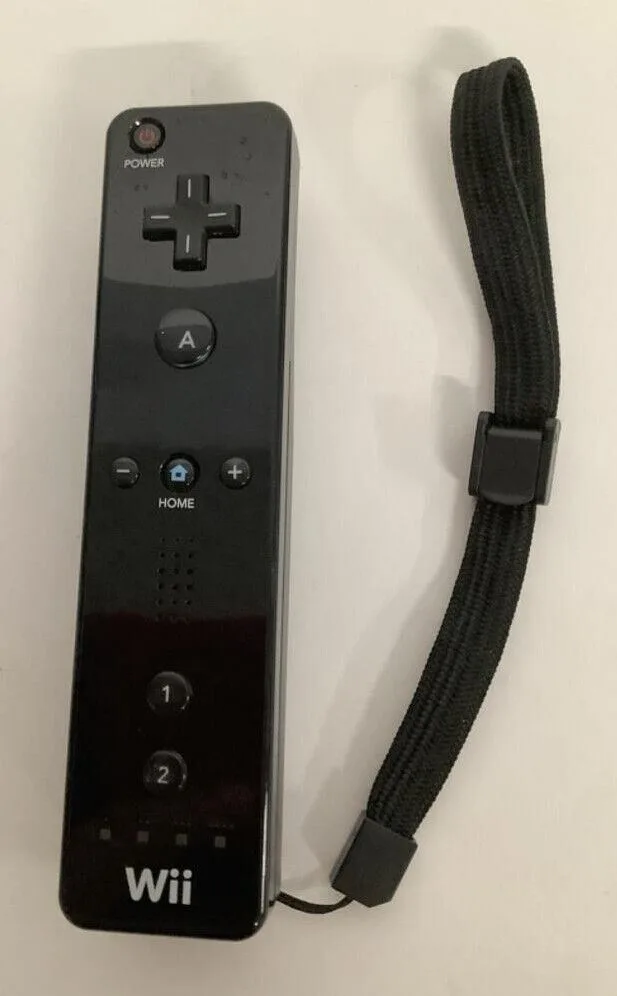
[Pre-Owned/Refurbished] OEM Nintendo Wii/Wii U Remote Controller BLACK RVL-003 Genuine game console
-
[Pre-Owned/Refurbished] OEM Nintendo Wii/Wii U Remote Controller BLACK RVL-003 Genuine game console: The listing states there is a 15% restocking fee for non-defective returns. If the remote works but you simply change your mind, returning it will cost 15% of the purchase price. Test thoroughly before deciding to keep it.
-
[Pre-Owned/Refurbished] OEM Nintendo Wii/Wii U Remote Controller BLACK RVL-003 Genuine game console: The seller states they carry multiple items in stock and will first attempt to replace the item before providing a refund. If your remote is defective, you may receive a replacement rather than an immediate refund. Contact the seller within 30 days of arrival.
What the Listing Does Not Confirm
The listing does not specify whether batteries, a sensor bar, or a nunchuk are included. It also does not confirm the remote's button or sync functionality. These are standard for pre-owned electronics, so plan to test as described. The remote is sold as pre-owned/refurbished, so cosmetic wear is possible but not detailed.