Quick Answer
To upgrade your game with metal tokens, first identify which components you want to replace, then purchase the correct metal token set for your game. Next, carefully remove the plastic tokens from your game and replace them with the metal versions, ensuring they fit the same spaces. Finally, store the plastic tokens as backups and enjoy the enhanced tactile experience.
Metal tokens can transform your gaming experience, adding weight and a premium feel that plastic simply can't match. Whether you're upgrading Moonrakers or another favorite game, this guide walks you through the process step by step, from choosing the right tokens to integrating them into your game.
We'll cover the practical considerations, like what to look for in a metal token set, how to handle the switch, and common pitfalls to avoid. By the end, you'll know exactly how to upgrade your game with metal tokens and why it's worth doing.
Identify Which Components to Upgrade
Start by examining your game's components. Look for frequently handled pieces like ship tokens, faction reputation markers, or first player tokens. These are prime candidates for metal upgrades because they're used often and benefit most from a heavier, more durable feel.
Consider the game's mechanics: if a token is used for tracking or bidding, a metal version can make it easier to handle and read. Also, check if the game has expansions or add-ons that might require additional tokens, as you'll want to ensure your upgrade covers all necessary components.
- Check the game's component list to see which tokens are used most.
- Consider the aesthetics: metal tokens often have a more detailed finish that can enhance the game's theme.
Choose the Right Metal Token Set
Once you know which tokens you need, select a metal token set that matches your game. Look for sets specifically designed for your game, as they'll have the correct shapes, sizes, and denominations. For example, if you're upgrading Moonrakers, you might consider the Moonrakers Metal Ship Tokens or Moonrakers Extra Metal Coins.
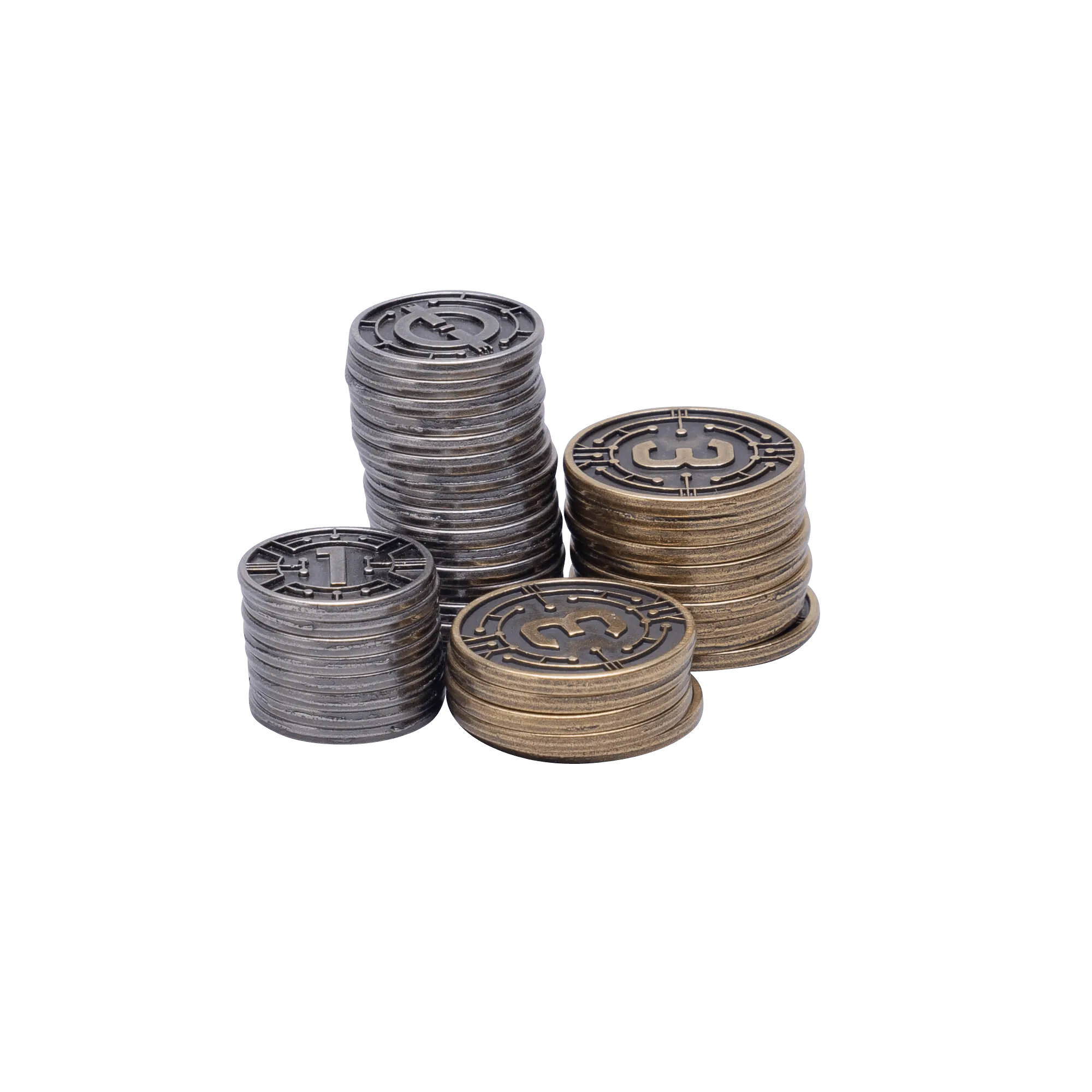
Moonrakers Extra Metal Coins
Pay attention to the number of tokens included. Some sets replace only the base game tokens, while others cover expansions. Read the product description carefully to ensure you get enough tokens for all the components you want to upgrade.
- Verify that the metal tokens have the same dimensions as the plastic ones to ensure a proper fit in the game's storage and play areas.
Prepare Your Game for the Upgrade
Before making the switch, gather all the plastic tokens you plan to replace. Sort them by type and note their quantities. This will help you verify that your metal set includes all the necessary pieces.
Clean the game's storage insert or bag to remove any debris that might scratch the new metal tokens. If the game uses a specific tray or holder, test-fit one metal token to ensure it fits properly.
- Take photos of the original token layout for reference.
Replace the Plastic Tokens with Metal
Carefully remove the plastic tokens from the game and replace them with the metal versions. Handle metal tokens by their edges to avoid fingerprints, and place them in the same positions as the originals.
If you're upgrading multiple types of tokens, do it one type at a time to avoid confusion. For example, replace ship tokens first, then coins, then faction tokens. This makes it easier to track your progress and ensures you don't miss any.
- Use a soft cloth to wipe any smudges from the metal tokens before playing.
Test the Gameplay
After replacing the tokens, play a test round to ensure everything functions as expected. Check that the metal tokens fit in any designated areas, such as player boards or tracking charts, and that they don't slide or stack awkwardly.
Also, consider how the metal tokens feel during gameplay. If they feel too heavy or slippery, you might need to adjust your handling. Some players find that metal tokens are easier to pick up and less likely to stick together.
- If a token doesn't fit, double-check that you have the correct set for your game edition.
Store the Plastic Tokens as Backups
Once you've successfully upgraded, store the original plastic tokens in a labeled bag or container. They serve as backups in case you ever need to replace a metal token or if you want to play with the original components.
Keep the plastic tokens in a cool, dry place to prevent warping or damage. This way, you have a complete set of components for your game, and you can always revert to the original version if desired.
- Use a small zip-lock bag or the game's original insert to store the plastic tokens.
Step-by-Step Upgrade Process
- Step 1: Audit your game components: List the plastic tokens you want to replace and check their quantities. Checkpoint: Confirm you have a metal set that matches the exact count and types.
- Step 2: Purchase the correct metal tokens: Choose a set designed for your specific game and edition, ensuring it covers all necessary components. Checkpoint: Verify the product description to avoid missing pieces.
- Step 3: Prepare the game and workspace: Clean the storage area and have a soft cloth ready to handle the metal tokens. Checkpoint: Test-fit one token to ensure it fits properly.
- Step 4: Replace tokens one type at a time: Swap plastic tokens for metal, keeping them organized to avoid mix-ups. Checkpoint: Count tokens after replacement to ensure none are missing.
- Step 5: Playtest and adjust: Run a practice round to ensure the metal tokens function well in gameplay. Checkpoint: If a token doesn't fit, double-check the product compatibility.
- Step 6: Store plastic tokens as backups: Keep the original plastic tokens in a labeled bag for future use. Checkpoint: Label the bag clearly to avoid confusion with other games.
Metal Token Upgrades You Can Use
- Moonrakers: Binding Ties Metal Faction Rep Tokens: Enhance your plays of the Moonrakers: Binding Ties expansion by upgrading the plastic Faction Reputation tokens to metal tokens. Includes: 25 metal tokens, which is enough to replace the plastic tokens in both the Binding Ties expansion and the Negotiation Board add-on. If you own the Binding Ties expansion, this set ensures you have enough metal tokens for both the expansion and the add-on, so you don't have to buy twice.
- Moonrakers Metal Ship Tokens: Replicas of the five plastic ship tokens that are included with each copy of Moonrakers, but made of metal for that heavy token feel. One set of metal ship tokens will replace the included plastic tokens in either the base game or the Nomad expansion. These ship tokens are frequently handled during gameplay, and the metal version adds a satisfying weight that enhances the tactile experience.
- Brink Metal First Player Token: Upgrades plastic token to metal in all editions of Brink! The first player token is passed around often, so a metal version is more durable and less likely to get lost or damaged.
- Moonrakers Extra Metal Coins: Made of heavy zinc alloy, these are the coins we wish every game contained. Contains x15 '3' value and x25 '1' value coins. Included in: Moonrakers Platinum and Moonrakers Titan Edition If you need additional coins for a larger player count or just want a heavier feel, these extra coins are a great addition to your Moonrakers set.
Upgrading your game with metal tokens is a straightforward process that can significantly enhance your enjoyment. By following these steps, you'll have a premium set of components that feel great to handle and last longer. Remember to choose the right set for your game, handle the tokens with care, and keep the plastic ones as backups. Happy gaming!
![[3x] Tend Playmat](https://xilands.com/api/media/sync/bf/bfc8fe574f8453aeaa444b92da9a9429d51ee85b9ed605b8713f0aedb12dc602.webp)