Quick answer
To get clean four-point star bursts, mount a 4 point star filter on a 62mm lens, use a small aperture, and position bright light sources near the edges of the frame. Rotate the filter to align the star points with your composition.
Why a 4 point star filter instead of stopping down
A 4 point star filter creates diffraction spikes from any bright point of light, even when your lens is wide open. This gives you the star effect without needing a narrow aperture or a long exposure, which is especially useful in low-light scenes where you want to keep the shutter speed fast.
The trade-off is that the effect applies to every bright highlight in the frame, not just your main subject. Street lamps, car headlights, and even shiny reflections can all become stars, which can clutter the image if you don't position them carefully.
Choosing the Right Scenes and Settings
The 4 point star filter works best when you have small, bright light sources against a darker background. Think of city lights at night, candle flames, water reflections, or jewelry with sparkle. The effect is most visible when the light source is small and intense relative to the frame.
For a natural look, avoid pointing the filter at very large or diffuse light sources like the sun at noon or broad window light. These can wash out the star effect and reduce contrast.
Step-by-Step Guide to Using a 4 Point Star Filter
- Attach the filter to your lens: Screw the 62mm filter onto a lens with a 62mm thread. If your lens has a different filter size, use a step-up ring. Ensure it is snug but not over-tightened. Check that the filter is clean and free of smudges before mounting.
- Set up a point light source: For the strongest effect, aim at a small, bright light: street lamps, car headlights, candle flames, or reflected sunlight on water. The effect is most visible when the light is much brighter than the rest of the scene. If the star looks faint, move closer to the light or use a longer lens to enlarge the specular highlight.
- Adjust aperture and exposure: Use a narrow aperture (f/8 to f/16) to make the star points more defined. Because the filter reduces light, you may need to increase exposure time or ISO to compensate. Check your histogram to avoid clipping the highlights; the star effect depends on bright points, but overexposure can wash it out.
- Rotate the filter for composition: Rotate the filter in its ring to change the angle of the four points. Align the points with your subject or horizon for a deliberate composition. Rotate slowly while looking through the viewfinder to find the most pleasing orientation.
- Choose the right light source: Use direct or reflected light sources like street lamps, candle flames, or water glints. The filter creates four-point star effects from these specular highlights, so avoid diffuse lighting. Test with a small, bright light source first to see the effect clearly.
- Adjust aperture and focus: Stop down the aperture (f/8 to f/16) to make the star spikes more pronounced. Focus on the light source or use manual focus to ensure sharpness. Check for unwanted flare by reviewing the viewfinder or LCD. If the star looks soft, close the aperture one stop and refocus.
- Rotate the filter for composition: Rotate the filter to change the angle of the four points relative to your scene. Align them with vertical or horizontal lines for a classic look, or tilt for dynamic diagonals. Tighten the filter ring gently after rotating to avoid accidental shifts.
The filter we recommend
-
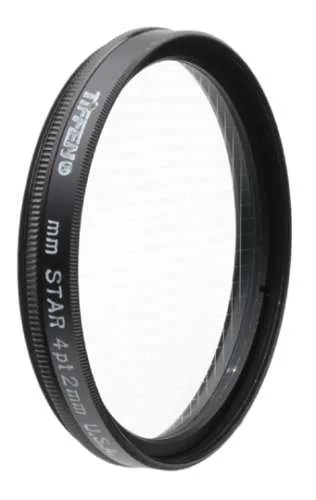
Tiffen 62mm 4 Point Star: The Tiffen 62mm 4 Point Star creates four-point star effects from direct or reflected light sources and can be rotated for creative control. This means you can position the star bursts exactly where you want them in the frame, whether from a streetlight, candle flame, or water reflection.
Tiffen 62mm 4 Point Star


