Quick Answer
A pet selfie stick helps you capture sharp, engaging photos by keeping your pet's attention on the camera. Clip it to your phone, attach a treat or toy, and follow a few simple steps to get great shots every time.
Why a Pet Selfie Stick Works Better Than a Regular Selfie Stick
A pet selfie stick is designed specifically for animals. Unlike a standard selfie stick, it includes a clip or attachment point for a treat or toy, which naturally draws your pet's gaze toward the lens. This keeps their eyes locked on the camera, resulting in sharp, scroll-stopping photos rather than blurry or distracted shots.
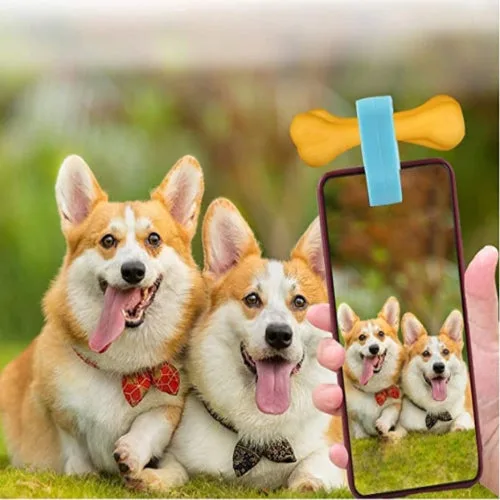
The Pet Selfie Phone Attachment from Pet-Tags.com is a simple, affordable tool that clips onto your phone and lets you attach a treat or toy. It works for both dogs and cats, and it's small enough to carry on walks or trips to the park.
Common Mistakes to Avoid
Many pet owners make the mistake of using a regular selfie stick, which offers no way to hold your pet's attention. Without a treat or toy near the lens, your pet will likely look away or move, leading to blurry images.
Another common error is using a treat that's too large or distracting. A small, high-value treat (like a tiny piece of cheese or a favorite kibble) works best because it keeps your pet focused without causing them to jump or paw at the camera.
Steps to Take Great Pet Selfies
- 1. Attach the Selfie Stick to Your Phone: Clip the Pet Selfie Phone Attachment securely to your phone's camera end. Make sure it's tight so it doesn't shift during use. If your phone has a case, check that the clip fits properly. A loose clip can cause the stick to fall off mid-shot, so double-check the fit before you start.
- 2. Add a Small, High-Value Treat or Toy: Place a tiny piece of a favorite treat or a small toy in the attachment's holder. The treat should be just enough to catch your pet's attention without making them overly excited or distracted. Using a treat that's too large can cause your pet to jump or paw at the camera, ruining the shot.
- 3. Position Your Pet in Good Light: Move to a well-lit area, preferably near a window or outdoors in soft daylight. Avoid harsh direct sunlight, which can create shadows or make your pet squint. Hold the selfie stick at your pet's eye level for the most natural perspective. Poor lighting is the #1 cause of blurry pet photos. Natural light works best.
- 4. Get Your Pet's Attention with the Treat: Hold the treat or toy near the camera lens so your pet looks directly at it. Use a happy, encouraging voice to keep them engaged. If your pet looks away, gently move the treat back toward the lens. Patience is key—some pets need a few tries before they focus on the treat.
- 5. Take Multiple Shots in Burst Mode: Use your phone's burst mode (usually holding the shutter button) to capture several frames quickly. This increases your chances of getting a sharp shot, especially if your pet moves suddenly. Review the images and delete any blurry ones. Burst mode is essential for active pets—don't rely on a single tap.
- 6. Reward Your Pet After the Session: Give your pet the treat you used during the photo session as a reward. This positive reinforcement makes them more willing to cooperate next time. Keep sessions short (under 5 minutes) to avoid frustration. Ending on a positive note builds a good association with the selfie stick.
Product Spotlight
-
Pet Selfie Stick: The Pet Selfie Phone Attachment clips to your phone and includes a spot to attach a treat or toy. This keeps your pet's eyes on the camera, making it easier to capture sharp, engaging photos without blur.
Pet Selfie Stick