Why a Coiled Audio Cable for Camera Audio?
When you're recording video on a smartphone, tablet, or computer, the built-in microphone often picks up handling noise and room echo. A better approach is to use an external microphone or wireless receiver, but connecting it to your device isn't always straightforward. Many microphones and receivers use a standard 3.5mm TRS output, while smartphones and tablets typically have a 3.5mm TRRS headphone jack. A coiled audio cable like the ProMaster 7990 bridges that gap with a compact, tangle-resistant design.
ProMaster 7990 Coiled Audio Cable at a Glance
-
Promaster Audio Cable 3.5mm TRRS male right angle - 3.5mm TRS male right angle - 8 1/2" coiled: The ProMaster 7990 is a coiled audio cable that connects a microphone or wireless receiver with a common 3.5mm TRS output to the 3.5mm TRRS headphone jack of a smartphone, tablet, computer or similar device. This cable solves the connector mismatch between typical prosumer microphones and modern mobile devices, letting you use better audio gear without an adapter.
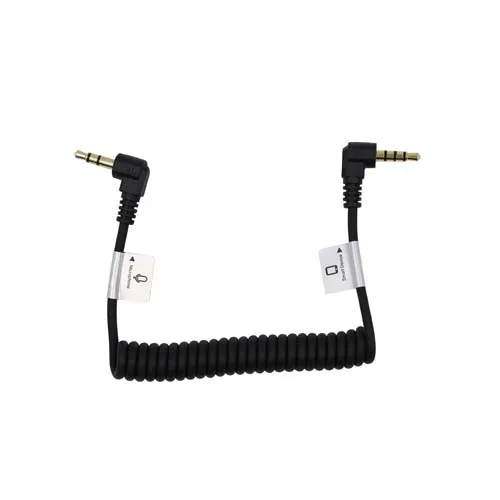
Promaster Audio Cable 3.5mm TRRS male right angle - 3.5mm TRS male right angle - 8 1/2" coiled
-
Promaster Audio Cable 3.5mm TRRS male right angle - 3.5mm TRS male right angle - 8 1/2" coiled: Each end is terminated with a right angle connector, and the cable is coiled, stretching comfortably as needed. Follow the supplied product instructions for proper use and avoid overstretching to prevent damage. The right angle plugs reduce strain on device jacks, and the coiled design keeps the cable tidy when not in use while allowing enough reach for a camera rig or pocket setup.
-
Promaster Audio Cable 3.5mm TRRS male right angle - 3.5mm TRS male right angle - 8 1/2" coiled: The tips are gold-plated for protection against corrosion. Gold plating helps maintain a reliable connection over time, especially in humid or outdoor shooting conditions.
What You Need for This Setup
Before connecting, check that your gear meets these requirements:
- Microphone or wireless receiver with a 3.5mm TRS output: Most lavalier mics, shotgun mics, and wireless receiver packs use this standard three-conductor plug.
- Smart device with a 3.5mm TRRS headphone jack: The ProMaster 7990 is compatible with iOS, Android, Mac OS, and Windows. Some newer devices may lack a native 3.5mm port and require a separate adapter (not included).
- The ProMaster 7990 coiled audio cable: One end is labeled "Microphone" (TRS plug) and the other is labeled "Smart Device" (TRRS plug). The labels help you connect correctly without guessing.
Steps to Connect and Use the Cable
Follow these steps to get clean audio from your external mic into your recording device.
- Identify the labeled ends: Look for the small label near each connector. Plug the "Microphone" end into your microphone or wireless receiver's output jack. Plug the "Smart Device" end into your smartphone, tablet, or computer's headphone jack.
- Check the connection: The right angle connectors allow the cable to lie flat against your device, reducing strain. Ensure both plugs are fully seated.
- Adjust cable length: The coiled cable is relaxed but can stretch as needed. Gently pull to extend as needed for your setup, but avoid overstretching to prevent damage.
- Test audio levels: Open your recording app and speak into the microphone. Adjust input gain as needed. The cable itself does not affect levels, but a secure connection ensures consistent signal transfer.
What This Cable Does Not Cover
The ProMaster 7990 is a passive cable — it does not provide phantom power or amplify the signal. If your microphone requires plug-in power (common with some smartphone-compatible lavaliers), that must come from your device or an inline power source. Also, if your smart device lacks a 3.5mm jack, you will need a compatible adapter; the cable's compatibility depends on the adapter's ability to pass the TRRS signal. For most standard setups, however, this coiled cable offers a simple, reliable connection for field audio.