Quick Answer
To use the DJI Osmo Action 6 Waterproof Case safely, fit your camera snugly, verify the seal is clean and free of debris, and perform a freshwater test before any saltwater dive.
Why the case matters for underwater shooting
The DJI Osmo Action 6 Waterproof Case is built for serious underwater work, protecting your camera down to 60 metres. That depth rating means you can take it scuba diving, snorkelling, or even into rough surf without worrying about water damage.
The high-strength glass front keeps the view crystal clear, which is essential when you're composing shots in low-light or murky conditions. A dirty or scratched lens port will ruin footage, so treating the glass with care is part of the job.
Trade-off: depth vs. convenience
The case gives you real protection, but it adds bulk and makes the touchscreen harder to use. Plan your settings before sealing the case, and use the physical buttons or the DJI Mimo app for adjustments while underwater.
Also note that the case is designed specifically for the Osmo Action 6. If you own a different model, this housing won't fit, and you'll need to look for a compatible option.
Step-by-Step Setup and Diving Guide
- Prepare the camera: Turn off the Osmo Action 6 and remove any quick-release mount or protective frame. Clean the camera body and lens with a soft cloth to remove dust or sand that could scratch the case interior. A clean camera prevents debris from scratching the case glass from the inside.
- Insert the camera correctly: Align the camera's lens with the case's glass port and slide it in until it clicks into place. Make sure the camera sits flat and the buttons line up with the case's external controls. If the camera doesn't sit flush, remove and reinsert it—forcing it can damage the seal.
- Inspect and close the seal: Run your finger along the rubber gasket to check for any hair, sand, or cracks. Close the case and press firmly until both latches click shut. Give each latch a gentle tug to confirm they're locked. A visible gap or a loose latch means the case isn't sealed—do not dive until it's secure.
- Perform a freshwater test: Before any saltwater or deep dive, submerge the sealed case in a bucket or shallow water for a few minutes. Check for bubbles or water entry, and dry the case completely before opening. This quick test catches seal failures before they ruin a dive or damage your camera.
- Dive and operate the controls: Use the external buttons to start/stop recording and switch modes. Keep the glass port clear of your fingers and avoid touching it with sunscreen or grease, which can smear footage. Practice button operation on land first so you know which control does what underwater.
- Rinse and dry after every dive: After saltwater use, rinse the case with fresh water immediately, then dry it with a microfiber cloth. Leave the latches open and the case out of direct sunlight to prevent the gasket from degrading. Regular rinsing and drying extends the life of the seal and prevents corrosion.
Product Highlight
-
DJI Osmo Action 6 Waterproof Case: The DJI Osmo Action 6 Waterproof Case protects your camera up to a depth of 60 metres and uses high-strength glass for a clear view. This depth rating means you can confidently take it on recreational dives, and the durable glass keeps your footage sharp even underwater.
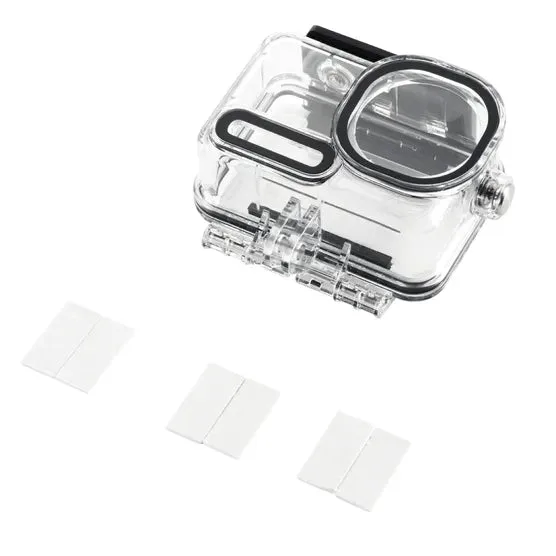
DJI Osmo Action 6 Waterproof Case