Quick Answer
Attach the handlebar clamp to a 25mm tube or rod on your rig, then secure your accessory using the 3/8"-16 or 1/4"-20 threads. Tighten evenly to avoid slipping.
Why Use a Handlebar Clamp on a Camera Rig?
Handlebar clamps are designed to mount accessories like monitors, lights, or microphones onto tubular rig components. They work on gimbal stabilizers such as the DJI Ronin-M or Ronin-MX, as well as on standard 25mm rods. The clamp provides a secure, quick-to-adjust attachment point without permanent modification.
One trade-off: the clamp adds a little bulk and weight, so it's best used when you need a temporary or adjustable mount rather than a fixed solution.
Step-by-Step: Mounting a Handlebar Clamp on Your Rig
- 1. Choose the Mounting Location: Identify a 25mm tube or rod on your rig—common spots include the gimbal handlebar, a cheese plate rod, or a bike handlebar. The clamp must fully encircle the tube. Make sure the tube is clean and free of grease so the clamp doesn't slip.
- 2. Open the Clamp and Position It: Loosen the clamp's screw enough to slide it over the tube. Position it at the desired angle and height, then hand-tighten the screw until the clamp grips the tube but can still rotate with moderate force. Do not overtighten yet—you may need to adjust the angle after attaching your accessory.
- 3. Attach Your Accessory: Use the 3/8"-16 ARRI-style mount for heavier accessories like a monitor, or one of the 1/4"-20 threads for smaller items like a LED light or microphone. Screw the accessory in until snug, but avoid cross-threading. Check that the accessory's weight is balanced over the clamp to prevent the rig from tipping.
- 4. Tighten All Screws Evenly: Alternate between the clamp screw and the accessory screw, tightening a little at a time. This ensures even pressure and prevents the clamp from twisting under load. A common mistake is tightening only the clamp screw—the accessory can still rotate if its mount is loose.
- 5. Test Stability Before Shooting: Gently shake the rig or simulate movement. If the clamp or accessory shifts, tighten further. If it feels solid, you're ready to shoot. If you hear creaking, the clamp may be slipping—re-tighten or add a rubber shim between the clamp and tube.
Product Used in This Guide
-
SmallRig Handlebar Clamp: The SmallRig Handlebar Clamp is made of aluminum and stainless steel, mounts on any 25mm tube or rod, and includes one 3/8"-16 ARRI-style accessory mount and four 1/4"-20 threads. These thread options let you attach most standard camera accessories without extra adapters, and the metal build keeps the rig stable during movement.
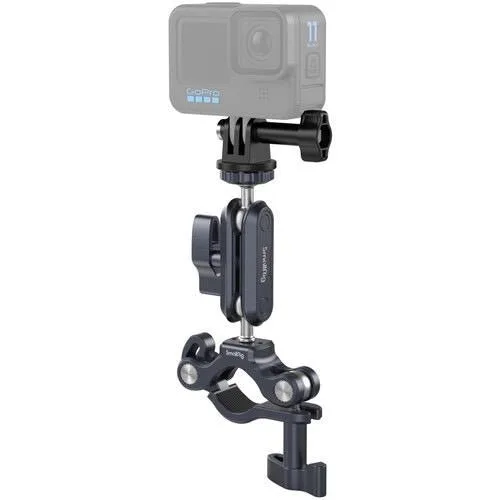
SmallRig Handlebar Clamp