Quick answer
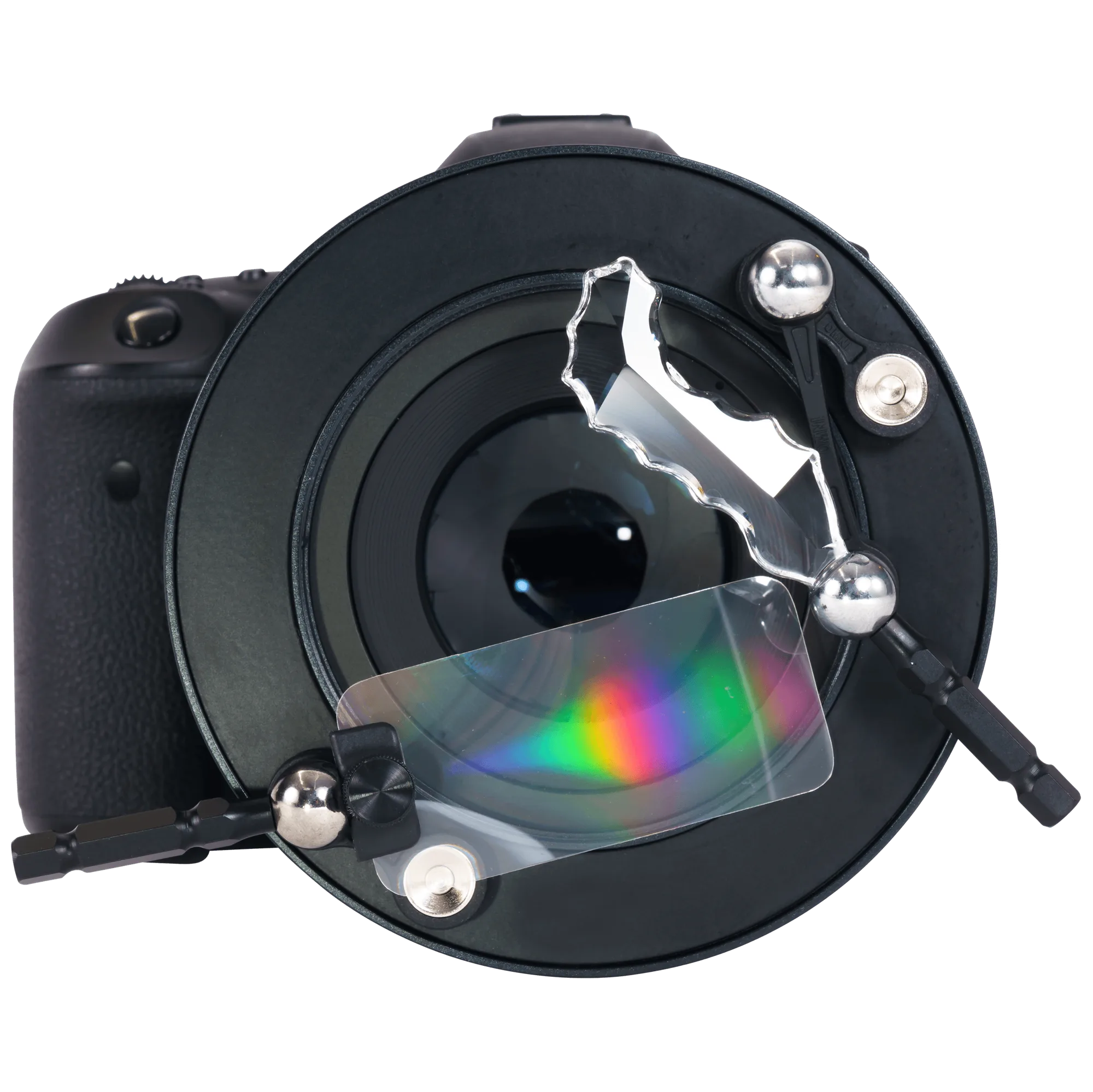
To use the OMNI filter system, attach the filter holder to your lens, insert a creative effect arm, and adjust its position while watching your live view. The OMNI system works best with a moderate focal length and a wide aperture; start with one effect at a time and refine from there.
What you need before you start
You need the OMNI Creative Filter System, a camera with live view or an electronic viewfinder, and a lens with a filter thread that matches the OMNI holder. The system is designed for photographers who want to shape light directly onto the lens, so a tripod helps when you are fine-tuning placement. If you wear glasses, use the diopter adjustment on your viewfinder so you can judge the effect precisely.
Step 1: Attach the OMNI holder to your lens
Screw the OMNI filter holder onto your lens filter thread until it is snug. Do not overtighten; you only need it secure enough that it will not shift when you move the effect arm. If your lens has a rotating front element, hold the front element still while attaching the holder to avoid stress on the lens barrel.
Step 2: Choose and insert a creative effect arm
The OMNI system includes interchangeable effect arms such as prisms, crystals, and textured glass. Slide one arm into the holder until it clicks or sits firmly. Start with a single arm rather than combining several; stacking effects makes it harder to see which element is creating which part of the look.
Step 3: Position the effect while watching live view
Turn on live view and slowly move the effect arm around the front of the lens. You will see streaks, reflections, or soft color shifts appear at the edges of the frame. Move the arm closer to the lens for a broader effect and farther away for a more localized streak. Keep your camera steady during this step; a tripod makes small adjustments much easier.
Step 4: Adjust aperture and focus for the look you want
A wider aperture (such as f/2.8 or f/4) makes the effect more pronounced and the background softer. Stopping down to f/8 or beyond reduces the effect and increases overall sharpness. Focus on your main subject first, then fine-tune the effect arm position. If the effect disappears when you stop down, open the aperture again or move the arm closer to the lens.
Step 5: Refine and shoot
Take a test shot and review it on the rear screen. Check that the effect enhances rather than obscures your subject. Small changes in arm angle can dramatically change the result, so make one adjustment at a time. When you find a placement you like, note the arm and position so you can repeat it later.
OMNI setup steps with checkpoints
- Attach the holder: Screw the OMNI holder onto your lens filter thread until snug. Avoid overtightening, which can make removal difficult. Checkpoint: the holder should not wobble when you gently push on it.
- Insert one effect arm: Slide a single arm into the holder until it sits firmly. Start with just one to isolate its effect. Common mistake: forcing an arm in the wrong orientation can scratch the holder.
- Position with live view: Move the arm slowly around the front of the lens while watching live view. Closer to the lens creates a broader effect; farther away creates a tighter streak. Checkpoint: you should see the effect change as you move the arm.
- Set aperture and focus: Use a wide aperture for a stronger effect and softer background. Stop down if you want less effect and more sharpness. Common mistake: stopping down too far can make the effect nearly invisible.
- Test and refine: Take a test shot and review it. Adjust one variable at a time—arm position, aperture, or focus—until the effect supports your subject. Next step: once you have a look you like, try a different arm for a new variation.
OMNI system at a glance
- OMNI Creative Filter System: The OMNI Creative Filter System is designed for photographers who want unique, imaginative effects by shaping and directing light onto the lens. This means you can create in-camera effects that would otherwise require post-processing or expensive lighting modifiers.


