Quick answer
To improve portrait lighting with a reflector disc, position it opposite your main light to fill shadows, choose the surface based on the effect you want, and adjust its distance to control contrast.
Why use a reflector disc instead of a flash?
A reflector disc is a lightweight, affordable way to shape light without adding a second light source. It bounces existing light—whether from the sun, a window, or a studio strobe—back onto your subject, filling in shadows and adding a natural catchlight to the eyes.
The main tradeoff is control: reflectors are passive, so you depend on the ambient or key light intensity. In low light, a reflector may not be strong enough, and you'll need a flash or a larger reflector to achieve the same effect.
Choosing the right reflector surface
Reflector discs come with different surfaces, each affecting the quality of light. Silver gives a crisp, bright fill; white produces a soft, natural fill; gold warms the skin tone; and black can be used to add shadows or deepen contrast. Translucent panels can also diffuse light when placed between the light source and your subject.
For most outdoor portraits, white or silver are the safest choices. Gold is useful at golden hour to enhance warmth, but it can look unnatural in cloudy conditions. Black is a more advanced tool for creative shadow control.
Step-by-step guide to using a reflector disc
- Position the reflector opposite your main light: Identify your key light source (sun, window, or flash). Hold the reflector on the opposite side of your subject, angled so it bounces light back into the shadow side of the face. Check the catchlight in the eyes—if it's absent, adjust the angle. Mistake: placing the reflector too far away or at the wrong angle; move it until you see the light fill the shadows.
- Choose the surface based on the desired effect: Use white for soft, natural fill; silver for a brighter, more contrasty fill; gold to warm the skin; black to deepen shadows. For diffusion, use the translucent panel between the light and subject. Mistake: using silver in harsh sunlight can create unnatural contrast; switch to white for a gentler fill.
- Adjust the distance to control contrast: The closer the reflector is to your subject, the softer and stronger the fill. Move it farther away to reduce the effect and increase contrast. This gives you precise control over the lighting ratio. Mistake: placing the reflector too close can create a flat, washed-out look; back off for more dimension.
- Use the grey panel for exposure and color balance: If your reflector includes a grey surface, use it to take a custom white balance reading or as a neutral reference for exposure. This ensures accurate colors, especially when mixing light sources. Mistake: forgetting to re-meter after changing reflector position; always re-check exposure when adjusting light distance.
Product spotlight
-
PM ReflectaDisc 7-in-1 Plus - 42": The PM ReflectaDisc 7-in-1 Plus - 42" includes a translucent center disc, a grey back panel, and three double-sided sleeves: chroma blue/green, reflective white/silver, and soft gold/gold. This one disc covers most portrait scenarios—soften light, bounce a bright or gentle fill, warm the skin, or even use the grey panel for accurate exposure and color balance.
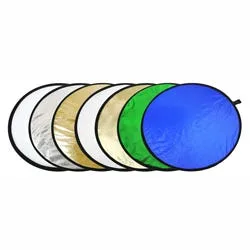
PM ReflectaDisc 7-in-1 Plus - 42"


