Quick answer
Setting up the Quad Lock Desk Kit for your iPhone 17 Pro takes under five minutes. You attach the nano suction base to your desk, adjust the gimbal head, and snap your phone into the mount for secure one-handed use.
Why choose a desk mount for your iPhone 17 Pro
A dedicated desk mount keeps your iPhone 17 Pro at eye level, reducing neck strain and freeing both hands for typing, video calls, or following recipes. The Quad Lock Desk Kit uses a re-usable nano suction base that holds securely on most smooth surfaces, yet removes cleanly without residue. The adjustable gimbal head lets you tilt and rotate the phone to your preferred angle, whether you are working, streaming, or using FaceTime.
What comes in the box
The Quad Lock Desk Kit includes the desk mount arm with a built-in gimbal head, a nano suction base, and the mounting hardware. You supply your own Quad Lock case or adapter for the iPhone 17 Pro. The kit does not include a charger, so if you want wireless charging you will need the Quad Lock Desk Mount Charger separately.
How to set up and use your iPhone 17 Pro Desk Kit
- Clean the mounting surface: Wipe your desk or table with a damp cloth and dry it thoroughly. The nano suction base needs a clean, smooth, non-porous surface for maximum grip. Avoid textured or dusty surfaces. A dirty surface reduces suction strength; test the grip before placing your phone.
- Attach the suction base: Press the nano suction base firmly onto the cleaned area. Flip the lever on the base to lock it in place. The base should feel solid with no wobble. If the base does not stick, the surface may be too porous or uneven. Try a different spot.
- Mount your iPhone 17 Pro: Slide your Quad Lock case onto the desk mount head until you hear a click. Rotate the phone to your desired viewing angle using the gimbal head. To remove, press the release button on the mount and lift the phone away. Always use the release button to avoid stressing the locking mechanism.
- Adjust the angle for your task: Loosen the tension knob on the gimbal head, tilt the phone to your preferred angle (portrait or landscape), then tighten the knob. For video calls, position the camera at eye level. For watching media, tilt slightly downward. Over-tightening can strip the knob; snug is sufficient.
Product facts
-
Desk Kits - iPhone: The re-usable nano suction base ensures Quad Lock Desk Mounts hold securely at all times, and placing and removing your phone only requires one hand. You can reposition the mount without damaging your desk and grab your phone quickly when a call or notification comes in.
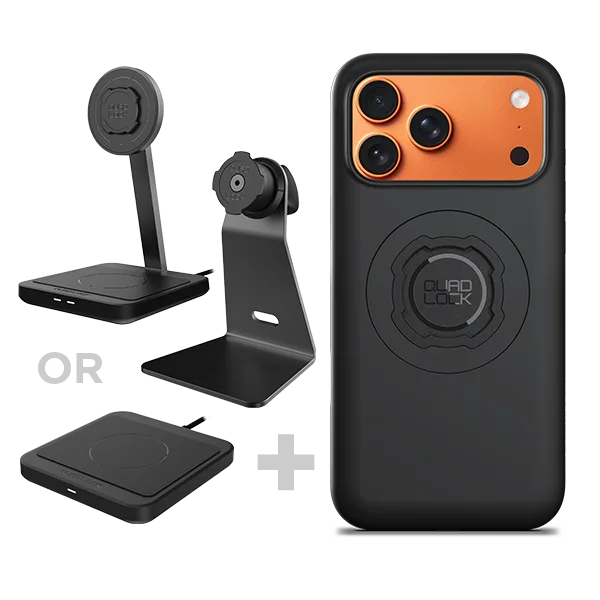
Desk Kits - iPhone