Start with the version, not the switches
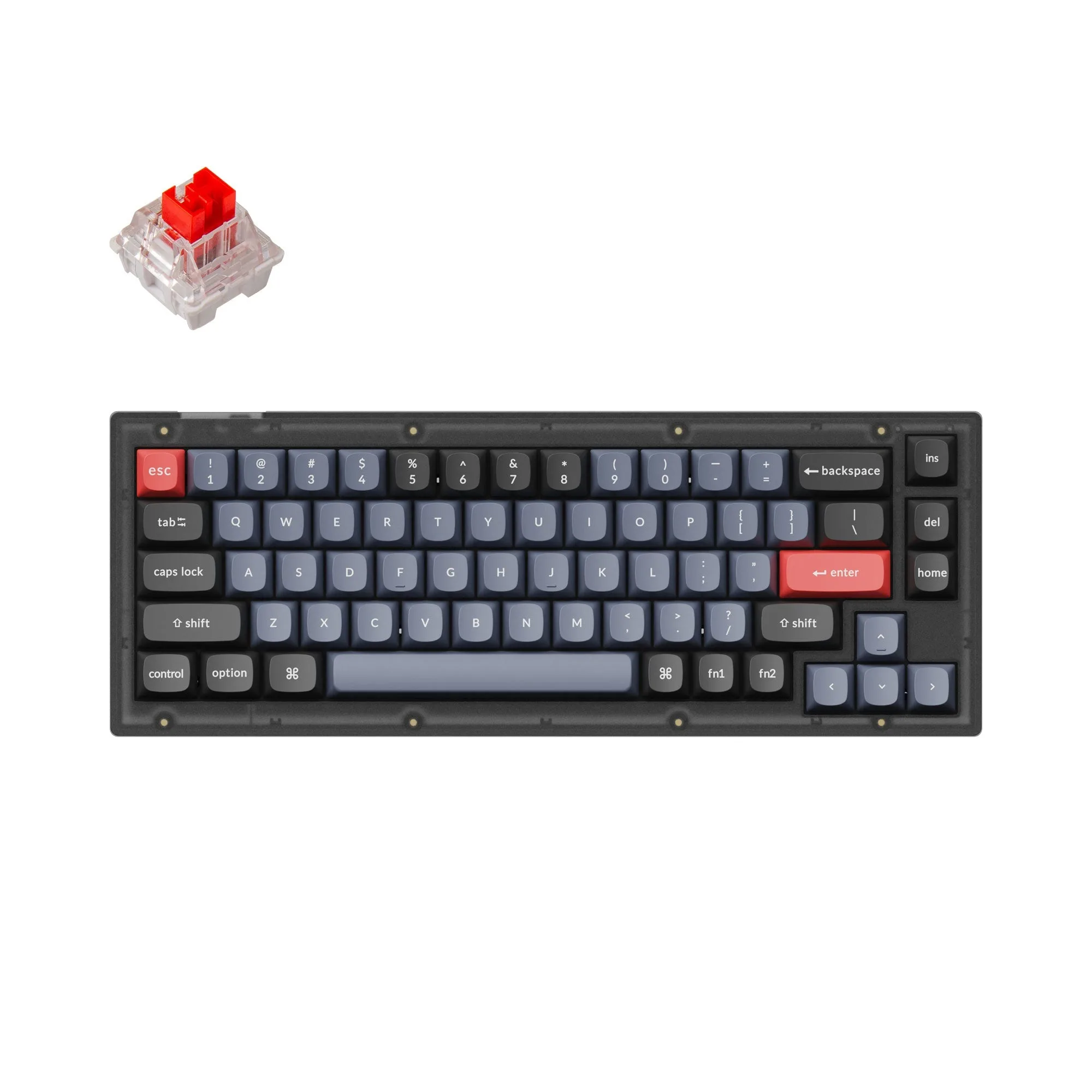
The Keychron V2 QMK Custom Mechanical Keyboard comes in two build paths, and that choice shapes everything else. The fully assembled version arrives with the ABS plastic housing, the keyboard PCB, screw-in stabs and steel plate, double-shot OSA PBT keycaps including Mac and Windows keycaps, and Keychron K Pro switches. The barebone version does not include the keycaps and switches.
For a first custom mechanical keyboard, the assembled version removes the two purchases that trip people up: keycaps and switches. For someone who already owns a keycap set and switches they like, the barebone version avoids paying twice. Neither path is better in the abstract; the catalog simply confirms what each one contains.
What the V2 listing confirms
-
Keychron V2 QMK Custom Mechanical Keyboard: The fully assembled version includes the ABS plastic housing, keyboard PCB, screw-in stabs, steel plate, double-shot OSA PBT keycaps (including Mac & Windows keycaps), and Keychron K Pro switches. This is the complete list of what arrives assembled, so you can judge whether you still need keycaps or switches.
Keychron V2 QMK Custom Mechanical Keyboard
-
Keychron V2 QMK Custom Mechanical Keyboard: The barebone version does not include the keycaps and switches. Budget for those two items separately if you choose barebone; the lower kit price is not a typing-ready price.
-
Keychron V2 QMK Custom Mechanical Keyboard: No discount codes can be used for V2. Plan your purchase around the listed price rather than waiting for a code that will not apply.
Case color and the knob decision
The listed variants pair two case finishes with two K Pro switch weights. Frosted Black (Translucent) and Carbon Black (Non-transparent) describe the housing appearance, not a different internal build. The catalog also separates a Fully Assembled Knob option from the standard Fully Assembled option, and the knob variants appear only in Frosted Black in the supplied variant list.
If a volume or media knob matters to your desk setup, treat it as a variant choice to make at checkout rather than an accessory you add later. The supplied information does not describe a retrofit knob kit, so do not assume one exists.
K Pro Blue vs K Pro Brown: what the listing tells you
Both switch options appear across the assembled and knob variants. The catalog names them but does not supply actuation force, travel distance or sound profiles, so this is not a place to invent a “best for typing” verdict.
- Keychron K Pro Blue: Listed as an available switch across the assembled variants. The supplied record does not include a tactile or audible description, so check the switch name against your own preference before ordering.
- Keychron K Pro Brown: Also listed across the assembled variants. The catalog does not confirm a specific feel or noise level, so treat the choice as a personal preference rather than a documented performance difference.
What “QMK” means for this purchase
The product name identifies the V2 as a QMK custom mechanical keyboard, and the listing confirms the PCB and screw-in stabs are part of the assembled build. The supplied record does not include a firmware guide, keymap instructions or a list of supported QMK features. If remapping is central to why you want this board, plan to rely on Keychron’s own QMK documentation rather than assuming a particular workflow from the product name alone.
The same caution applies to connectivity, battery life and operating system support. The keycap set includes Mac and Windows keycaps, which tells you the layout is intended for both, but the supplied information does not confirm wireless standards or battery specifications. Those are questions to resolve from the full product page before ordering.
A short pre-order check for beginners
Use this as a decision filter, not a setup manual. Each point maps to something the catalog actually states or leaves open.
- Choose assembled if you do not own switches and keycaps: The assembled version includes both, along with the housing, PCB, stabs and plate.
- Choose barebone only with a keycap and switch plan: The barebone version does not include keycaps or switches, so the total cost includes those purchases.
- Decide on the knob before checkout: The knob appears as a separate Fully Assembled Knob variant in the supplied list, not as a confirmed add-on.
- Check stock rather than waiting on a code: The listing states no discount codes can be used for V2, and asks shoppers to use “Notify Me When Available” if a model is out of stock.
Where the catalog stops short
The supplied record does not list dimensions, weight, connection type, polling rate or a full QMK feature set. That is not evidence those features are absent; it means the listing excerpt used here does not confirm them. Before you buy, read the full product page for the specifications that matter to your desk, and treat the assembled-versus-barebone contents as the one decision the catalog settles clearly.
If you are comparing the V2 against other QMK boards, the practical differentiator in this listing is the included OSA PBT keycap set and the choice of K Pro Blue or Brown switches in the assembled build. Those are concrete, confirmed contents. The rest of the comparison should come from each product’s own specification page.