Quick answer
Choose a height adjustable laptop stand if you switch between sitting and standing or share your screen often. Pick a fixed riser for a stable, budget-friendly setup when your desk height never changes.
Why height adjustment matters for neck and posture
An ergonomic laptop stand raises the screen to eye level so you don't hunch forward. Height adjustable models let you fine-tune the angle and elevation, which is essential if you alternate between a desk chair and a standing desk. Fixed risers offer a single preset height — fine if your chair and desk are already matched, but less forgiving if your setup changes.
The TECKNET BASICS Laptop Stand, for example, lets you adjust height and tilt from 0-180°, bringing the screen to eye level and reducing neck strain by 50%. That flexibility matters most during long work or study sessions.
Portability and desk space trade-offs
Height adjustable stands often have more moving parts, which can make them bulkier. Fixed risers are typically lighter and simpler to slide into a bag. If you move between home and office daily, a foldable adjustable stand like the TECKNET BASICS model — with its foldable design and 360° rotating base — still packs flat while giving you rotation for quick screen sharing.
On a cramped desk, a fixed riser takes up less vertical space when not in use. An adjustable stand may need a little more room to accommodate its hinge or lift mechanism.
Stability under heavy laptops
Fixed risers tend to be more rigid because they have fewer joints. If you use a heavier 17-inch laptop, a solid fixed stand can feel more secure. Height adjustable stands vary — look for a wide base and sturdy materials. The TECKNET BASICS stand supports laptops from 10 to 17 inches, and its 360° rotation base adds stability by keeping the center of gravity low.
If you type aggressively or rest your wrists on the laptop, test the wobble. A stand with a wide, non-slip base reduces shake better than a narrow folding design.
Decision rules: Height adjustable vs fixed riser
- Rule 1: Check your desk setup: If you use a fixed-height desk and never stand, a fixed riser at the correct height is simpler and cheaper. If you switch between sitting and standing, or share your desk, choose a height adjustable stand.
- Rule 2: Evaluate screen-sharing needs: If you frequently show your screen to a colleague or client, a 360° rotating base saves time and avoids cable tangles. Without that need, a fixed or tilt-only stand works fine. Rotation adds convenience but isn't essential for solo work.
- Rule 3: Prioritize stability for heavy laptops: For a 15-inch or larger laptop, test the stand's base width and non-slip grip. Fixed risers are generally more stable. Adjustable stands with a wide, low center of gravity (like the TECKNET BASICS model) are a good compromise.
- Rule 4: Match your budget to your use case: Fixed risers often cost less than adjustable models. If you only need one height and rarely move your laptop, save the money. If you work in multiple positions or share your screen, the extra cost of an adjustable stand pays off in comfort and flexibility.
Product facts
-
TECKNET BASICS Laptop Stand with 360° Rotating Base, Ergonomic Foldable Riser, Height Adjustable for MacBook/Dell/HP & All 10-17" Laptops- Silver: Adjusts height and tilt from 0-180° to bring screen to eye level, reducing neck strain by 50%. You can fine-tune the angle for sitting or standing, which helps prevent neck and shoulder pain during long work sessions.
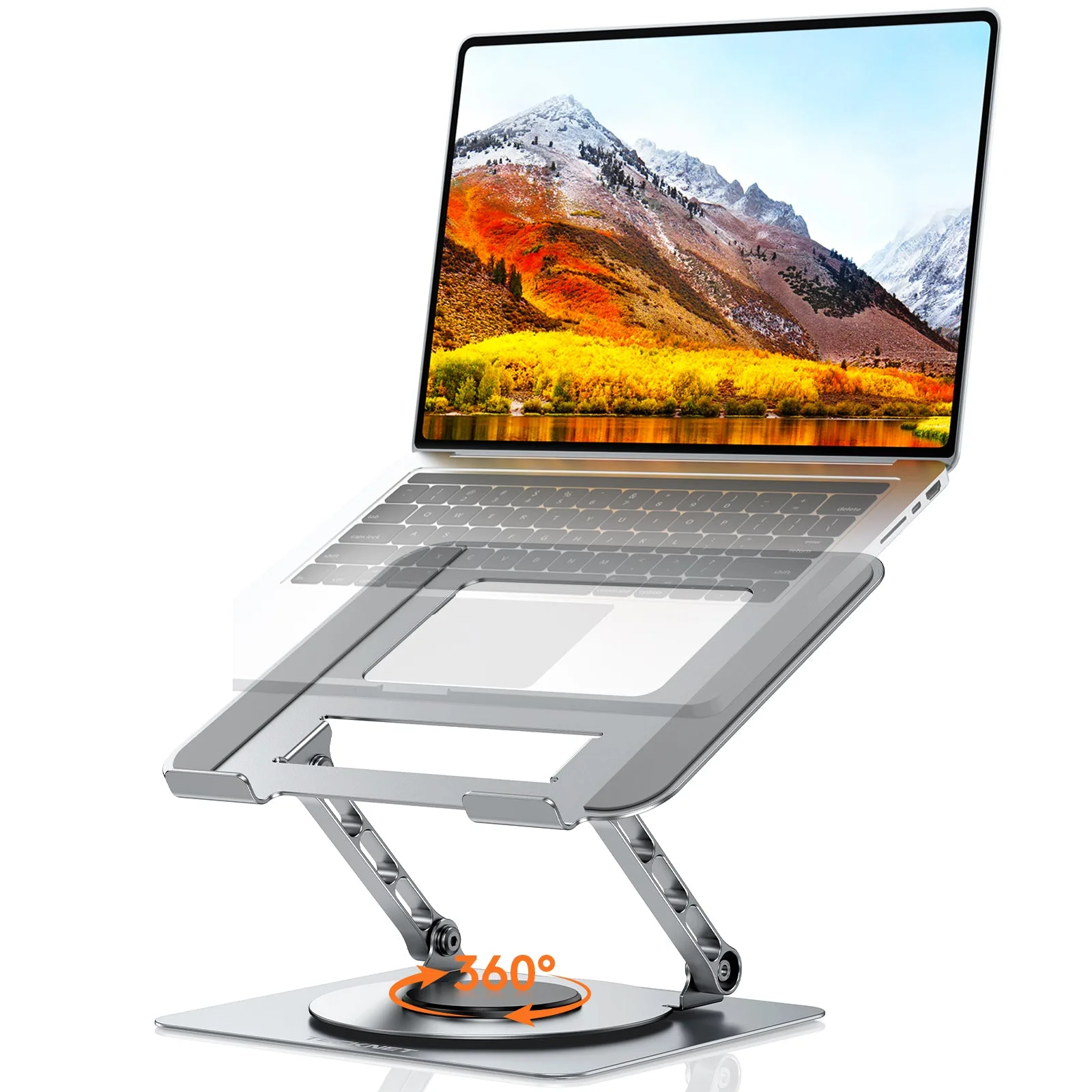
TECKNET BASICS Laptop Stand with 360° Rotating Base, Ergonomic Foldable Riser, Height Adjustable for MacBook/Dell/HP & All 10-17" Laptops- Silver
-
TECKNET BASICS Laptop Stand with 360° Rotating Base, Ergonomic Foldable Riser, Height Adjustable for MacBook/Dell/HP & All 10-17" Laptops- Silver: 360° full rotation lets you share your screen instantly without lifting the laptop. Ideal for meetings or dual-monitor workflows — you rotate the stand instead of moving the whole laptop.
-
TECKNET BASICS Laptop Stand with 360° Rotating Base, Ergonomic Foldable Riser, Height Adjustable for MacBook/Dell/HP & All 10-17" Laptops- Silver: Supports laptops from 10 to 17 inches and folds flat for portability. Works with most standard laptops and is easy to carry between home and office without adding bulk.
Who should buy what
Best for height adjustable stand
- Remote workers who alternate between sitting and standing desks
- People who share their screen in meetings or collaborative work
- Users with neck or shoulder strain who need precise screen positioning
Not ideal for
- Minimalists who want the lightest, simplest travel stand
- Users with a permanently fixed desk and chair that already align perfectly