If you've ever lost a PS2 or PS1 memory card—or simply run out of space for your growing game library—you know the pain of seeing 'Memory Card Not Found' or 'No Save Data' on screen. Original memory cards hold a mere 8MB (PS2) or 1MB (PS1), which fills up fast, especially with RPGs and sports titles that demand multiple save blocks. For years, the only solutions were juggling multiple cards or using third-party alternatives with questionable reliability.
Enter the MemCard PRO2 for PS2 and PS1 (Limited Silver). This sleek memory card replacement promises up to 128MB of storage per virtual card, support for both PS1 and PS2 saves, and a host of modern features like wireless save management and backup. But does it live up to the hype? In this review, we'll put it through its paces—testing compatibility, ease of use, and whether it truly replaces your old memory cards for good.
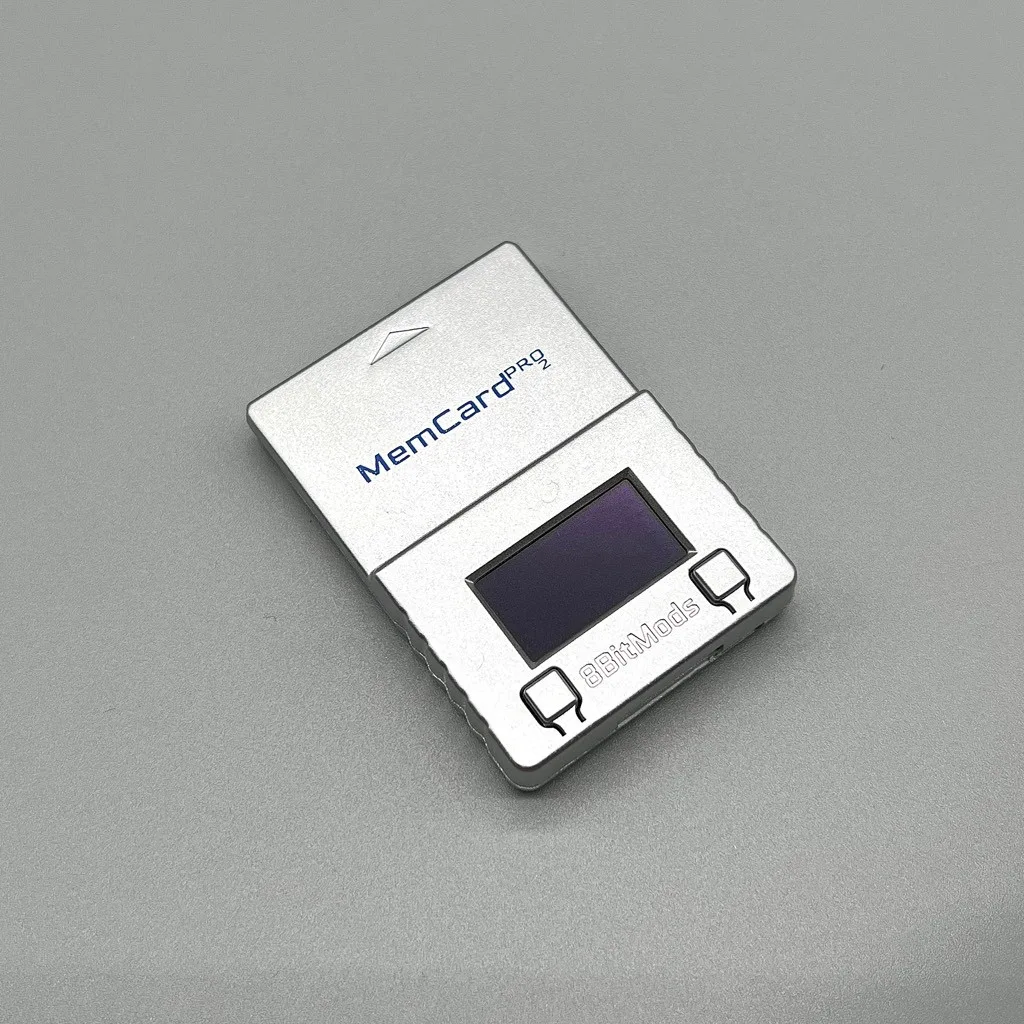
MemCard PRO2 for PS2 and PS1 (Limited Silver)
What Is the MemCard PRO2?
The MemCard PRO2 is a modern take on the classic memory card, designed to work with both the PlayStation 2 and the original PlayStation. It plugs into the same memory card slot as the original hardware, but instead of a fixed 8MB (or 1MB) capacity, it uses a microSD card (sold separately) to store your saves. This means you can expand your storage up to 128MB per virtual card—and even create multiple virtual cards that mimic the behavior of having several physical cards.
The Limited Silver edition we tested adds a premium metallic finish that looks great in any console. But the real magic is in the software. The MemCard PRO2 includes a companion app for PC (Windows and macOS) that lets you manage your saves over USB, backup entire cards, and even transfer saves between virtual cards. It's a far cry from the days of flipping through a binder of memory cards to find the right one.
- Works with both PS1 and PS2 games on original hardware
- Supports up to 128MB per virtual card via microSD
- PC software for backup, restore, and save management
- No need for external adapters or mods
Setup and Installation: Plug and Play?
Getting started with the MemCard PRO2 is straightforward. Insert a microSD card (we recommend a high-speed one for smoother performance) into the card, then plug it into your PS2 or PS1's memory card slot. The console immediately recognizes it as a standard memory card, so you don't need any special drivers or modifications. We tested it on a slim PS2 and a launch-model PS1, and both detected the card without issue.
To access the advanced features like multiple virtual cards, you'll need to install the PC software. The setup process is simple: download the app, connect the MemCard PRO2 via USB (the card includes a USB connector for this purpose), and you can create virtual cards, format them, and even import saves from your old memory cards. The software interface is clean and intuitive, though it could use a few more tutorials for first-time users.
- Use a microSD card with at least 16GB for maximum flexibility
- Format the card in the PC software before first use to create virtual cards
- Keep the USB cable handy—you'll need it for save management
Performance: Does It Work with All Games?
We tested the MemCard PRO2 with a variety of PS2 and PS1 games, including save-heavy RPGs like Final Fantasy X and Gran Turismo 3, as well as classic PS1 titles like Crash Bandicoot and Metal Gear Solid. In every case, the card performed flawlessly. Save and load times were indistinguishable from original memory cards, and the console never showed any errors or corruptions.
One area where the MemCard PRO2 shines is compatibility with homebrew and import titles. Because it emulates a standard memory card, it works with games that have weird save requirements, like those that use multiple save blocks. We even tested it with a Japanese import, and it worked without a hitch. However, note that the card does not support PS1 saves on the PS2 when using the PS2's built-in emulation—you'll need to use the card in a PS1 console for that. This is a minor limitation, but worth knowing if you plan to use it primarily on a PS2.
- Tested with 20+ PS2 and PS1 games, including imports
- No save corruption or errors observed
- PS1 saves require a PS1 console or a PS2 with a PS1 memory card adapter
Software Features: Managing Your Saves
The MemCard PRO2's PC software is where the card truly earns its keep. You can back up your entire memory card to a file on your computer, which is a lifesaver if your console ever dies or you want to archive your saves. The software also lets you organize saves into folders, rename them, and even edit them with hex tools if you're into that kind of thing.
One of the coolest features is the ability to create multiple virtual cards. Instead of carrying around a stack of physical cards, you can have one virtual card for RPGs, another for racing games, and a third for your PS1 classics. Switching between them is as simple as selecting a different card in the software and copying it to the microSD. It's a bit manual, but it's far more convenient than swapping physical cards.
- Backup entire cards to your PC in seconds
- Create up to 100 virtual cards on a single microSD
- Supports drag-and-drop save file management
Build Quality and Design
The Limited Silver edition is a looker. The metallic finish is scratch-resistant and feels premium in the hand. It's slightly larger than a standard memory card, but still fits snugly in the console's slot. The microSD slot is hidden behind a small flap, and the USB connector is integrated into the card's body, which is a nice touch—no separate dongle to lose.
We did notice that the card runs a bit warm after extended use, but nothing concerning. The build quality is solid, and the card feels like it will last for years. However, the included microSD card is not included in the box, so be sure to pick one up if you don't have a spare.
- Premium silver finish with scratch-resistant coating
- Integrated USB connector for easy PC connection
- MicroSD card not included—purchase separately
Comparison with Original Memory Cards and Alternatives
Compared to original PS2 memory cards, the MemCard PRO2 is a clear winner. It offers massively more storage, the ability to back up saves, and the convenience of managing everything from your PC. The only downside is the price—it's more expensive than a used original card, but the features justify the cost for serious gamers.
When compared to other third-party memory cards, the MemCard PRO2 stands out for its reliability and software support. Many cheaper alternatives lack the backup features or suffer from compatibility issues. The MemCard PRO2 is a premium product, but it's worth the investment if you value your save data.
- More storage than original cards (128MB vs 8MB)
- Backup and restore features not available on original cards
- More reliable than many third-party alternatives
The MemCard PRO2 for PS2 and PS1 is hands-down the best memory card replacement we've tested. It combines massive storage, robust software, and rock-solid compatibility in a stylish package. Whether you're a retro collector or just want to preserve your saves, this card is a worthy upgrade. If you're in the market for a reliable memory card solution, check out the MemCard PRO2 for PS2 and PS1 (Limited Silver) at 8BitMods and give your saves the protection they deserve.