Quick answer
For a fixed wall installation of the BirdDog XL Ultra PTZ, use the BirdDog Wall Mount pour XL Ultra (Noir). To mount a BirdDog O4 PTZ in a corner, you need the BirdDog Corner Mount pour O4 (Gris) plus the required BirdDog O4 wall mount (sold separately).
Wall vs. corner: choosing the right mount
The BirdDog Wall Mount pour XL Ultra (Noir) is designed specifically for the XL Ultra PTZ camera. It keeps the camera fixed on a wall, which is ideal for permanent installations in rooms where a tripod or ceiling mount isn't practical. The mount is sturdy and holds the camera securely, but remember that the camera itself is sold separately.
For the BirdDog O4, a corner installation requires two separate components: the BirdDog Corner Mount pour O4 (Gris) and the BirdDog O4 wall mount (BDO4-WM). The corner mount adapts the wall mount to fit into a corner, giving you more placement flexibility. Without the wall mount, the corner mount cannot be used, so plan your purchase accordingly.
Trade-offs to consider
Wall mounting limits camera movement compared to a tripod or ceiling mount, but it provides a clean, professional look and saves floor space. The corner mount for the O4 adds an extra step in installation and requires two parts, but it allows you to place the camera in tight spaces where a flat wall mount wouldn't work. Neither mount includes the camera, so factor that into your budget.
Step-by-step mounting guide
- Prepare the mounting surface: Ensure the wall or corner area is clear of obstructions and can support the weight of the camera and mount. Use a stud finder to locate solid framing for the wall mount. A weak surface can cause the mount to fail; always anchor into studs or use appropriate wall anchors.
- Attach the wall mount to the wall: For the XL Ultra, secure the BirdDog Wall Mount directly to the wall using the provided hardware (not included in the product description, so use standard screws suitable for your wall type). For the O4, first install the BirdDog O4 wall mount (BDO4-WM) on the wall following its instructions. Double-check that the mount is level before tightening all screws.
- Install the corner mount (O4 only): If using the BirdDog Corner Mount pour O4 (Gris), attach it to the already-installed O4 wall mount. The corner mount adapts the angle so the camera faces into the room from a corner. The corner mount cannot be used alone; it must be paired with the O4 wall mount.
- Mount the PTZ camera: Carefully attach the BirdDog XL Ultra or BirdDog O4 camera to the mount. Follow the camera's manual for any specific locking mechanisms or safety clips. Ensure the camera is securely locked in place before releasing it to prevent drops.
- Route cables and test: Connect power, video, and control cables to the camera. Use cable ties or clips to keep cables tidy and out of the way. Power on the camera and test pan, tilt, and zoom functions. Cable strain can damage connectors; leave enough slack for the camera's limited movement (if any) and secure cables neatly.
Product details
-
BirdDog Wall Mount pour XL Ultra (Noir): The BirdDog Wall Mount pour XL Ultra (Noir) is a wall mount for the BirdDog XL Ultra PTZ camera, sold separately. This mount lets you install the XL Ultra on a wall when a tripod or ceiling mount isn't suitable, keeping the camera fixed in one position.
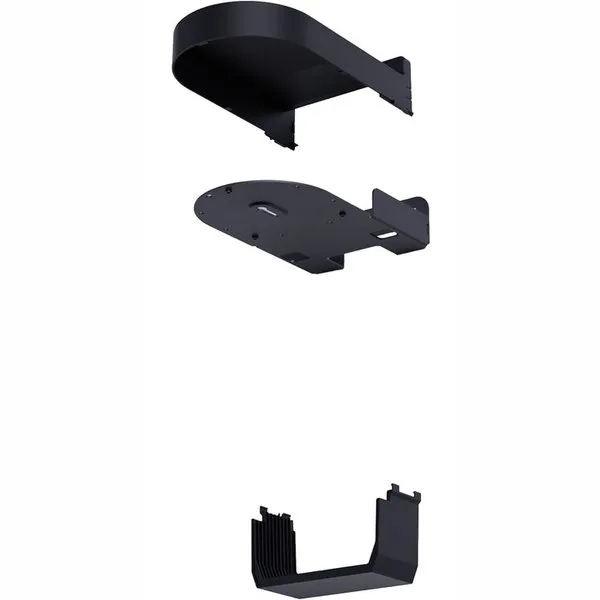
BirdDog Wall Mount pour XL Ultra (Noir)
-
BirdDog Corner Mount pour O4 (Gris): The BirdDog Corner Mount pour O4 (Gris) is a corner mounting bracket for the BirdDog O4 PTZ, but it requires the BirdDog O4 wall mount (BDO4-WM) to function. You need both the corner mount and the separate wall mount to install the O4 in a corner, so plan for two purchases.
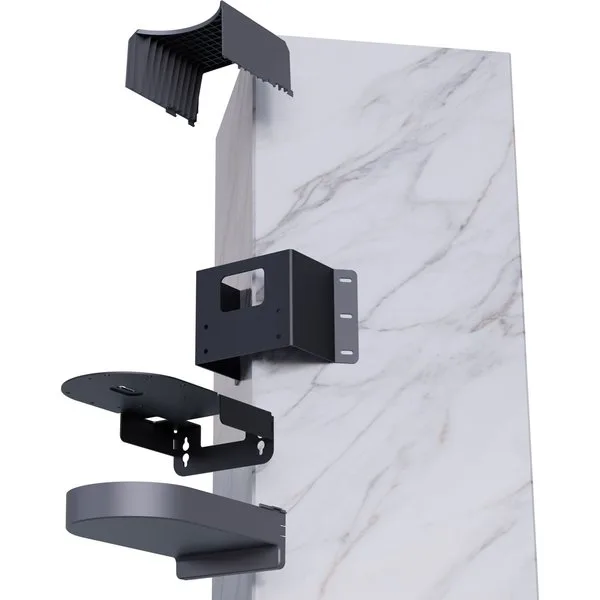
BirdDog Corner Mount pour O4 (Gris)