Quick answer
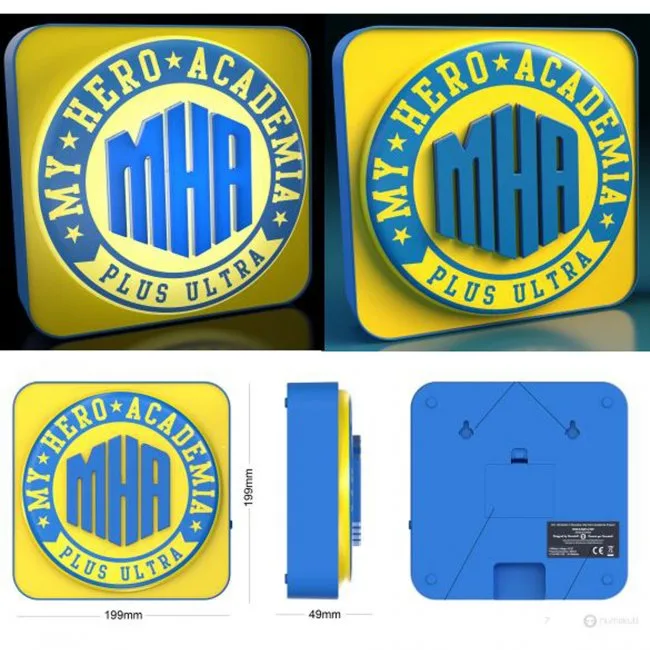
The My Hero Academia 3D Molded Logo Lamp works great on a desk or mounted on a wall. Use the included micro USB cable for steady power, or 3 AA batteries for cord-free placement.
Desk vs. wall: which setup fits your space?
The lamp's 3D molded design looks dynamic from multiple angles, making it suitable for both flat surfaces and vertical mounting. On a desk, it serves as a focused accent light next to your monitor or collectibles. On a wall, it becomes a statement piece that frees up desk space and draws the eye. The main trade-off is power access: wall mounting may hide the micro USB port, so plan your cable route or use batteries for a cleaner look.
Power options and their trade-offs
The lamp can be powered via the included micro USB cable or with 3 AA batteries (not included). USB power is reliable for daily use and avoids battery changes, but the cable limits placement flexibility. Battery power lets you place the lamp anywhere without a cord, but you'll need to replace batteries periodically. For wall mounting, batteries are often the tidier choice unless you hide the cable behind furniture or use a cable management kit.
Step-by-step setup guide
- Choose your location and power source: Decide whether the lamp will sit on a desk or mount on a wall. For desk use, a micro USB cable is convenient. For wall mounting, batteries keep the look clean. Common mistake: forgetting to check if the wall surface can support the lamp's weight. Test the lamp's fit and weight on the wall before finalizing the mount.
- Prepare the lamp for power: If using batteries, open the battery compartment and insert 3 AA batteries with correct polarity. If using USB, plug the micro USB cable into the lamp and connect the other end to a USB power adapter (not included) or a computer port. Common mistake: inserting batteries backward or using a worn-out USB cable that doesn't fit snugly. Use fresh batteries and a quality USB cable to avoid intermittent power issues.
- Mount or place the lamp securely: For desk placement, set the lamp on a stable, flat surface away from the edge. For wall mounting, use the keyhole or mounting holes on the back (check the product for specific hardware). Secure with appropriate wall anchors and screws. Common mistake: mounting without anchors on drywall, which can cause the lamp to fall. Always use wall anchors rated for the lamp's weight, especially on drywall.
- Test the lamp and adjust the angle: Turn on the lamp using the switch (if available) and check that the 3D logo is evenly lit. Adjust the lamp's position or angle to minimize glare and highlight the design. Common mistake: placing the lamp too close to a reflective surface, which can wash out the 3D effect. Walk around the room to see the lamp from different angles for the best visual impact.
- Manage cables for a tidy look: If using USB power, route the cable along the desk edge or behind furniture using cable clips. For wall mounting, hide the cable behind the lamp or run it along the wall with paintable cord covers. Common mistake: leaving loose cables that create tripping hazards or look messy. Use adhesive cable clips to keep the cord flush against the wall or desk.
Product details
-
My Hero Academia - 3D Desk/Wall Lamp: The My Hero Academia 3D Molded Logo Lamp can be powered by a micro USB cable or 3 AA batteries. This gives you the flexibility to choose between a steady wired connection for desk use or cord-free placement for wall mounting.
My Hero Academia - 3D Desk/Wall Lamp