Quick answer
The NZXT C850 Gold ATX 3.1 is the right power supply if you are building a single-GPU gaming or creator PC that needs about 850 watts, want ATX 3.1 power-spike resistance, and need a native 12V-2x6 connector for modern high-end graphics cards. Skip it if your build needs more than 850 watts, relies on multiple GPUs, or you are assembling a low-power office PC where a smaller unit saves money.
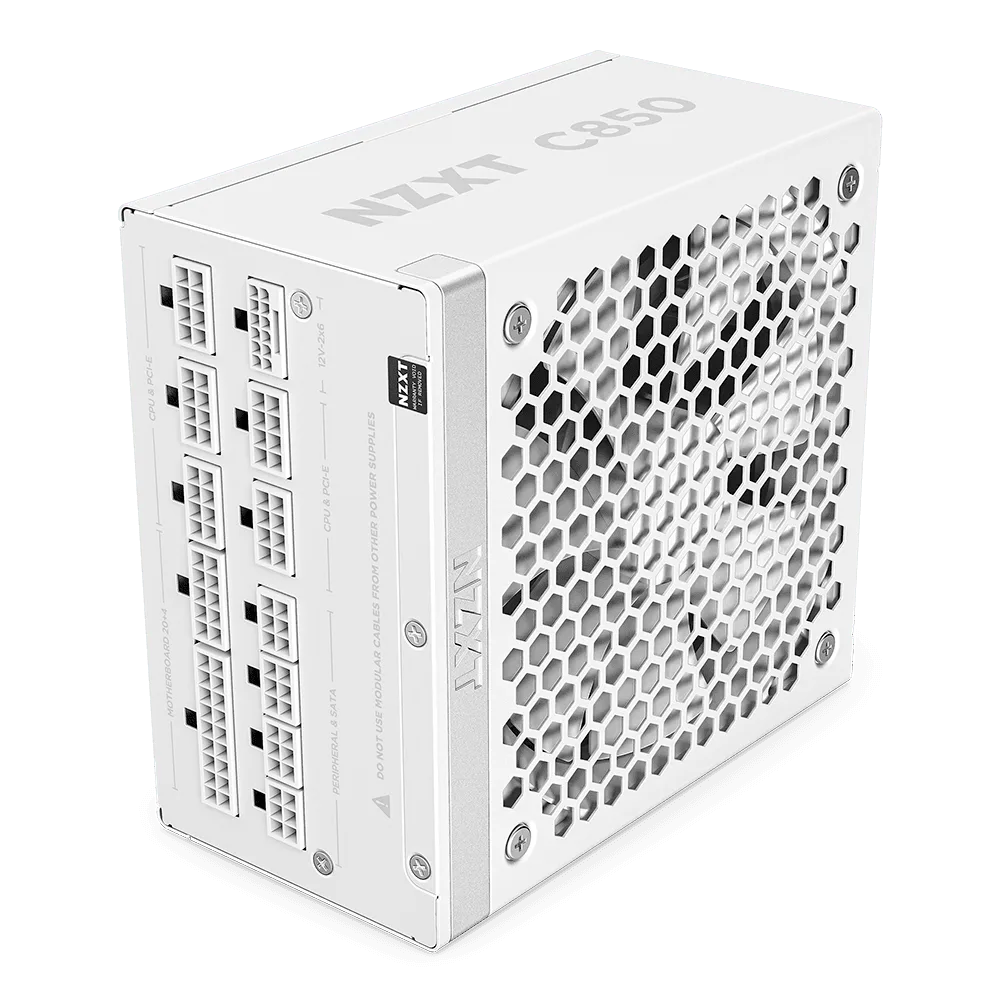
C850 Gold ATX 3.1
Power supply shopping gets easier once you stop chasing wattage numbers and start matching the unit to your actual parts list. The NZXT C850 Gold ATX 3.1 sits in a useful middle ground: enough capacity for most single-GPU gaming builds, with the newer ATX 3.1 standard and a 12V-2x6 connector that high-end cards expect.
This guide gives you decision rules instead of a spec dump. You will see who the C850 fits, when 850 watts is too much or not enough, and how to avoid the two most common mistakes: buying a PSU that cannot feed your GPU's power spikes, and paying for capacity your system will never use.
What 850 watts actually covers
An 850W unit is a sensible ceiling for a mainstream-to-upper gaming build with one graphics card. A typical combination of a mid-range CPU, a single high-end GPU, a couple of drives, fans, and an AIO leaves comfortable headroom at 850W without pushing the unit near its limit during long gaming sessions.
The C850 Gold ATX 3.1 is built for that scenario. NZXT describes the C Series as designed for maximum performance with minimal noise, and ATX 3.1 compliance is specifically about fueling high-performance components with stability, efficiency, and resistance to power spikes. That matters because modern GPUs draw brief bursts far above their average load.
- Add up your CPU and GPU sustained wattage first, then add roughly 150-200W for drives, fans, pump, and motherboard.
- If your total lands between 550W and 700W, 850W gives you room to upgrade the GPU later without replacing the PSU.
The 12V-2x6 connector and why it changes your GPU choice
The C850 Gold ATX 3.1 uses a durable, heat-resistant 12V-2x6 connector that pumps up to 600 watts to NVIDIA GeForce RTX 50 Series graphics cards. If you are planning around an RTX 50 Series card, that single native cable removes the adapter clutter and the seating worries that come with older 8-pin arrangements.
If you are searching for the best PSU for RTX 40 Series cards, the same connector logic applies to many of those models as well, but check your specific card's recommended power before assuming. The connector is only half the decision; the card's own power target still determines whether 850W is enough.
- Confirm your GPU's recommended PSU wattage before buying, not after.
- Seat the 12V-2x6 cable fully until it clicks, and avoid tight bends right at the connector.
Noise, cooling, and the 135 mm fan
The C850 Gold ATX 3.1 uses a 135 mm fluid dynamic bearing fan. Larger fans generally move the same air at lower RPM, and fluid dynamic bearings are chosen for smooth, long-life operation. In practice, that means the unit should stay quiet under normal gaming loads rather than ramping audibly the moment your GPU heats up.
Noise is also a function of how close you run the PSU to its capacity. A build that peaks around 600W on an 850W unit leaves the fan with little work to do. A build that peaks near 800W will run the fan harder and warmer. Sizing with headroom is a noise decision as much as a safety one.
- Mount the PSU with its fan intake unobstructed, whether that is bottom intake in a case with a filter or top intake in a dual-chamber layout.
- Keep the PSU intake clear of cables and dust filters that have not been cleaned in months.
When 850W is the wrong answer
Two situations justify looking elsewhere. First, a dual-GPU or workstation build with multiple power-hungry cards will exceed what 850W can comfortably deliver, and you should move up the wattage ladder. Second, a low-power office or media PC with integrated graphics will never approach 850W, so a smaller unit frees budget for storage or memory.
There is also a compatibility check that has nothing to do with wattage: physical length and cable reach. The C850 Gold comes in color options, so if you are matching a white or black case interior, choose the color at purchase. Cable routing space in compact cases is the constraint that catches people out, not the wattage rating.
- Measure the PSU bay length in your case before ordering.
- If you plan a GPU upgrade within two years, buy the wattage for the future card, not today's.
Decision rules for buying the C850 Gold ATX 3.1
- Rule 1: Size by GPU, not by habit: Start with your graphics card's recommended PSU wattage. If it recommends 750W or 850W and you run a single GPU, the C850 Gold ATX 3.1 fits. If it recommends more, step up. Checkpoint: your GPU recommendation should be 850W or lower.
- Rule 2: Buy for the connector you will actually use: If your card uses a 12V-2x6 connection, the native cable on the C850 Gold ATX 3.1 removes adapters. If your card uses standard 8-pin connectors, confirm the included cable set covers your card's count. Checkpoint: match connector type and count to your exact GPU model.
- Rule 3: Treat headroom as a noise and upgrade decision: A build peaking near 600W stays quiet and leaves room for a future GPU. A build peaking near 800W runs the fan harder. If you upgrade GPUs often, 850W is the safer long-term pick. Checkpoint: if your peak draw is above roughly 750W, consider a higher wattage unit.
- Rule 4: Confirm physical fit before you commit: Measure your case's PSU bay and plan cable routing, especially in compact cases. Choose the color option at purchase if you are matching a white or black interior. Checkpoint: bay length and color decided before ordering.
Product facts worth knowing
- C850 Gold ATX 3.1: Compliant with the ATX 3.1 standard to fuel high-performance PC components with stability, efficiency, and power spike resistance. Modern GPUs pull short bursts well above their rated draw, so ATX 3.1 headroom for spikes is what keeps a build stable instead of shutting down mid-game.
- C850 Gold ATX 3.1: Durable, heat-resistant 12V-2x6 connector pumps up to 600 watts to NVIDIA GeForce RTX 50 Series graphics cards. You get a native high-power cable for current high-end cards instead of daisy-chaining adapters, which simplifies cable management and seating.
- C850 Gold ATX 3.1: 135 mm fluid dynamic bearing fan, designed for maximum performance with minimal noise. A larger, smooth-bearing fan keeps the unit quiet during long sessions, which matters if your case sits on the desk next to you.
- Player One: Built for smooth, reliable 1080p gameplay with an Intel Core i5-14400F, NVIDIA GeForce RTX 5060, and 16GB DDR5. If you are pairing a prebuild like this with a PSU upgrade, its power draw is far below 850W, which is a useful reality check on how much capacity a typical 1080p gaming PC actually needs.
Who should buy it, and who should not
Best for
- Single-GPU gaming builds with a mid-range to high-end CPU and a card that recommends 850W or less
- Builds using an NVIDIA GeForce RTX 50 Series card that needs a native 12V-2x6 connection
- Buyers who want quiet operation under load and headroom for a future GPU upgrade
Not for
- Dual-GPU or workstation builds that exceed 850W of sustained draw
- Low-power office, media, or integrated-graphics PCs where a smaller PSU saves money
- Compact cases whose PSU bay cannot fit the unit or route its cables
If your parts list points to a single high-end GPU and roughly 850 watts, the NZXT C850 Gold ATX 3.1 covers the essentials: ATX 3.1 spike resistance, a native 12V-2x6 connector, and a quiet 135 mm fan. If your build needs more capacity or far less, choose accordingly and put the savings or the extra watts where they actually help.