Quick answer
The Ops-Core Sentry Mid Cut Helmet Cover Gen4 is a snug, protective cover that adds accessory mounting capability to your mid-cut helmet. It fits like a glove and secures all accessories, but choosing the right size and color is essential for a proper fit.
Why the Gen4 matters for your setup
The Gen4 update brings a next-generation fit that conforms closely to the helmet shell, reducing bulk and snag hazards. It also introduces universal accessory management, meaning you can attach lights, counterweights, or NVG battery packs without a separate adapter.
Compared to older generations or generic covers, the Gen4 uses a tighter weave and reinforced edge binding that holds up to repeated mounting and removal. This is especially useful if you switch between helmet configurations for different missions or training scenarios.
Trade-offs to consider
Because the cover is designed to fit like a glove, it requires precise sizing. If your helmet is between sizes or you plan to wear a thick liner, you may need to size up. The cover does not stretch significantly, so a too-small cover can be difficult to install and may compress padding.
The cover is available in multiple colors and camo patterns, but not all options are in stock at all times. If you need a specific pattern for uniform compliance, check availability before ordering.
Decision rules for choosing the Sentry Gen4 cover
- Match your helmet cut: This cover is specifically for mid-cut helmets. Do not use it on high-cut or full-cut shells—the fit and accessory slots will not align.
- Measure your helmet circumference: Use a soft tape measure around the widest part of your helmet (above the ear cups). Compare to the size chart for the Sentry Gen4 cover. If you are between sizes, choose the larger option to avoid compressing the padding.
- Select color for your environment: Choose a cover color or camo that matches your operational environment. The cover protects the helmet’s painted surface, so if you change environments frequently, consider a neutral pattern that works in multiple settings.
- Install with the front tab aligned: The cover has a front alignment tab that fits under the helmet’s shroud. Ensure this tab is centered before pulling the cover over the rear of the helmet. This prevents bunching and keeps accessory rails exposed. After installation, check that all accessory slots are clear and the cover is taut. Re-seat if needed.
Product facts
-
Ops-Core Sentry Mid Cut Helmet Cover-Gen4: The Gen4 is a next generation helmet cover that fits like a glove and gives the helmet new cutting edge functionality and universal accessory management. This means you can mount accessories securely without extra straps or adhesive, reducing the chance of losing gear during movement.
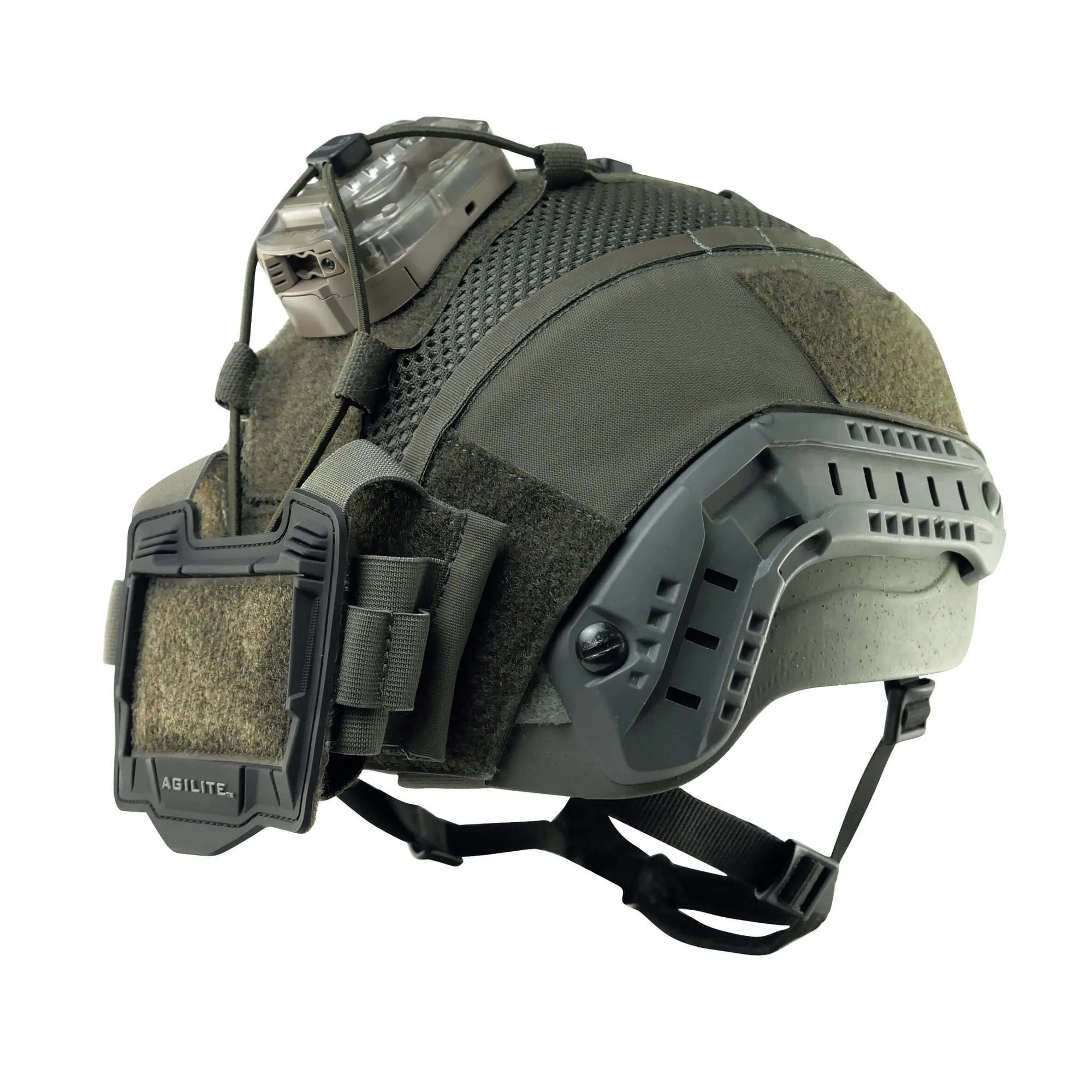
Ops-Core Sentry Mid Cut Helmet Cover-Gen4
Who should buy this cover
Best for
- Operators using a mid-cut Ops-Core helmet who need a secure platform for lights, counterweights, and NVG accessories
- Users who want to protect the helmet’s ballistic surface from scratches and UV damage while maintaining a low-profile look
Not for
- High-cut or full-cut helmet shells—the Gen4 mid cut cover will not fit properly
- Users who need a cover with integrated ear cup pockets or built-in comms routing (this cover focuses on accessory mounting, not ear cup integration)