Quick Answer
If you want to clear your desk without losing easy access to your tablet, game controller, and daily essentials, a multi-function desk organizer is a practical single purchase that consolidates several separate holders into one compact unit.
Why Consolidate Instead of Buying Separate Holders
A dedicated tablet stand, a controller hook, and a pen cup each take up their own footprint. A multi-function organizer stacks those jobs into one footprint, which frees up surface area for your keyboard, mouse, or a coffee mug. The trade-off is that you lose some flexibility: you can't reposition each holder independently, so the whole unit has to work with your existing layout.
That trade-off is worth it when your desk is small or you want a single clean line. It's less ideal if you frequently rearrange your setup or need each holder at a different angle.
What to Look for in a Multi-Function Organizer
Focus on the items you actually use daily. If you game with a controller, a dedicated holder prevents it from sliding off the edge. If you watch videos or follow recipes on a tablet, a stable stand with a visible viewing angle matters more than extra pen slots. The Brainwavz Desk Organizer covers these core needs with dedicated spaces for a controller, tablet, and pens.
Also consider how the organizer fits your desk depth. A wide unit may not suit a shallow shelf, while a tall stand might block your monitor. Measure your available space first.
Decision Rules for Choosing a Multi-Function Organizer
- Assess your daily items: List the items you use most often—controller, tablet, remote, pens—and choose an organizer that has dedicated spots for each. Avoid buying extra capacity you won't use.
- Measure your desk space: Before purchasing, measure the depth and width of your desk or shelf. Compare with the organizer's dimensions to ensure it fits without blocking your monitor or keyboard. Always measure first; a great organizer that doesn't fit is useless.
- Check stability for heavy items: If you'll rest a tablet or controller in the holder, ensure the base is wide enough to prevent tipping. A low center of gravity is safer for expensive electronics.
- Decide on adjustability vs. fixed layout: If you frequently change your setup, a fixed multi-function unit may feel restrictive. In that case, consider separate adjustable stands—but accept the extra footprint. Choose a fixed organizer only if your layout is stable.
Product Facts
-
Desk Organizer with Game Controller Holder, Tablet Stand for iPads/iPhones, TV Remote & Pen Storage, Reduce Desktop Clutter, Have All Your Side Table Items in One Space: All-in-one desktop organizer with dedicated areas for a game controller, tablet, TV remote, and pens. You can replace several separate holders with one unit, which reduces clutter and keeps your essentials within easy reach.
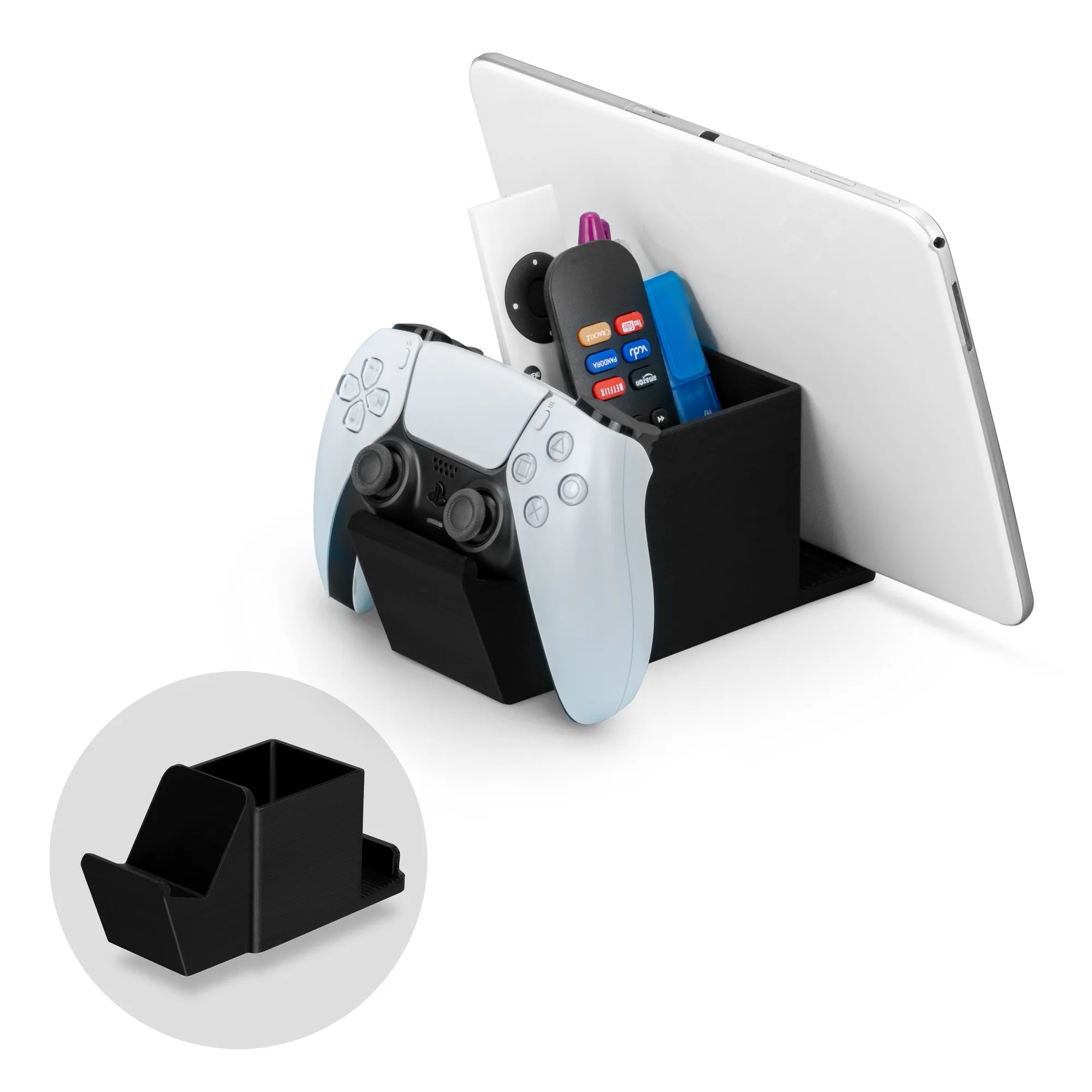
Desk Organizer with Game Controller Holder, Tablet Stand for iPads/iPhones, TV Remote & Pen Storage, Reduce Desktop Clutter, Have All Your Side Table Items in One Space
Who Should Buy This
Best for
- Gamers who want a dedicated controller holder and tablet stand in one compact unit
- People with small desks who need to reduce visual clutter without losing access to daily items
Not for
- Users who need independent adjustability for each holder
- Those with very large desks who prefer separate specialized stands for each device