Quick answer
Use the Phantom Sleeves Playmat as a sleeve finder to match your cards to the correct sleeve size, preventing damage from ill-fitting sleeves.
Why sleeve size matters for card protection
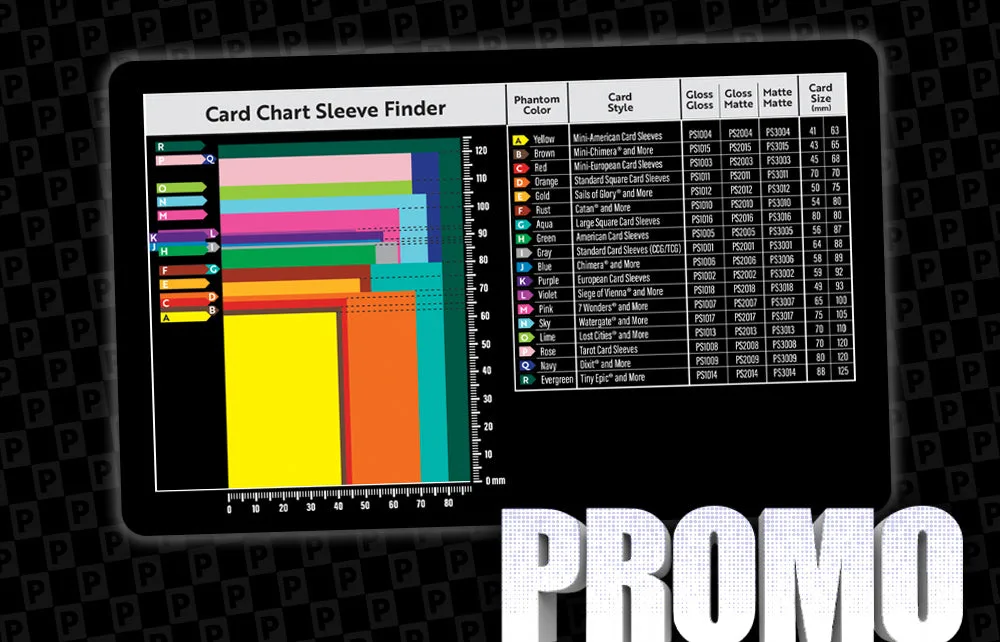
Using the wrong sleeve size can leave cards exposed to dust, spills, or bending. A snug fit ensures the sleeve stays closed and protects the edges. The playmat solves this by giving you a visual reference to compare your card against the exact sleeve dimensions.
Diagnosing sleeve fit issues
- Symptom: Your card sleeve feels too loose or too tight, or the card slides out easily.
- Likely cause: You selected a sleeve size that doesn't match your card's dimensions. Sleeve sizes vary by brand and even within the same brand.
- Corrective action: Place your card on the Phantom Sleeves Playmat's chart at the bottom left corner. Look for the color that closely matches your card along the top and right side. Those colored rectangles represent the exact card size the sleeve is designed to fit. If no color matches your card closely, consider a different sleeve brand or size.
- Stop or choose another option: If your card is non-standard (e.g., oversized or mini), the playmat may not have a matching rectangle. In that case, measure your card manually and look for sleeves labeled for that specific size.
Product facts
-
Phantom Sleeves Playmat: Identify the correct card sleeve for your game. To use the Sleeve Finder, simply place your card on the bottom left corner of the card chart. This lets you verify the sleeve size before buying, saving time and preventing the wrong fit that could damage your cards.
Phantom Sleeves Playmat