What the LiteChaser 17 Pro Max Directors Kit Includes
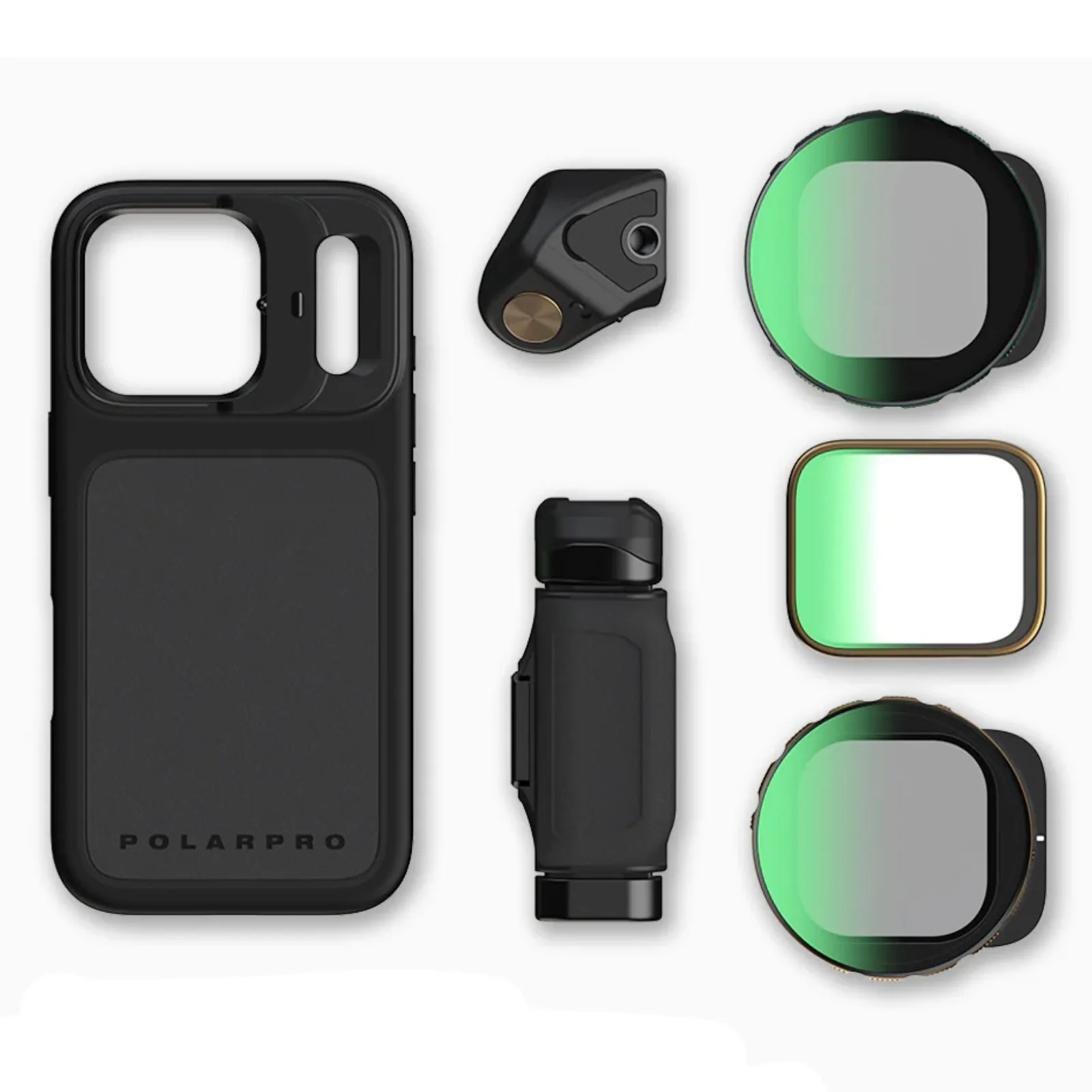
The PolarPro LiteChaser 17 Pro Max Case Directors Kit turns an iPhone 17 Pro Max into a modular filmmaking rig. The kit includes the case, a removable Bluetooth shutter grip, a VND 2-5 filter, a CineGold filter, and a ShortStache everyday filter. Everything locks together with the Slide-Lock system, so you can swap filters or attach the grip without threading or tools.
This setup guide walks through the core steps: mounting the case, attaching filters, using the grip, and working with MagSafe accessories. The supplied information confirms the case is purpose-built for the iPhone 17 Pro Max, so the fit is exact—no adapter or universal sizing is involved.
Step-by-Step Setup for Video Shooting
The following steps reflect what the supplied product details confirm. Some finer points, such as how the Bluetooth shutter pairs, are not covered in the available information, so treat those as unconfirmed rather than assumed.
- Attach the case to your iPhone 17 Pro Max: Snap the LiteChaser case onto the phone. It is precision-engineered for the iPhone 17 Pro Max, so the fit should be secure with all ports and buttons accessible.
- Slide on a filter: Use the Slide-Lock Filter System to attach the VND 2-5, CineGold, or ShortStache filter. The slide-lock design lets you swap filters instantly without threading, which is useful when you need to change exposure or color tone between shots.
- Attach the Bluetooth shutter grip: Clip the grip onto the case. The grip includes a removable Bluetooth shutter, so you can trigger the camera from the grip itself or detach it for remote shooting. The supplied details say the grip works handheld, on a tripod, or remotely.
- Use MagSafe for mounting and charging: The case is MagSafe Ready, so it works with MagSafe chargers and mounting gear you already own. That means you can attach the phone to a tripod mount or gimbal that uses MagSafe, and still charge wirelessly without removing the case.
- Optionally mount 67mm filters: If you have your own 67mm filters, you can add the optional 67mm filter adapter. This lets you use your existing glass with the iPhone, which is handy if you already own a set of cinema or photography filters.
Why the Slide-Lock and Grip Matter for Video
The Slide-Lock Filter System is the key feature for video work. Because filters slide on and off without threading, you can change from a variable ND to a color filter in seconds. That speed matters when you're chasing a moving subject or adjusting to changing light.
The removable Bluetooth shutter grip adds stability for handheld shots and lets you trigger the camera without touching the screen. The grip can be used on a tripod or detached for remote operation, which is useful for solo shooting or vlogging.
Confirmed Specs for Your Setup
-
PolarPro LiteChaser 17 Pro Max Case Directors Kit Shutter VND CineGold Filters: Purpose-built for iPhone 17 Pro Max – Precision-Engineered for iPhone 17 Pro Max - Designed specifically for filmmakers and photographers. You don't need to worry about fit or compatibility with other cases; this is made for that exact model.
PolarPro LiteChaser 17 Pro Max Case Directors Kit Shutter VND CineGold Filters
-
PolarPro LiteChaser 17 Pro Max Case Directors Kit Shutter VND CineGold Filters: Slide-Lock Filter System - Instant, secure swaps with zero threading or hassle. Filter changes take seconds, so you can adapt to lighting changes without breaking your shooting flow.
-
PolarPro LiteChaser 17 Pro Max Case Directors Kit Shutter VND CineGold Filters: New (optional) Grip with Removable Bluetooth Shutter - Shoot handheld, on a tripod, or remotely with one versatile tool. The grip gives you a stable hold and remote trigger, reducing camera shake and letting you frame shots from a distance.
-
PolarPro LiteChaser 17 Pro Max Case Directors Kit Shutter VND CineGold Filters: MagSafe Ready - Fully compatible with charging and mounting gear you already use. You can keep using your existing MagSafe chargers and mounts, so the case doesn't lock you into a new accessory ecosystem.
-
PolarPro LiteChaser 17 Pro Max Case Directors Kit Shutter VND CineGold Filters: 67mm Filter Adapter (Optional) - Bring your own favorite 67mm filters to the iPhone. If you already own 67mm filters, you can use them instead of buying new ones, saving money and keeping your kit consistent.
What the Supplied Information Does Not Cover
The available details do not explain how to pair the Bluetooth shutter with the iPhone or how to charge the grip. They also don't specify battery life for the shutter or the exact installation steps for the 67mm adapter. If those details matter for your purchase, check the full product documentation or contact the manufacturer before relying on the setup.