Quick answer
To set up the PocketWizard MiniTT1 for Nikon, mount it on your camera's hot shoe, set the correct channel and zone, then pair it with a compatible PocketWizard receiver or speedlight in TTL mode. Test fire before shooting to confirm reliable triggering.
Why TTL radio triggering changes your workflow
The MiniTT1 for Nikon is a TTL radio transmitter that lets you control off-camera speedlights without sync cables. Unlike manual radio triggers, it preserves i-TTL metering, so you can adjust flash output from the camera menu or use automatic TTL exposure. This is especially useful when the flash is in a softbox or behind a modifier where you can't easily reach it.
However, TTL radio triggering requires compatible receivers. The MiniTT1 transmits to PocketWizard FlexTT5 or PowerMC2 receivers, or to Nikon speedlights with built-in PocketWizard radio (such as the SB-5000). If your receiver is manual-only, you'll lose TTL and must set flash power manually.
Channel and zone planning for multi-light setups
The MiniTT1 offers multiple channels and zones. Use a unique channel to avoid interference from other photographers nearby. Zones let you group lights: for example, Zone A for your key light and Zone B for a rim light. You can then adjust each zone's output separately from the camera's flash menu.
A common mistake is leaving the transmitter and receiver on different channels. Always double-check that both devices show the same channel number before shooting. Also, if you're using multiple receivers, assign them to different zones to maintain control.
Step-by-step setup and triggering
- Mount the MiniTT1 on your Nikon camera: Slide the MiniTT1 into the camera's hot shoe and tighten the locking ring. Make sure it's fully seated and the contacts are clean. Common mistake: forcing it if it doesn't slide easily—check for obstructions or bent pins. A loose connection can cause intermittent firing or TTL errors.
- Set the channel and zone on the MiniTT1: Use the buttons to select a channel (1–8) and zone (A, B, or C). Choose a channel not used by others nearby. For a single flash, any zone works; for multiple, assign different zones. Checkpoint: confirm the LCD shows your chosen channel and zone. Write down your channel/zone settings to avoid confusion later.
- Prepare your receiver or speedlight: If using a PocketWizard FlexTT5, set it to the same channel and zone as the MiniTT1. If using a Nikon SB-5000, enable its radio mode and set the same channel. For manual receivers, set them to the same channel and set flash power manually. Common mistake: forgetting to set the receiver's zone to match. Test each receiver individually before combining multiple lights.
- Configure TTL settings on the camera: In your camera's flash menu, set the MiniTT1 to TTL mode (or i-TTL). You can then adjust flash exposure compensation per zone. If you prefer manual, set the MiniTT1 to manual and adjust power on the receiver. Checkpoint: ensure the camera recognizes the MiniTT1 as a flash and shows TTL options. If TTL options don't appear, re-seat the MiniTT1 and clean hot shoe contacts.
- Test fire and adjust: Take a test shot and check that the flash fires. If it doesn't, verify channel/zone match, battery levels, and that the receiver is in range (typically up to 100m/330ft for PocketWizard). Adjust flash position or power as needed. Common mistake: shooting before confirming all connections. Always test fire before an important shoot; carry spare batteries.
Product facts
-
PocketWizard MiniTT1 Transmitter for Nikon: PocketWizard MiniTT1 Transmitter for Nikon This transmitter mounts directly on Nikon cameras and enables TTL radio triggering of compatible off-camera flashes.
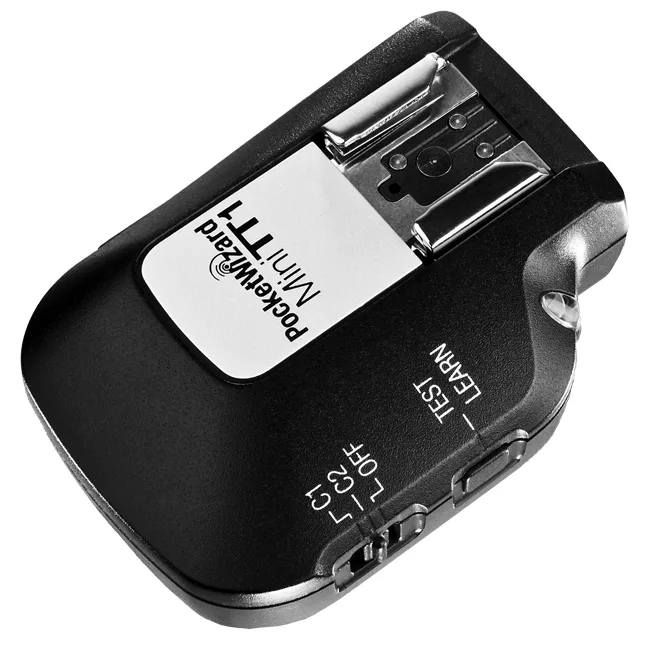
PocketWizard MiniTT1 Transmitter for Nikon