Quick Answer
To set up a wireless remote trigger for your Canon camera, attach the receiver to the camera, pair it with the transmitter, and set both to the same channel. Test the shutter and flash triggering before your shoot.
Why Use a Wireless Remote Trigger?
A wireless remote trigger lets you fire your Canon camera from a distance, which is essential for self-portraits, group shots, and long exposures where you want to avoid camera shake. It also lets you trigger a flash remotely, giving you more creative control over lighting.
The Hahnel Captur Wireless Remote Trigger for Canon is a reliable option that works on the 2.4 GHz frequency with a range of 328 feet. Its Digital Channel Matching feature makes pairing quick and simple, even when you add extra receivers or triggers.
What to Check Before You Start
Before setting up, ensure your camera is compatible with the remote trigger system. The Hahnel Captur comes with cables for Canon cameras, so check that your camera model is supported. Also, make sure both the transmitter and receiver have fresh batteries and that you are within the operating range.
Step-by-Step Setup Guide
- Attach the Receiver to Your Camera: Connect the receiver to your Canon camera's remote terminal using the appropriate cable from the Hahnel Captur kit. Ensure the connection is secure to avoid signal dropouts. Check that the cable is fully inserted and locked, as a loose connection can cause intermittent triggering.
- Power On Both Units: Turn on the transmitter and receiver. Verify that the batteries are charged and that the power indicators are lit. If not, replace the batteries before proceeding. Always carry spare batteries, as low power can reduce the effective range and reliability.
- Set the Same Channel on Both Units: Use the channel selection controls on both the transmitter and receiver to set them to the same channel. The Hahnel Captur's Digital Channel Matching makes this process quick and error-free. If you have multiple triggers, assign a unique channel to each setup to avoid accidental triggering.
- Test the Shutter Trigger: Press the shutter button on the transmitter to see if the camera fires. If it doesn't, check the cable connection and channel settings. Move closer to the camera to rule out range issues. Perform this test before your actual shoot to ensure everything works reliably.
- Set Up Flash Triggering (Optional): If you want to trigger a flash remotely, connect a compatible flash to the receiver's flash sync port. Ensure the flash is set to a compatible mode and test the firing. Not all flashes are compatible; check your flash's manual for remote triggering support.
Product Spotlight
-
Hahnel Captur Wireless Remote Trigger for Canon: The Hahnel Captur Wireless Remote Trigger for Canon operates on the 2.4 GHz frequency with a range of 328 feet and includes both a transmitter and receiver. This gives you the flexibility to trigger your camera and flash from up to 328 feet away, making it ideal for remote shooting scenarios.
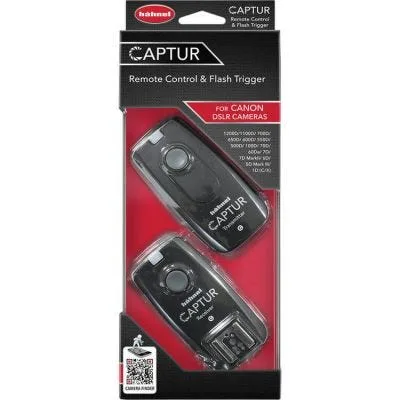
Hahnel Captur Wireless Remote Trigger for Canon