Quick answer
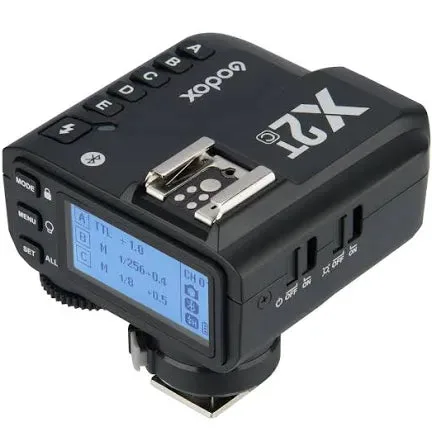
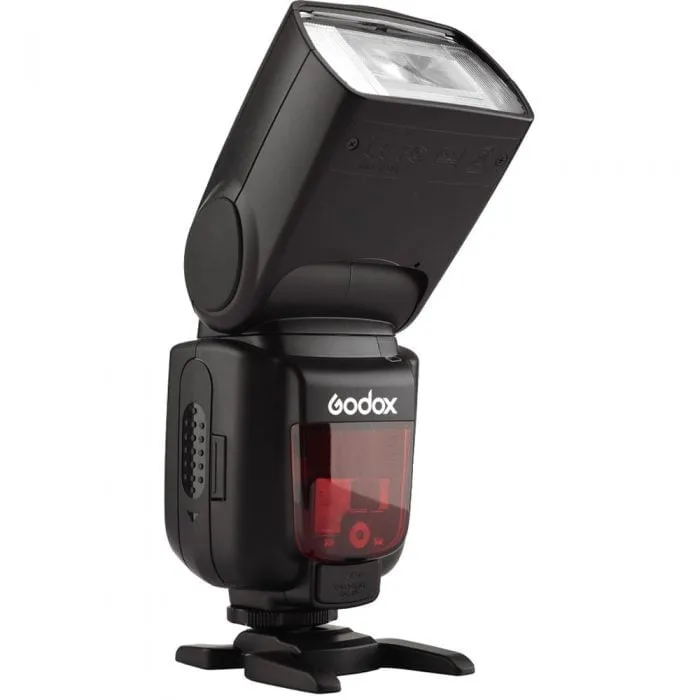
To set up the Godox X2T-C trigger for Canon, mount it on your camera's hot shoe, power on both the trigger and your flash, then match the channel and group settings. For off-camera flash with a manual unit like the Godox TT600, set the flash to 2.4GHz radio mode and pair it to the trigger. Always test fire before shooting.
What you need before you start
You need a Canon camera with a standard hot shoe, the Godox X2T-C trigger, and at least one compatible Godox flash or receiver. The X2T-C is dedicated to Canon's E-TTL/E-TTL II system, so it communicates TTL and HSS data when paired with Canon-compatible flashes. For manual off-camera flash, a flash like the Godox TT600 works well because it has a built-in 2.4GHz X wireless radio system. Make sure all batteries are charged; weak batteries are a common cause of pairing failures.
Step 1: Mount and power the trigger
Slide the Godox X2T-C into your Canon camera's hot shoe and tighten the locking ring. Turn on the trigger and the camera. The trigger's display should light up. If it doesn't, check that the batteries are inserted correctly and that the hot shoe contacts are clean. A common mistake is not pushing the trigger fully forward; if it's not seated properly, it won't fire.
Step 2: Set the channel and group
The X2T-C operates on 2.4 GHz with 32 channels and 99 ID settings to avoid interference. Choose a channel that is not used by other nearby systems. For a single off-camera flash, set the trigger to group A and the flash to group A. If you use multiple flashes, assign them to different groups (A, B, C, D, or E) so you can control their power independently. Write down your channel and ID settings; you'll need them when pairing the flash.
Step 3: Configure your flash for radio triggering
If you're using a Godox TT600, press the wireless button until the radio icon appears. Set the flash to the same channel as the trigger. Then set the flash to the group you assigned. For the TT600, you'll also need to set the flash to manual mode (M) because it doesn't support TTL. If you're using a TTL-capable Godox flash, you can leave it in TTL mode for automatic exposure. A common mistake is leaving the flash in optical slave mode (S1 or S2) instead of 2.4GHz radio mode; optical modes require line-of-sight and are less reliable.
Step 4: Pair the trigger and flash
On the X2T-C, press the menu button and navigate to the custom function for pairing, or simply ensure both devices are on the same channel and group. The trigger and flash should link automatically. If they don't, use the trigger's test button to fire the flash. If the flash doesn't fire, check that the flash is in radio mode and that the channel and group match exactly. Also verify that the flash's batteries are fresh.
Step 5: Test and adjust
Press the test button on the trigger to fire the flash. If it fires, you're ready to shoot. Adjust the flash power on the trigger or on the flash itself. For off-camera flash, position the flash and use a light stand or bracket. If you need high-speed sync (HSS) for shutter speeds above 1/200s, enable HSS on both the trigger and a compatible flash. The TT600 supports HSS for off-camera use, but only when triggered by a compatible transmitter. A common mistake is forgetting to enable HSS on both units; if HSS isn't working, check both settings.
Step-by-step setup checklist
- Mount the trigger: Slide the X2T-C onto your Canon camera's hot shoe and tighten the locking ring. Turn on the trigger and camera. Checkpoint: The trigger display should light up. If not, check batteries and hot shoe contacts.
- Set channel and group: Choose a channel on the trigger (e.g., 1) and assign a group (e.g., A). Avoid channels used by other photographers. Checkpoint: Note your channel and group; you'll need them for the flash.
- Prepare the flash: On your Godox flash (e.g., TT600), switch to 2.4GHz radio mode, set the same channel, and assign the same group. Set to manual mode if the flash is manual-only. Checkpoint: Ensure the flash is not in optical slave mode (S1/S2).
- Pair and test: Press the test button on the trigger. The flash should fire. If not, verify channel/group match and battery levels. Checkpoint: Successful test fire means you're ready to shoot.
- Adjust and shoot: Set flash power on the trigger or flash. For HSS, enable it on both units if needed. Position your off-camera flash for the desired look. Checkpoint: For HSS, ensure both trigger and flash support and have HSS enabled.
Product facts
- Godox X2T c trigger wireless cannon cameras brand new: The Godox X2T-C is dedicated to Canon's E-TTL/E-TTL II system and operates on a 2.4 GHz frequency, with 5 groups, 32 channels, and 99 ID settings. This means you get reliable TTL and manual control with Canon cameras, and the many channels and IDs help avoid interference in crowded shooting environments.
- Godox TT600 camera flashlight brand new: The Godox TT600 Thinklite Flash has a built-in 2.4GHz X wireless radio system, a guide number of 60 (200mm/ISO100), and supports manual, S1, S2, and HSS modes. As a manual flash, it pairs well with the X2T-C for off-camera use, and its high guide number provides ample power for creative lighting.