Quick answer
Set up the Pro Cart Ultra Electric Tall Universal by confirming a dedicated outlet, loading hot and chilled food into separate compartments, and powering the cart only after doors are closed. Run the electric modules continuously during service, then unplug and clean the cart after it cools. If no outlet is available, the cart still holds hot or cold food for at least 4 hours thanks to CFC-free insulation.
Before you plug in
Position the cart on a level surface within reach of a grounded outlet that is not shared with high-draw kitchen equipment. Check that both doors latch and that the cord is not pinched under the cart. Confirm the back module is the electric type you intend to use; the Pro Cart Ultra can be configured with hot, cold, or passive modules, and swapping the back module changes the compartment's function.
- Do not plug the cart into a power strip or extension cord.
- Inspect the gaskets and hinges for damage before loading.
- Verify the module is fully seated before powering on.
Load hot and cold items without cross-contamination
Load preheated hot food into the heated compartment and prechilled cold food into the chilled compartment. Keep raw proteins and ready-to-eat items in separate pans, and never place hot food directly above cold food without a solid barrier. The Pro Cart Ultra Pan Carriers allow hot and cold food in the same cart at the same time, so label each compartment clearly to prevent mix-ups during service.
- Use covered pans to retain temperature and prevent spills.
- Leave space around pans for air movement inside the compartment.
- Do not overload; the cart holds temperature best when air can circulate.
Power-up and temperature monitoring
Close and latch both doors before switching on the electric module. Allow the cart to reach its set holding temperature before adding food, and check the compartment temperature with a calibrated probe at least every two hours. If the cart is running on electricity, keep doors closed except when loading or serving; each opening lets heat or cold escape.
- Record the start time and initial temperature for each compartment.
- If the temperature drifts, check the door seal and module seating first.
- Do not use the cart to reheat food; it is designed for holding.
Operating without an outlet
When no electrical outlet is available, the Pro Cart Ultra Electric Tall Universal can still hold hot or cold food for 4+ hours using its CFC-free insulation. Pre-heat or pre-chill the cart and the food before transport, keep doors closed, and move the cart directly to the service area. This passive holding is for transport and short service windows, not all-day holding.
- Pre-condition the cart with hot or cold pans before loading food.
- Minimize door openings during transport.
- Check food temperature before service and discard if it falls outside safe holding ranges.
Shutdown, cleaning, and storage
Unplug the cart and let it cool or come to room temperature before cleaning. Remove all pans and wipe the interior with a damp cloth and mild detergent; do not hose down the electrical module. Clean gaskets and door frames to maintain the seal, and store the cart with doors slightly open to prevent odors. Inspect the cord and plug for wear before the next use.
- Never spray water directly on the electric module or controls.
- Dry all surfaces before closing doors for storage.
- Schedule a periodic check of hinges, latches, and gaskets.
Setup and operation steps
- Position and inspect the cart: Place the cart on a level floor near a grounded outlet, check the cord for damage, and confirm the back module is the type you need (hot, cold, or passive). Common mistake: plugging into a shared circuit or extension cord, which can trip breakers or damage the module.
- Pre-condition and load compartments: Pre-heat or pre-chill the cart if possible, then load hot food into the heated compartment and cold food into the chilled compartment using covered pans. Checkpoint: never put hot food directly over cold food without a barrier.
- Close doors and power on: Latch both doors before switching on the electric module, and let the cart reach holding temperature before adding food. Common mistake: powering on with doors open, which delays recovery and wastes energy.
- Monitor temperature during service: Use a calibrated probe to check each compartment at least every two hours, and keep doors closed between servings. If temperature drifts, check door seals and module seating before calling for service.
- Shut down and clean: Unplug the cart, let it cool, remove pans, and wipe interior surfaces with mild detergent; never spray the electrical module. Store with doors ajar to prevent odors and preserve gaskets.
Product facts
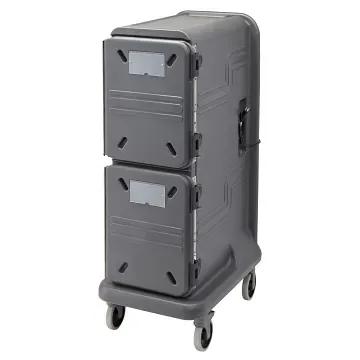
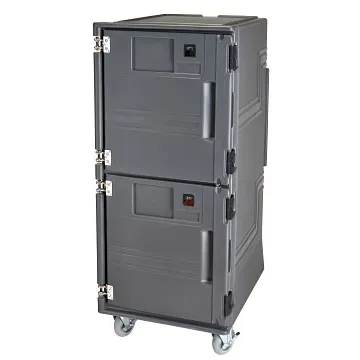
- Pro Cart Ultra® - Electric, Tall Universal: The Pro Cart Ultra Electric Tall Universal maintains hot and chilled foods in the same server and allows swapping the back module to transform a compartment to non-drying heat or an additional cooling unit. You can change the cart's function as your menu changes without buying a second cart.
- Pro Cart Ultra® - Electric, Tall Universal: This compact cart keeps hot food hot and cold food cold for 4+ hours without electricity, protected by thick CFC-free insulation. You can transport food safely even when no outlet is available at the destination.
- The Pro Cart Ultra® Pan Carriers: The Pro Cart Ultra Pan Carriers hold both hot and cold food in the same cart at the same time, using hot, cold, and passive modules to customize the cart. Separate compartments reduce the risk of temperature mixing and cross-contamination during service.