Quick answer
Most Xbox One S controller disconnects come from a weak battery pair, stale sync, or USB 3.0 and Wi-Fi interference near the console. Replace both batteries with fresh AAs, re-pair the controller using the console sync button, and move any external drive or router at least a foot away. If it still drops only while you push the sticks, the issue is drift or a worn board, and replacement is usually smarter than repair on a refurbished Xbox One S.
Symptom check: random drops versus drift
A controller that disconnects while sitting idle points to power or sync. A controller that disconnects only during heavy stick movement, or that keeps walking your character after you let go, points to analog drift. Test both: leave the controller on the dashboard for ten minutes without touching it, then open a game and hold the left stick fully forward for thirty seconds. If the dashboard drop happens, treat it as a connection problem. If only the in-game test fails, treat it as a stick problem. This split matters because the fixes are completely different, and a refurbished Xbox One S may arrive with either one.
Cause 1: battery and power problems
The Xbox One S controller runs on two AA batteries, and mismatched or partially drained cells cause voltage sag that looks exactly like a disconnect. Do not mix brands or rechargeable with disposable. If you use a play-and-charge kit, the cable may be supplying data but not enough current, so the controller browns out mid-game. Test with a known-good pair of fresh AAs before you change any settings. If the disconnects stop, the controller is fine and your battery routine is the problem.
Cause 2: sync and pairing failures
Sync can go stale after a console update or after the controller was paired to a phone or PC. On the console, press the sync button on the left edge near the disc slot, then hold the sync button on the top of the controller until the Xbox button flashes faster. If it never settles, unplug the console for thirty seconds, power it back on, and re-pair. A controller that pairs but drops within seconds usually has a failing radio board, not a software fault.
Cause 3: wireless interference and range
The Xbox One S controller uses a proprietary wireless link, not standard Bluetooth, so a USB 3.0 external drive, a Wi-Fi router, or a metal TV stand between you and the console can cause dropouts. Move the console out of a closed cabinet, keep external drives on the opposite side, and sit within about 20 feet with clear line of sight. If disconnects only happen at one spot in the room, interference or range is the cause, and no controller replacement will fix it.
Cause 4: analog drift and worn sticks
Drift is a mechanical wear issue inside the stick module, and it is common on any used controller that saw heavy play. You can confirm it in the Xbox Accessories app by watching the stick input without touching it. A small clean-up with isopropyl alcohol and a cotton swab around the stick base sometimes helps dust-related drift, but worn potentiometers need a new module or a new controller. On a refurbished Xbox One S, a replacement controller is often cheaper than a professional repair.
Diagnosis: match the symptom to the fix
- Drops while idle, Xbox button still lit: Replace both AA batteries with a matched fresh pair and re-pair the controller using the console sync button. If it stays connected for an hour, you are done. If it drops again, move to the interference check.
- Drops only during stick movement: Open the Xbox Accessories app and watch the stick input without touching it. Visible movement means drift, not a connection fault. Clean the stick base with isopropyl alcohol. If drift remains, replace the controller rather than repairing a refurbished unit.
- Drops in one spot in the room only: Move external USB drives and the router away from the console, and sit with clear line of sight within about 20 feet. If the drop follows you to a different seat, the controller radio is failing. If it stays in one spot, your room layout is the cause.
- Never pairs at all after a console update: Unplug the console for thirty seconds, power on, then re-pair with the sync buttons on both devices. If pairing still fails, the controller radio board is dead. Stop troubleshooting and replace the controller.
A refurbished console that fits this setup
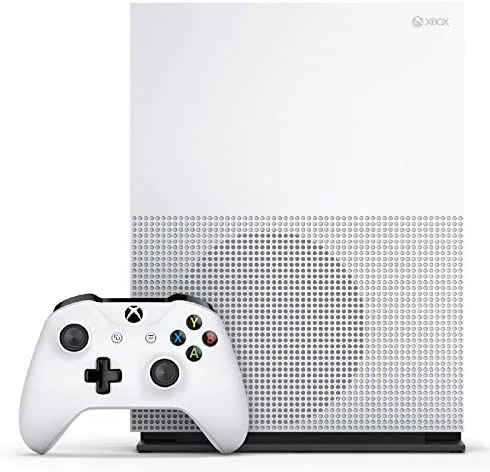
- Xbox One S 500GB – White – Refurbished B: Xbox One S 500GB in White with a 500GB hard drive, 4K UHD streaming, and HDR support, refurbished Grade B. If your current console has a failing wireless board or you want a spare unit for a second room, this bundle gives you the console and a fresh pairing target without paying new prices. Grade B means cosmetic marks are possible, so ask about the controller condition before you buy if the listing includes one.