Quick Answer
To replace the spacer set on your Quad Lock Motorcycle Handlebar Mount, remove the bar clamp, swap in the correct spacer for your handlebar diameter (22mm, 25mm, or 28mm), and re-torque the bolts to spec. Use the Quad Lock Replacement Handlebar Mount Spacer Set (Medium) for a secure fit.
Why Spacer Size Matters
The spacer set determines how tightly the bar clamp grips your handlebar. Using the wrong size can leave the mount loose or over-stressed, which risks your phone's stability while riding.
The Quad Lock Replacement Handlebar Mount Spacer Set (Medium) is designed to fit handlebars with diameters of 22mm, 25mm, and 28mm. This covers most standard motorcycle bars, but always measure your handlebar before ordering.
When to Replace the Spacers
Replace the spacers if you've changed handlebars, notice the mount wobbles, or if the original spacers are worn or damaged. It's also a good practice to inspect them during routine maintenance, especially after a drop or hard ride.
If you're unsure whether your handlebar fits the medium set, measure the outer diameter at the clamp point. If it's outside the 22–28mm range, the medium set won't work.
Step-by-Step Spacer Replacement
- Measure your handlebar diameter: Use a caliper or measuring tape to measure the outer diameter of your handlebar at the point where the clamp sits. Confirm it falls within 22mm, 25mm, or 28mm. If it doesn't, the medium spacer set won't fit. Common mistake: guessing the size. Always measure to avoid a loose mount.
- Remove the bar clamp: Loosen the bolts on the Quad Lock Bar Clamp using the appropriate hex wrench. Remove the clamp and the existing spacers. Keep the bolts in a safe place. Checkpoint: Note the orientation of the spacers before removal so you can match it during reinstallation.
- Install the new spacer set: Place the correct spacers from the Replacement Handlebar Mount Spacer Set (Medium) onto the handlebar, aligning them with the clamp's mounting holes. Ensure they sit flush against the bar. Common mistake: forcing a spacer that doesn't align. If it doesn't seat easily, double-check the size.
- Reattach the bar clamp: Position the bar clamp over the spacers and hand-tighten the bolts. Then use a torque wrench to tighten to the manufacturer's recommended specification (if known). If you don't have a torque spec, tighten evenly and firmly. Checkpoint: Tighten bolts alternately to keep the clamp even. Over-tightening can strip threads or crack the clamp.
- Test the mount: Before riding, push and pull on the mount to verify it's secure. Attach your phone and give it a gentle shake. If there's any movement, re-check the spacer fit and bolt tightness. Final check: A stable mount should not move even under vibration. If it wobbles, redo the installation.
Product Recommendation
-
Replacement - Handlebar Mount / Bar Clamp (Medium) Spacer Set: Replacement spacers for the Quad Lock Motorcycle Handlebar Mount and Bar Clamp (Medium), fitting handlebars 22mm, 25mm, and 28mm in diameter. This set gives you the right spacers to match your bar diameter, ensuring a tight and stable mount without needing to buy a whole new mount.
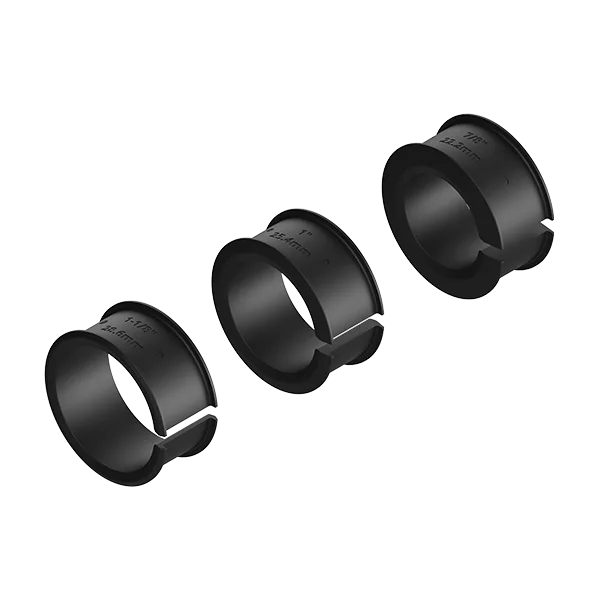
Replacement - Handlebar Mount / Bar Clamp (Medium) Spacer Set