Quick Answer
The Fotodiox Selfie Starlite Stix Vlog Light Kit with tripod gives you two bi-color LED wands with gooseneck arms and a stable tripod, making tabletop vlog lighting simple to set up and adjust.
Why a Dedicated Tabletop Kit Matters
Using a single desk lamp or overhead light often creates harsh shadows and uneven skin tones for close-up vlogging or makeup demos. A two-light kit with flexible arms lets you position soft, dimmable light exactly where you need it, reducing post-production color correction.
The included tripod keeps the lights off your desk surface, freeing up space for your camera, props, or notes. The bi-color range (3000K–6500K) lets you match ambient room light or create a warmer look without swapping gels.
Trade-Offs to Consider
The 11-inch wand panels are compact, so they won't cover a large background or light a full-body shot. For tight tabletop framing—face, hands, or small products—they are more than sufficient.
The included tripod is designed for the wands' weight; swapping in a heavier studio stand may require an adapter. Stick with the supplied tripod for the best stability.
How to Set Up Your Tabletop Vlog Light Kit
- 1. Assemble the Tripod: Extend the tripod legs fully and lock each leg latch. Place the tripod on a flat, stable surface near your recording area. Attach the mounting bracket to the center column. Common mistake: leaving legs partially extended can cause the kit to tip over when you adjust the goosenecks.
- 2. Mount the LED Wands: Screw each wand's base into the tripod bracket's cold-shoe or 1/4-20 mount. Tighten the knob firmly but avoid overtightening. Position the wands so the panels face your subject. Check that the wands are parallel to each other before tightening to avoid uneven light spread.
- 3. Adjust the Gooseneck Arms: Bend each gooseneck arm to point the light panel at your face or product. For a typical tabletop vlog, position one light at 45° left and the other at 45° right, about 12–18 inches away. A common mistake: bending the arm too sharply can strain the cable inside; keep bends gradual.
- 4. Set Color Temperature: Turn the knob on each wand to adjust the color temperature between 3000K (warm) and 6500K (daylight). Match your room's ambient light or choose a consistent temperature for both wands. Mixing temperatures between the two lights creates an unnatural two-tone look. Set both to the same Kelvin value unless you want a creative effect.
- 5. Adjust Brightness: Rotate the dimmer knob to increase or decrease intensity from 0 to 100%. Start at 50% and fine-tune. Use the digital display to match brightness levels between the two wands. Setting both lights to 100% right away can wash out skin tones and cause lens flare; start lower and add light gradually.
- 6. Position the Tripod Height: Raise or lower the center column so the lights are slightly above eye level. For a desk vlog, this usually means the center of the light panels is 6–10 inches above your camera lens. Placing the lights below eye level creates unflattering upward shadows on the face; keep them above eye level for a natural look.
- 7. Test and Fine-Tune: Turn on your camera or phone and check the live preview. Adjust the gooseneck angles and brightness until shadows under your chin and nose are soft or eliminated. Record a short test clip. Don't skip the test clip—what looks good to the eye may appear harsh on camera due to sensor contrast.
Product Facts
-
Fotodiox Selfie Starlite Stix Vlog Light Kit w/ Tripod - 2x 11in Bi-Color Dimmable LED Wand Lights for Portrait, Photography, Makeup, YouTube, Live Streaming Video and more: Rotating and gooseneck arms assume any position for the soft LED twin lights; powerful 50W, 1500LM 11x2" panels force light into difficult to reach areas. You can bend the arms around a laptop screen or mirror without the lights sagging, which is essential for makeup tutorials or desk vlogs.
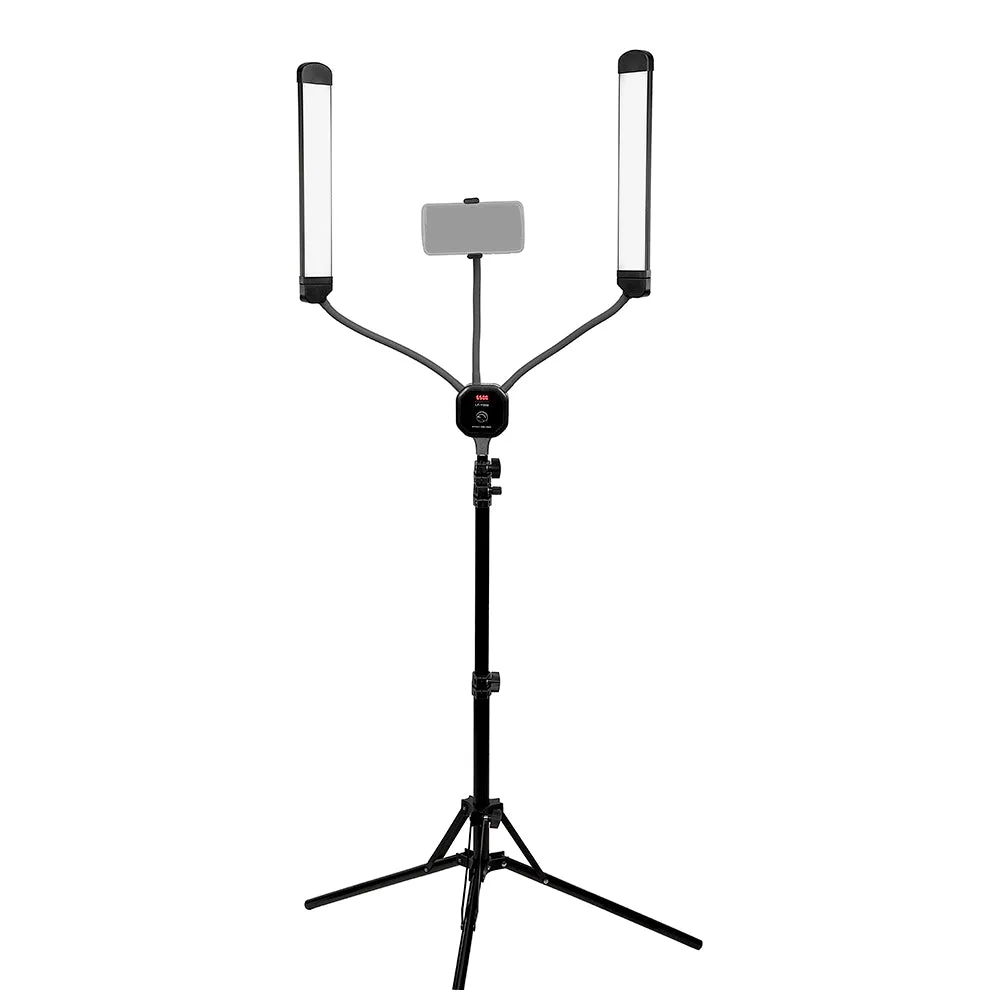
Fotodiox Selfie Starlite Stix Vlog Light Kit w/ Tripod - 2x 11in Bi-Color Dimmable LED Wand Lights for Portrait, Photography, Makeup, YouTube, Live Streaming Video and more