Quick answer
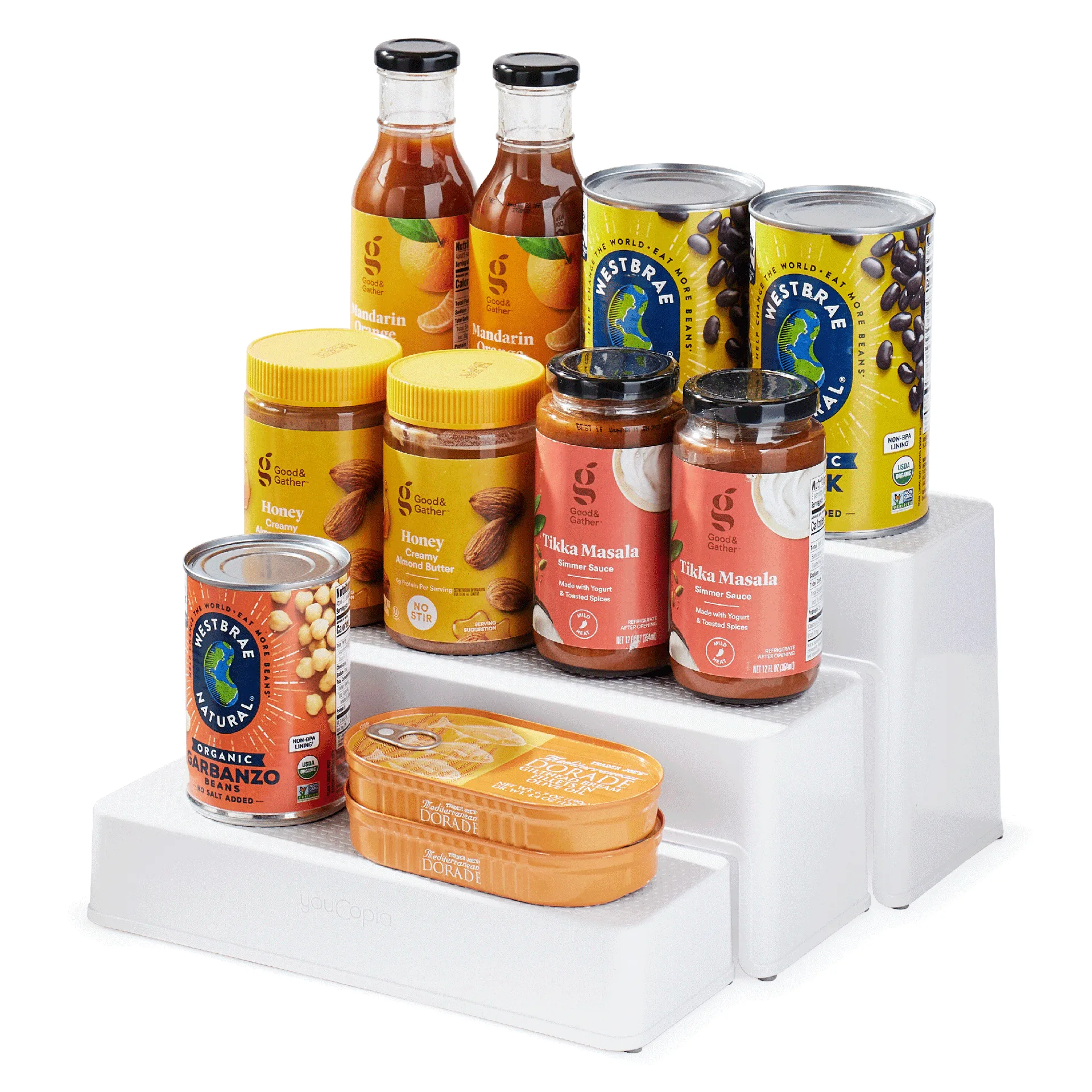
Set up the ShelfSteps Can Organizer by emptying one cabinet shelf, sorting cans by height and expiration date, then expanding the three shelves to your cabinet depth (4.8 to 12.6 inches) before loading labels forward. Keep the most-used cans on the lowest tier so you can see them at a glance, and leave the non-slip feet in place so the unit stays steady when you pull cans.
Measure your cabinet before you commit to a layout
A pantry can organizer only works if it fits the space you actually have. Clear one shelf completely, then measure its width, depth, and the height from the shelf to the shelf above. The ShelfSteps Can Organizer holds 16 to 24 cans and expands from 4.8 to 12.6 inches in depth, so a deep cabinet can take the full extension while a shallow one needs the shelves pushed together. If the cabinet is shorter than a standard can plus the organizer height, plan to use the three shelves separately rather than stacked.
Sort cans by use, not by label
Before any can goes on a shelf, group them by how often you cook with them. Daily cans like tomatoes, beans, and broth belong on the easiest-to-reach tier. Backstock or holiday cans can go on the top shelf because you touch them less. Within each group, put the oldest expiration date in front. This is the step most people skip, and it is the reason a can storage system stops working after a month: new cans get pushed to the front and old ones get buried at the back.
Build the 4-tier display and set the depth
The ShelfSteps Can Organizer uses three sturdy shelves that stand alone or fit together for a 4-tier display. Decide which configuration matches your cabinet. If you have a deep pantry, connect the shelves and expand the depth to the 12.6-inch maximum so the tiers step back naturally. If you have a shallow cabinet, leave the shelves separate and place them side by side. Either way, check that the non-slip feet sit flat on the shelf surface before you load anything.
Load labels forward and test the grab
Load cans with the labels facing out and the tops level so you can read them in a glance. Start at the bottom tier and work up. Once the first tier is full, pull one can from the middle to see whether the shelf stays put. The non-slip feet should hold everything steady. If the unit slides or tips, the depth is set too wide for the cabinet, so push the shelves back together and reload. A 3 shelf can organizer only helps if you can grab one can without knocking over the row.
Keep the system working with a two-minute reset
Once a week, or after a grocery run, pull the front can from each tier and check the date behind it. Move older cans forward and put new ones at the back. This is also the moment to wipe the shelf surface and confirm the feet are still seated. If you keep a running grocery list, note what you used so you do not rebuy cans that are already hidden on the top tier. The point of a pantry can storage setup is that you stop losing cans, not that you never touch them again.
Step-by-step setup
- Clear and measure one cabinet shelf: Empty the shelf completely and measure width, depth, and the height to the shelf above. Compare those numbers to the organizer's 4.8 to 12.6 inch depth range. Checkpoint: if the shelf is shorter than a can plus the organizer height, plan to use the three shelves separately.
- Sort cans by cooking frequency and date: Group daily cans, occasional cans, and backstock. Put the oldest expiration date at the front of each group. Common mistake: sorting by brand or label instead of by how often you actually cook with the can.
- Choose standalone or 4-tier configuration: Connect the three shelves for a 4-tier display in a deep pantry, or leave them separate side by side in a shallow cabinet. Checkpoint: the non-slip feet should sit flat on the shelf before you load any cans.
- Set the expandable depth: Expand the unit toward the 12.6-inch maximum for a deep cabinet, or push the shelves together for a shallow one. Common mistake: expanding the depth past what the cabinet allows, which makes the unit unstable.
- Load labels forward, bottom tier first: Place cans with labels facing out and tops level, starting at the lowest tier and working up. Checkpoint: pull one can from the middle of a full tier to confirm the shelf stays steady.
- Run a weekly two-minute reset: Pull the front can from each tier, check the date behind it, and move older cans forward after each grocery run. Next step: note what you used so you do not rebuy cans already hidden on the top tier.
Product facts
- ShelfSteps™ Can Organizer 3-Shelf: ShelfSteps Can Organizer makes a 4-tier display so you can see labels in a glance and find cans fast. Three sturdy shelves stand alone or work together with an expandable depth to fit any cabinet or pantry. Non-slip feet hold everything steady. Three shelves stand alone or fit together for a 4-tier display that expands 4.8" to 12.6" depth; holds 16-24 cans. The expandable depth is what lets the same organizer work in a shallow cabinet or a deep pantry, and the 16-24 can capacity tells you whether one unit covers your weekly cooking or whether you need to split backstock into a second spot.