Quick answer
A custom-fit silicone cover for the Sony a7S III does not block buttons or trap heat in normal use. It is cut around the controls, ports, and screen, so every dial and door stays reachable, and the thin silicone layer adds grip instead of insulation. The real risks are a loose or generic fit and forgetting to remove the cover before heavy-duty cleaning.
What a Custom-Fit Silicone Cover Actually Covers
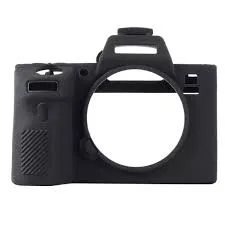
The Silicone Protection Cover for the Sony a7S III is a custom-fit shell, not a universal sleeve. That distinction matters because a cover cut for one camera body will not line up with the button layout, card door, or battery compartment of another. On a properly fitted cover, the cutouts sit exactly over the controls, so the shutter, dials, and rear buttons remain fully usable.
- It adds a slim, smooth layer that enhances grip without interfering with controls or accessories.
- It preserves the camera's sleek profile rather than adding bulk.
- It comes in Red, Black, Camouflage, or Yellow, so the color choice is cosmetic and does not change protection.
Does It Block Buttons or Ports?
No, not when the fit is correct. A custom-fit silicone shell is molded to the a7S III body, so the openings align with the controls and accessory doors. If you cannot press a button or open a port door without forcing it, the cover is either not seated properly or is the wrong model. Reseat it first; if the problem continues, the cover is not a match for your camera.
- Check that the cover is fully seated before judging button access.
- Confirm the cutouts line up with the card slot, battery door, and ports.
- A cover that shifts during use is a fit problem, not a design flaw in the camera.
Will a Silicone Cover Make the Camera Overheat?
The cover is a thin silicone layer, and it is cut around the controls and accessory areas rather than sealing the body. That means it does not enclose the camera in an insulated shell. The honest tradeoff is that any added layer slightly changes how heat leaves the surface, so if you shoot long takes in a hot environment, remove the cover and let the body breathe. For everyday stills and short clips, the cover is not the cause of a heat warning.
- Remove the cover during long recording sessions in high heat.
- Do not stack the cover with other body armor or wraps.
- If a heat warning appears, check your recording settings and environment before blaming the cover.
Where the Cover Helps Most
The cover earns its place against everyday bumps and scratches, which is the most common way a camera body picks up wear. It also improves grip, which matters on a body like the a7S III that gets handled constantly on set or in the field. If you want protection without changing how the camera handles, this is the low-commitment option.
- Good for travel, event work, and any situation where the body gets knocked around.
- Useful when you want extra grip without adding a cage or plate.
- Easy to swap colors without buying a new camera body.
When Not to Use a Silicone Cover
Skip the cover if you need frequent access to the battery door and card slots under time pressure, or if you shoot long-form video in hot conditions. It is also the wrong choice if you want impact protection from drops; silicone absorbs minor scuffs, not serious falls. In those cases, a cage or a hard case is the better tool.
- Not a substitute for a drop-rated case or cage.
- Not ideal for rapid battery and card swaps if the fit is tight.
- Not necessary if the camera lives on a gimbal or tripod and rarely gets handled.
Verdicts on the common claims
- Claim: a silicone cover blocks buttons and ports: A custom-fit cover is cut around the controls and accessory doors, so buttons, dials, and ports stay reachable when the cover is seated correctly. Verdict: false for a properly fitted cover, true for a loose or generic one.
- Claim: a silicone cover causes overheating: The cover is a thin layer cut around the controls, not a sealed enclosure. It does not trap heat in normal stills and short-clip use, but removing it during long takes in high heat is the safe habit. Verdict: not the cause in normal use; remove it for long hot sessions.
- Claim: any silicone case fits any camera: Fit is model-specific. The Silicone Protection Cover for the Sony a7S III is molded for that body, so a generic sleeve will not align with its controls or doors. Verdict: false. Buy the cover made for your exact camera model.
Product facts
- Silicone Protection Cover for Sony a7siii: The Silicone Protection Cover for the Sony a7siii is a custom-fit silicone shell designed specifically for the camera, offering defense against everyday bumps and scratches while preserving the camera's sleek profile. A body-specific cut is what keeps the controls and ports usable, so the cover protects without changing how you shoot.
- Silicone Protection Cover for Sony a7siii: The cover adds a slim, smooth layer that enhances grip without interfering with controls or accessories, and is available in Red, Black, Camouflage, or Yellow. Grip improves without adding bulk, and the color options let you match your kit without affecting protection.