Quick Answer
Mount the DS-8X and TB-1 to your rig with M6 bolts, connect the USB and serial cables to your PC, then configure the dual-mode shifter and handbrake in Simagic Pro software.
What’s in the Bundle and What You’ll Need
The Simagic DS-8X shifter and TB-1 handbrake bundle includes the shifter, handbrake, mounting hardware, a USB cable for the shifter, and a serial cable that links the handbrake to the shifter. You will need a Phillips screwdriver, a 5 mm hex key, and M6 bolts (the bundle does not include bolts for your specific rig).
The DS-8X is a full-metal unit that supports both 8-speed H-pattern (with reverse) and sequential modes. The TB-1 is a separate handbrake that communicates through the shifter’s electronics. Both devices draw power from the single USB connection, so you only need one free USB port on your PC.
Mounting Considerations Before You Start
Position the shifter and handbrake so your shifting arm stays relaxed. The DS-8X works best mounted on a horizontal plate or a dedicated shifter bracket. The TB-1 handbrake can be mounted on the same bracket or on a separate arm, typically to the right of the shifter for right-handed use.
The DS-8X uses a bottom plate with four M6 bolt holes (spaced 60 mm × 60 mm). The TB-1 has a clamp-style mount that fits bars up to 40 mm in diameter. If your rig uses 80/20 aluminum profile, you may need a bracket adapter for the handbrake.
Software Configuration Tips
Simagic Pro software (available from the Simagic website) lets you assign the shifter’s H-pattern and sequential modes, adjust handbrake sensitivity, and calibrate the analog input on the TB-1. The DS-8X is recognized as a single game controller, with the handbrake appearing as an additional axis.
If the handbrake does not register in games, check that the serial cable is fully seated. The TB-1 sends its signal through the shifter’s USB connection, so a loose cable will cause the handbrake to be invisible to the PC.
Setup Steps
- Mount the Shifter to Your Rig: Place the DS-8X on your rig’s shifter mount. Align the four M6 bolt holes (60 mm spacing) with the bracket or plate. Insert M6 bolts and tighten with a 5 mm hex key until snug. Do not overtighten on aluminum profile—use T-nuts if needed. Check that the shifter sits level and does not rock. A loose mount will cause missed shifts and feel sloppy.
- Mount the TB-1 Handbrake: Attach the TB-1 clamp to your rig’s handbrake bar or bracket. The clamp opens to 40 mm. Position the handbrake at a comfortable reach (usually beside or slightly above the shifter). Tighten the clamp bolts with a Phillips screwdriver. If the handbrake wobbles, add a rubber shim between the clamp and the bar. Many rigs require a separate bracket for the TB-1.
- Connect the Serial Cable: Plug the included serial cable into the port on the TB-1 handbrake, then connect the other end to the matching port on the DS-8X shifter. The cable is keyed and should click into place. Do not force it—misalignment can damage the pins. A loose serial connection is the most common cause of the handbrake not being detected. Ensure both ends are fully seated.
- Connect USB to PC: Use the supplied USB cable to connect the DS-8X shifter to a USB 2.0 or 3.0 port on your PC. Windows will automatically recognize it as a game controller. The TB-1 handbrake will appear as an additional axis on the same device. If the shifter is not detected, try a different USB port. Avoid USB hubs—connect directly to the motherboard.
- Install and Configure Simagic Pro Software: Download Simagic Pro from the official Simagic website. Open the software and select the DS-8X. In the shifter tab, choose H-pattern or sequential mode. In the handbrake tab, adjust the analog sensitivity curve to your preference. Click Apply to save settings. After changing modes, test all gears in the software’s calibration screen before launching a game. The H-pattern mode requires you to push down for reverse.
- Test in Game and Fine-Tune: Launch your sim (iRacing, Assetto Corsa, etc.) and map the shifter gears and handbrake axis in the control settings. Test each gear and the handbrake pull. If the handbrake feels too sensitive or not sensitive enough, return to Simagic Pro and adjust the curve. Some games require you to invert the handbrake axis in the game settings. If pulling the handbrake does nothing, check the axis inversion.
Product Facts
-
Simagic DS-8X Shifter & TB-1 Handbrake Bundle: Premium dual-mode shifter supporting 8-speed H-pattern (plus Reverse) and sequential modes. Full-metal aluminium alloy and steel construction ensures durability and rigidity. The all-metal build means the shifter stays precise over thousands of shifts, and you can switch between H-pattern and sequential without buying a second unit.
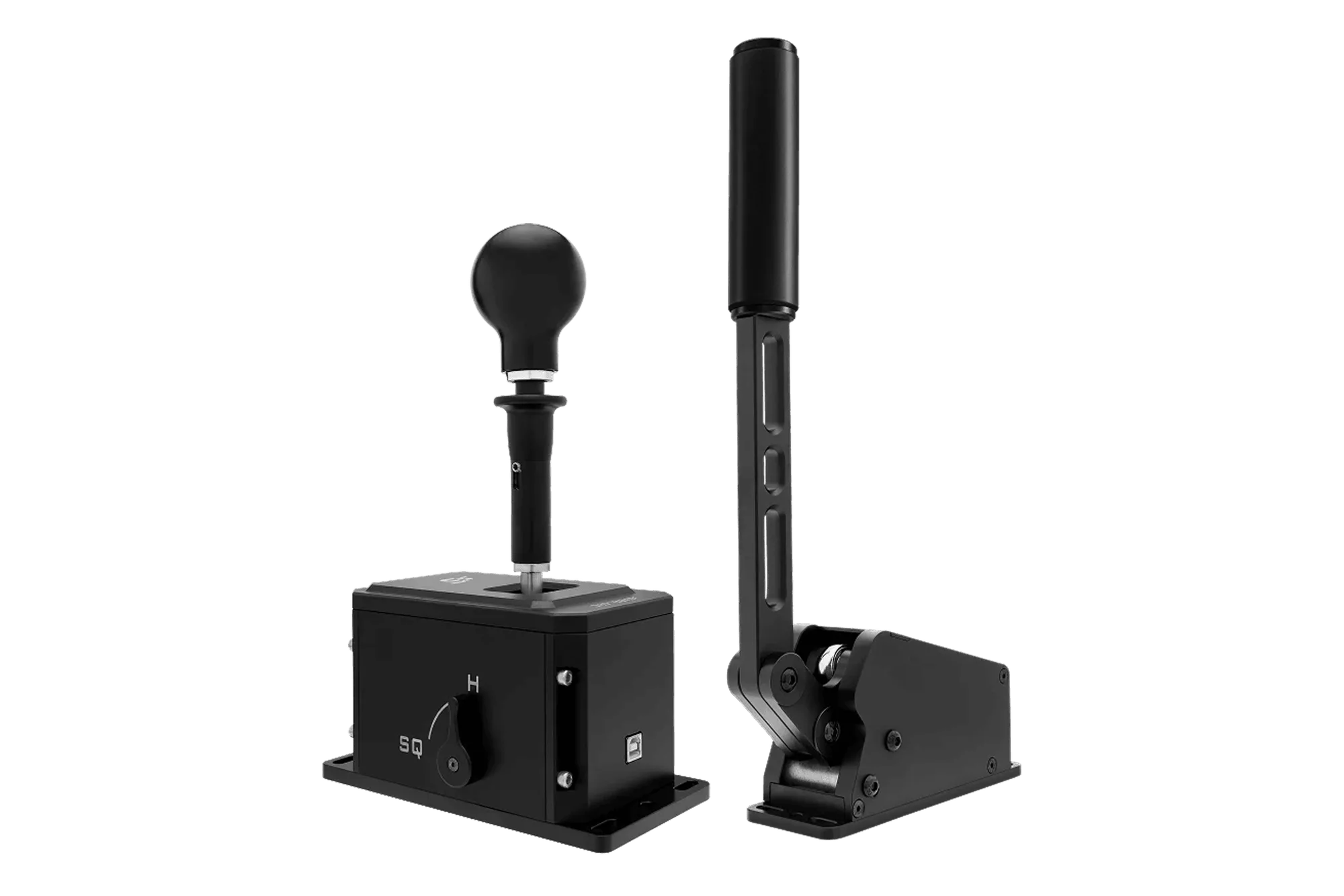
Simagic DS-8X Shifter & TB-1 Handbrake Bundle