Quick answer
Installing the Step2 Weight Version-3 Pool White is straightforward: identify the correct slot on your pool, insert the weight, and ensure it's fully seated to maintain stability.
Why this weight matters
The Step2 Weight Version-3 Pool White is a replacement part designed to keep your pool stable. Without it or with a damaged one, the pool might shift or become unbalanced, especially when filled with water. This single white weight fits into a dedicated slot and helps maintain the proper setup of compatible Step2 pools.
Installation steps
- Locate the weight slot: Check your pool's frame or base for a dedicated slot or recessed area where the weight should sit. This is usually near the bottom edge or on a support leg. Common mistake: forcing the weight into a slot that doesn't match its shape. The Version 3 design has a specific profile—ensure it aligns before inserting.
- Insert the weight: Align the white weight with the slot and push it in firmly until it clicks or sits flush. It should not protrude or feel loose. Checkpoint: after insertion, give the weight a gentle tug to confirm it's secure. A loose weight won't provide stability.
- Test stability: Once installed, gently rock the pool or apply light pressure to ensure the weight stays in place and the pool feels balanced. If the pool still feels unstable, double-check that the weight is fully seated and that no other parts are missing or damaged.
Product details
-
Weight Version-3 Pool White (135119A01P): This Step2 replacement part is designed as a weight for select pool products, helping to maintain stability and proper setup. Using the correct replacement weight ensures your pool stays level and secure during use, preventing wobbling or tipping.
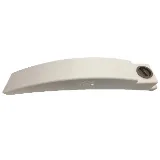
Weight Version-3 Pool White (135119A01P)