Two Quiet Peripherals, Different Priorities
If you're building a desk setup that stays quiet without sacrificing function, the TECKNET Wired Gaming Keyboard and the TECKNET Classic Jiggler Mouse both aim for low noise but serve different needs. The keyboard focuses on near-silent typing and gaming with backlight control, while the mouse prioritizes silent clicking and an automatic jiggler mode for keeping your computer awake. Here’s how they compare where it matters most.
Noise Level and Typing vs Clicking
Both devices use quiet technology, but they target different actions. The keyboard’s whisper-quiet switches are designed for typing and gaming without disturbing others, while the mouse uses silent-click technology for mousing—ideal for shared spaces or late-night work.
- TECKNET Wired Gaming Keyboard: Uses whisper-quiet gaming switches with a classic volcano switch structure rated for 50 million keystrokes. The near-silent operation suits office environments and gaming setups where typing noise is a concern.
- TECKNET Classic Jiggler Mouse: Employs advanced silent-click technology that operates 90% quieter than standard mice. The quiet clicks are especially useful in libraries, open offices, or when recording audio.
Backlight and Visual Feedback
The keyboard offers extensive backlight customization, while the mouse has no backlight—its visual feedback comes from DPI level indicators and the jiggler mode activation.
- TECKNET Wired Gaming Keyboard: Features 15-zone rainbow backlighting with 7 illumination modes and 4 brightness levels. You can cycle through 15 RGB color modes to match your setup or mood. The backlight helps in low-light conditions but can be turned off to save power or reduce distraction.
- TECKNET Classic Jiggler Mouse: No backlight. The only visual cue is the cursor movement when jiggler mode is active. This keeps the mouse simple and battery-efficient.
Key Specs at a Glance
-
TECKNET Wired Gaming Keyboard, 2.4G USB Computer Keyboards, 7-Color & 4 Modes Backlit, Whisper Quiet Switches, Full Size Quiet Keyboard for Windows Desktop, PC, Laptop, Gaming: Ergonomic 7-degree input angle with integrated wrist rest and stepped key layout. Durable ABS keycaps and metal base. Reduces hand fatigue during long typing or gaming sessions. The metal base adds stability.
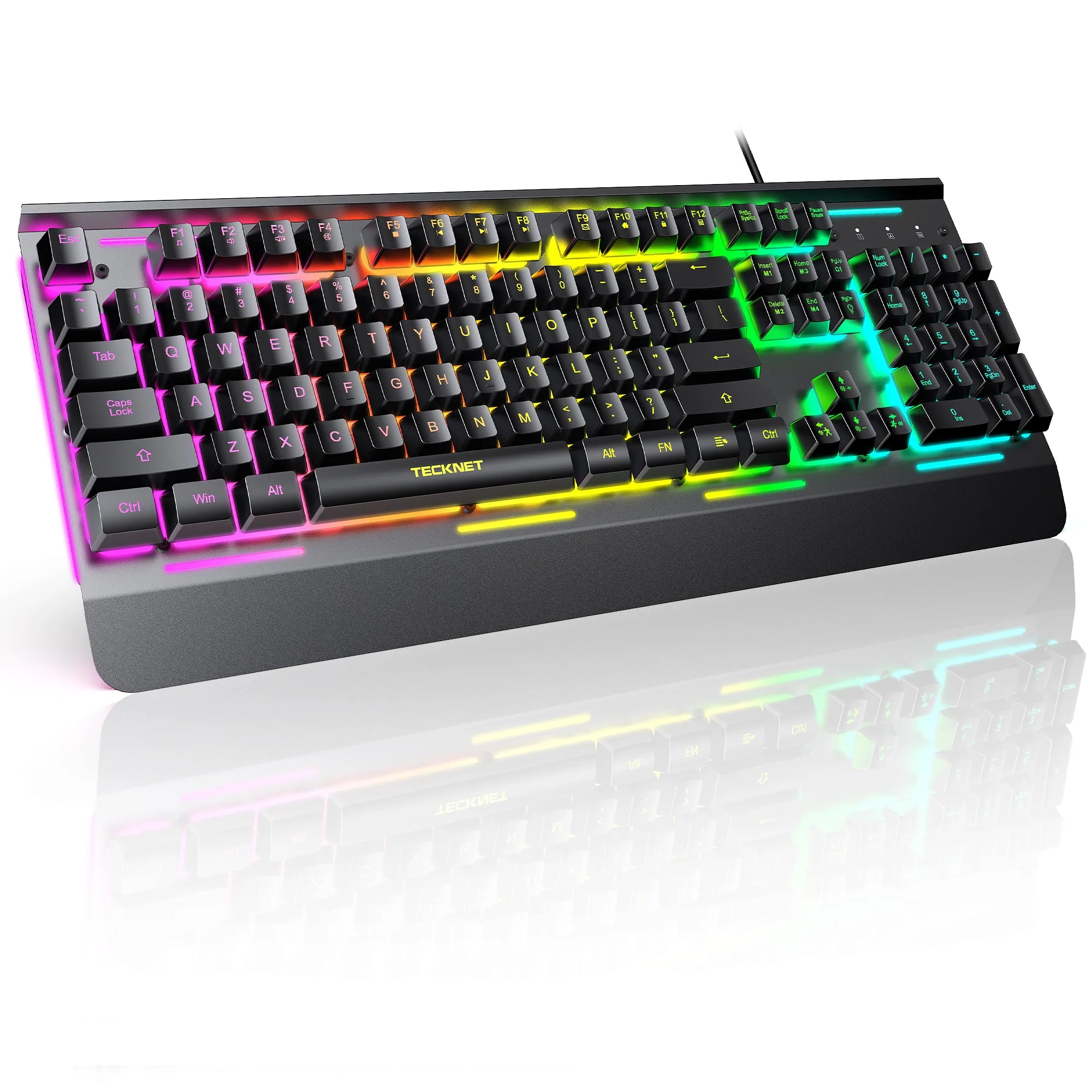
TECKNET Wired Gaming Keyboard, 2.4G USB Computer Keyboards, 7-Color & 4 Modes Backlit, Whisper Quiet Switches, Full Size Quiet Keyboard for Windows Desktop, PC, Laptop, Gaming
-
TECKNET Wired Gaming Keyboard, 2.4G USB Computer Keyboards, 7-Color & 4 Modes Backlit, Whisper Quiet Switches, Full Size Quiet Keyboard for Windows Desktop, PC, Laptop, Gaming: 25 anti-ghost keys allow simultaneous key presses without missed inputs. Essential for fast-paced games where multiple keys are pressed at once.
-
TECKNET Classic Jiggler Mouse, Silent, Rechargeable MS002: Full-size design with soft rubber grip and natural curvature reduces wrist strain by up to 35%. Comfort for M-L hands over long workdays, similar ergonomic intent as the keyboard's wrist rest.
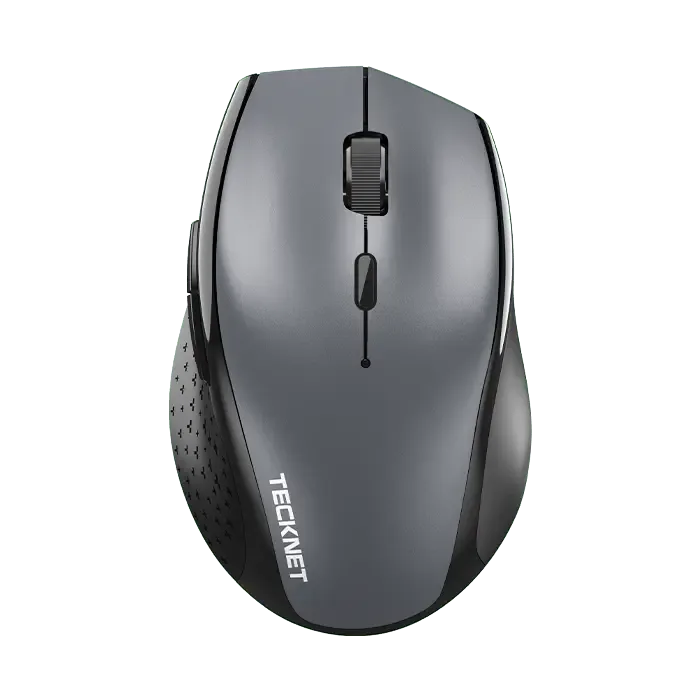
TECKNET Classic Jiggler Mouse, Silent, Rechargeable MS002
-
TECKNET Classic Jiggler Mouse, Silent, Rechargeable MS002: 6-level adjustable DPI up to 6400, with jiggler mode activated by holding the DPI button for 3-5 seconds. Lets you switch between precise cursor control and automatic movement to prevent sleep mode.
Spill Resistance and Durability
The keyboard has an IP32 spill resistance rating with four drainage holes in the wrist rest, making it more forgiving of accidental drinks. The mouse has no stated spill resistance, so it should be kept away from liquids. Both use durable materials—the keyboard’s metal base and the mouse’s rubber grip—but the keyboard is the better choice for a desk prone to spills.
Connectivity and Power Considerations
The keyboard is wired (USB-A) with a 2.4G connection, so it never needs batteries and has no latency concerns. The mouse is wireless with a Type-C rechargeable 800mAh battery lasting up to 90 days, and it includes a Type-C to USB-A adapter for compatibility. If you prefer a fixed cable and no charging, the keyboard wins. If you want a clutter-free desk with occasional charging, the mouse fits better.
What the Evidence Doesn't Cover
The supplied information does not confirm whether the keyboard's multimedia keys work with Mac systems (they are noted as incompatible with Mac). The mouse's jiggler mode compatibility with specific operating systems beyond Windows is also not detailed. Both devices' exact switch type (mechanical vs membrane) for the keyboard and sensor type for the mouse are not specified in the available records.