Quick answer
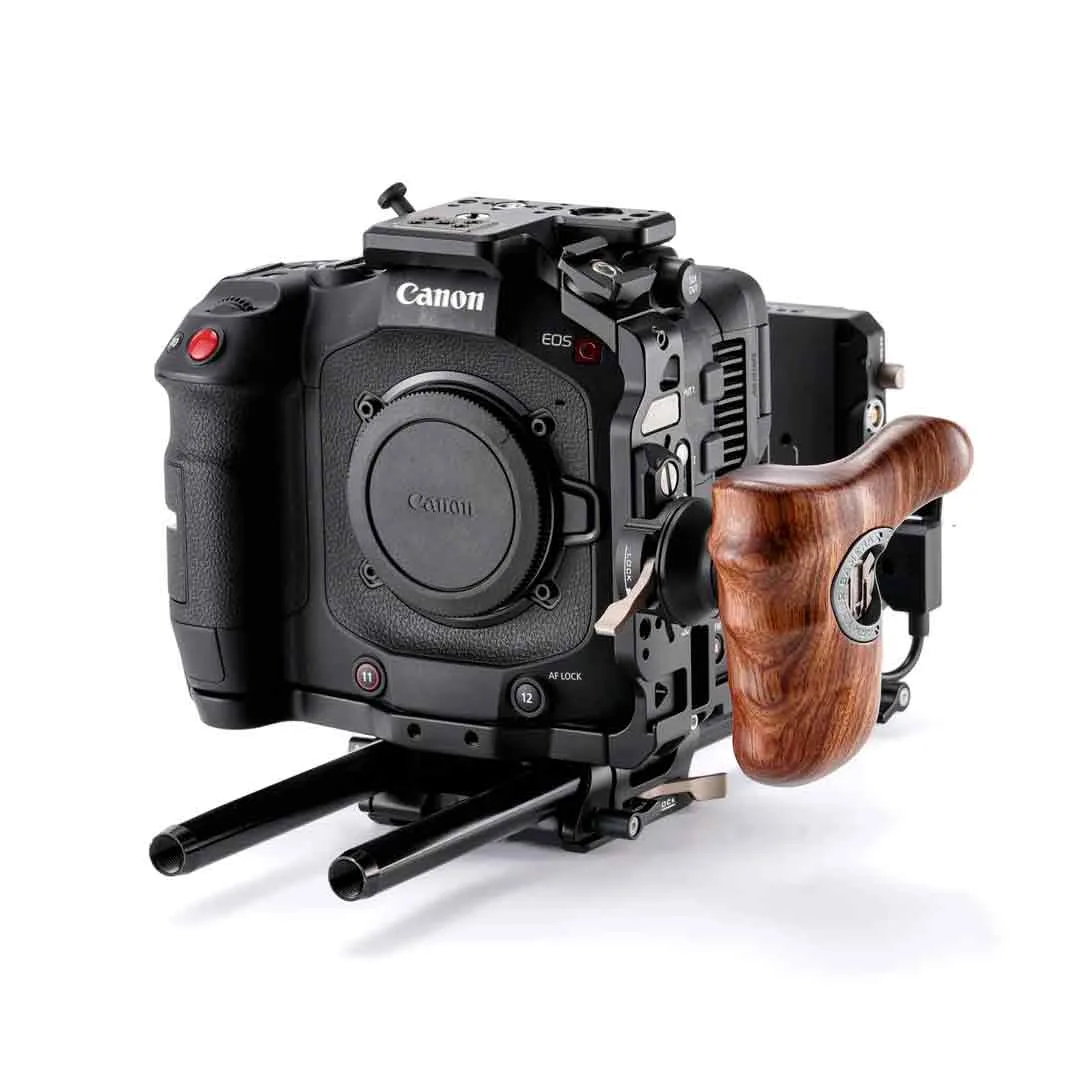
Mount the Tilta Cage for Canon EOS C80 by first attaching the cage to the camera body with the supplied screws, then securing the baseplate to a tripod or shoulder rig before adding the top handle and accessories. Tighten all screws progressively and check cable clearance before powering on.
Prepare the camera and cage before mounting
Before attaching the cage, remove the camera's battery and memory cards to reduce weight and avoid accidental power-on. Place the Canon EOS C80 on a clean, padded surface with the lens removed if possible. The Tilta Cage Pro Kit is designed specifically for this body, so you should not need to force any part into place. Check that all supplied screws are accounted for and that the cage's mounting holes align with the camera's tripod socket and side mounting points.
Secure the cage to the camera body
Start by threading the main base screw into the camera's tripod socket, but do not fully tighten it yet. Then add any side or top screws that the cage uses, tightening them in a star pattern to avoid stressing the camera body. Once all screws are started, go back and snug them down firmly. Over-tightening can strip threads or crack the cage, so stop when you feel resistance.
Attach the top handle and check clearance
The Pro Kit includes a top handle that mounts to the cage's top plate. Slide the handle into the NATO rail or screw it into the designated holes, depending on your kit version. Before locking it down, rotate the handle to a comfortable angle and verify that it does not block the camera's top buttons, vents, or hot shoe. A common mistake is mounting the handle too far forward, which can obstruct the lens release or microphone inputs.
Add a shoulder pad or baseplate for handheld work
For shoulder-mounted shooting, attach a shoulder pad or baseplate to the bottom of the cage. The Tilta system uses standard 15mm rod ports, so you can slide in rods and adjust the balance point. Position the pad so the camera sits comfortably on your shoulder with the weight centered over your body. Check that the pad does not interfere with the cage's bottom screws or the camera's battery compartment.
Mount accessories and manage cables
With the cage secured, you can add accessories like a monitor, microphone, or wireless transmitter using the cage's 1/4"-20 and 3/8"-16 threads. Route cables along the cage's sides and secure them with hook-and-loop straps or cable clamps to prevent strain on the camera's ports. Leave a small service loop near each connector so that vibrations do not pull the cable loose. Test all accessories before the shoot to confirm they are powered and transmitting correctly.
Rigging steps with checkpoints
- Attach the cage to the camera: Align the cage's base screw with the camera's tripod socket and start all screws by hand. Tighten in a star pattern until snug, but do not overtighten. Checkpoint: The cage should sit flush against the camera body with no gaps or wobble.
- Install the top handle: Slide the handle onto the cage's top NATO rail or screw it into the top plate. Adjust the angle for comfort and lock it down. Checkpoint: The handle must not block the camera's top vents, buttons, or hot shoe.
- Add a shoulder pad or baseplate: Mount the shoulder pad or baseplate to the cage's bottom using the 15mm rod ports. Adjust the position for balance on your shoulder. Checkpoint: The pad should not cover the battery compartment or any bottom-mounted ports.
- Mount accessories and route cables: Attach monitors, mics, or transmitters to the cage's threaded holes. Secure cables with straps or clamps, leaving a service loop at each connector. Checkpoint: Test all accessories for power and signal before the shoot.
Product facts
- Tilta Cage Caméra pour Canon EOS C80 (Pro Kit) (ES-T25-C-V): The Tilta Cage Caméra pour Canon EOS C80 (Pro Kit) (ES-T25-C-V) is the most complete configuration in Tilta's range for the Canon C80, designed for professional productions needing extended power, advanced ergonomics, and full accessory compatibility. This means the cage is built specifically for the C80, so you get a precise fit and access to Tilta's ecosystem of power and mounting accessories without adapters.