Quick answer
Replace worn Travel Tripod leg bushings by removing the old bushings, installing the correct replacement kit bushings for each leg section, and reassembling the legs. The Peak Design Travel Tripod Bushing Replacement Kit includes five bushings (legs A through E) and is the only part you need.
When to replace tripod leg bushings
If your Travel Tripod legs feel loose, wobble when extended, or make a grinding sound when you twist the leg locks, the bushings are likely worn. Bushings are plastic sleeves that reduce friction between leg sections; they wear down over time, especially if you use the tripod in dusty or sandy environments. Replacing them restores smooth extension and stable locking.
The bushing replacement kit covers all five leg sections (A through E), so you can replace one or all at once. You do not need to replace the entire leg assembly — just the bushings.
What you need before you start
You need the correct bushing replacement kit for your Travel Tripod. The Peak Design Travel Tripod Bushing Replacement Kit (SKU: TT-BRK-5-1) is a customer service part designed specifically for this repair. It includes bushings for leg positions A, B, C, D, and E. No other tools are required — the bushings press into place by hand.
Work on a clean, flat surface with good lighting. Have a small container to hold the old bushings and any small parts. Do not use lubricants or grease on the bushings; they are designed to work dry.
Step-by-step bushing replacement
- Step 1: Extend and remove the leg section: Fully extend the leg you are repairing. Unscrew the leg lock counterclockwise until it comes off. Slide the inner leg section out of the outer leg section. Keep the lock and any washers in a safe place. Common mistake: Forgetting which leg section goes where. Work on one leg at a time to avoid mixing up parts.
- Step 2: Remove the old bushing: The old bushing sits in a groove near the top of the outer leg section. Gently pry it out using your fingernail or a plastic spudger. Do not use metal tools — they can scratch the leg tube. Discard the old bushing. Checkpoint: If the bushing is cracked or deformed, replace it. If it looks fine but the leg is still loose, check the lock mechanism instead.
- Step 3: Install the new bushing: Take the correct bushing from the kit (labeled A, B, C, D, or E). Align it with the groove in the outer leg section and press it into place with your fingers. It should seat flush — no gaps. If it sits crooked, remove and re-seat it. Common mistake: Using the wrong bushing for the leg section. Each bushing is sized for a specific leg position; mixing them up causes binding or looseness.
- Step 4: Reassemble the leg: Slide the inner leg section back into the outer leg section. Screw the leg lock back on clockwise until snug — do not overtighten. Extend and retract the leg a few times to confirm smooth movement and a firm lock. Checkpoint: If the leg still feels loose, the bushing may not be seated correctly. Remove, inspect, and reinstall. If the problem persists, the lock may need replacement, not the bushing.
- Step 5: Repeat for remaining legs: Repeat steps 1-4 for each leg section that needs a new bushing. You can replace all five at once or only the worn ones. The kit includes bushings for all positions, so you have spares for future repairs. Final tip: Keep the unused bushings in the kit packaging in your camera bag. That way you have replacements ready if a bushing fails in the field.
Product needed for this repair
-
Travel Tripod // Bushing Replacement Kit - Leg A/B/C/D/E: This is a Peak Design Replacement Parts bushing kit for the Travel Tripod, covering leg positions A, B, C, D, and E. SKU: TT-BRK-5-1. It is the only part you need — no additional tools or adhesive required — and it ensures a precise fit for each leg section.
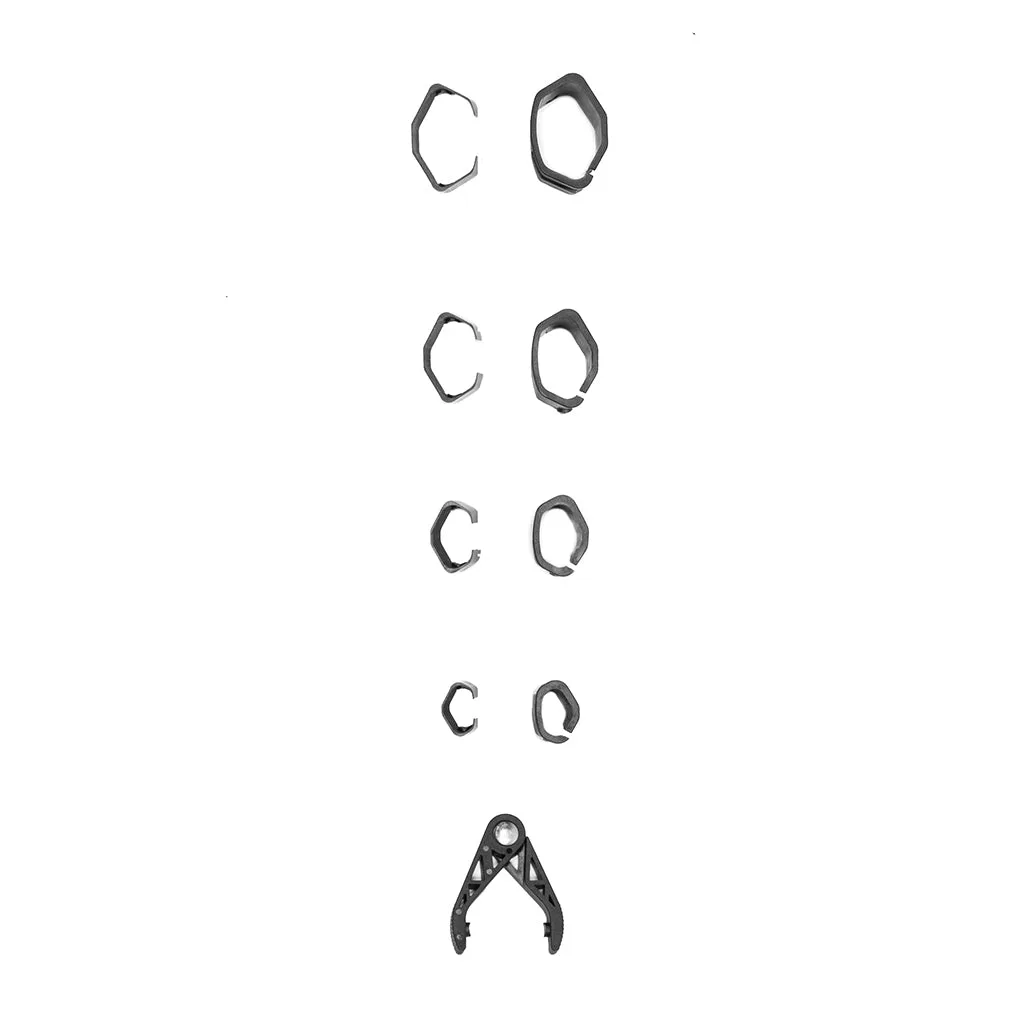
Travel Tripod // Bushing Replacement Kit - Leg A/B/C/D/E