Quick answer
Most turbo tube slide mounting hardware problems trace back to three causes: the slide is mounted at the wrong deck height, the bracket is attached to a surface that is not solid or square, or the hardware is installed in the wrong sequence. Fix the mounting surface and height first, then re-fit the bracket. If the bracket still will not sit flush or the slide cannot reach the deck safely, stop and choose a different slide rather than forcing the hardware.
A turbo tube slide is one of the most rewarding upgrades you can add to a swing set, but the mounting hardware is where most installations go sideways. The symptoms look different — a bracket that will not sit flush, bolts that will not tighten, a slide that feels loose at the top — yet they usually point to the same handful of root causes.
This guide separates each symptom from its likely cause and gives you a corrective action you can take with basic tools. It also tells you the point where continuing to force the hardware creates a safety problem, so you know when to stop and pick a different option.
Start with the mounting surface, not the hardware
Before you blame the bracket or the bolts, check what the bracket is attaching to. Tube slide mounting hardware needs a flat, solid, square surface — typically a play deck or a reinforced mounting board. If the wood is soft, split, or out of square, no amount of tightening will produce a stable joint. Press on the surface with your hand; if it flexes or crunches, that is your problem.
Deck height matters just as much. A tube slide is designed to connect at a specific deck elevation, and if your deck is too high or too low, the bracket will fight the slide instead of supporting it. Measure from the deck surface to the ground and compare that to the slide's intended mounting height before you drill anything.
- Confirm the mounting surface is solid, flat, and square before attaching hardware.
- Measure deck height and compare it to the slide's required mounting height.
- Do not enlarge existing holes to force a bracket into place.
Symptom: bracket will not sit flush against the deck
A bracket that rocks or leaves a gap is usually meeting an uneven surface or a deck edge that is not square. Check for protruding screw heads, old hardware, or a warped board. If the gap is small and the surface is sound, a shim or a fresh mounting board can solve it. If the gap is large, the deck itself is the issue, not the bracket.
This is also where tube slide bracket fit problems often get misdiagnosed. A bracket that will not sit flush on a twisted board is not a defective bracket — it is a mounting surface problem. Fix the surface, then re-test the fit before you tighten anything down.
- Remove old screws or hardware that block the bracket from seating.
- Use a shim only on a sound, flat surface — never to bridge a soft or rotten board.
- If the deck is twisted or rotten, repair or replace that section first.
Symptom: bolts will not tighten or keep spinning
Spinning bolts usually mean the hardware is mismatched to the hole size, the hole was drilled too large, or a nut is cross-threaded. Stop tightening immediately — continuing will strip the hole and ruin the mounting point. Back the bolt out, inspect the threads, and check that you are using the correct bolt for that specific bracket location.
If the hole is already enlarged, do not simply use a bigger bolt. Move the bracket to a fresh, solid section of the mounting surface and drill a correctly sized pilot hole. This is one of the most common swing set slide hardware issues, and it is almost always preventable with the right pilot hole size.
- Stop at the first sign of spinning or cross-threading.
- Match the pilot hole size to the bolt shank, not the threads.
- Relocate the bracket rather than upsizing hardware in a stripped hole.
Symptom: slide feels loose or shifts after installation
A slide that shifts at the top after you have tightened everything usually has a hardware sequence problem. Mounting hardware should be snugged in stages — start with the bracket-to-deck connection, then the slide-to-bracket connection, then final tightening. Tightening one side fully before the other pulls the assembly out of alignment and leaves play in the joint.
Re-check the hardware after the first few uses. A small amount of settling is normal on a new installation, but a slide that continues to shift means something is not fully seated. Re-torque the bracket bolts and confirm the footer or ground contact point is stable.
- Tighten in stages: bracket to deck first, then slide to bracket.
- Re-check all mounting hardware after the first few play sessions.
- A slide that keeps shifting needs re-seating, not more force.
When to stop and choose a different slide
There is a clear line between a fixable installation problem and a slide that does not belong on your set. If the deck height cannot be brought into the slide's required range, if the mounting surface cannot be made solid without major structural work, or if the bracket geometry simply will not align after correct installation, stop. Forcing hardware past that point creates a fall hazard.
At that stage, your options are to add a properly sized mounting platform, switch to a slide designed for your deck height, or choose a different tube slide configuration. The Quick Connect Turbo Tube Slide is worth considering here because its design uses far fewer hardware pieces than typical tube slides, which reduces the number of joints that can go wrong during installation.
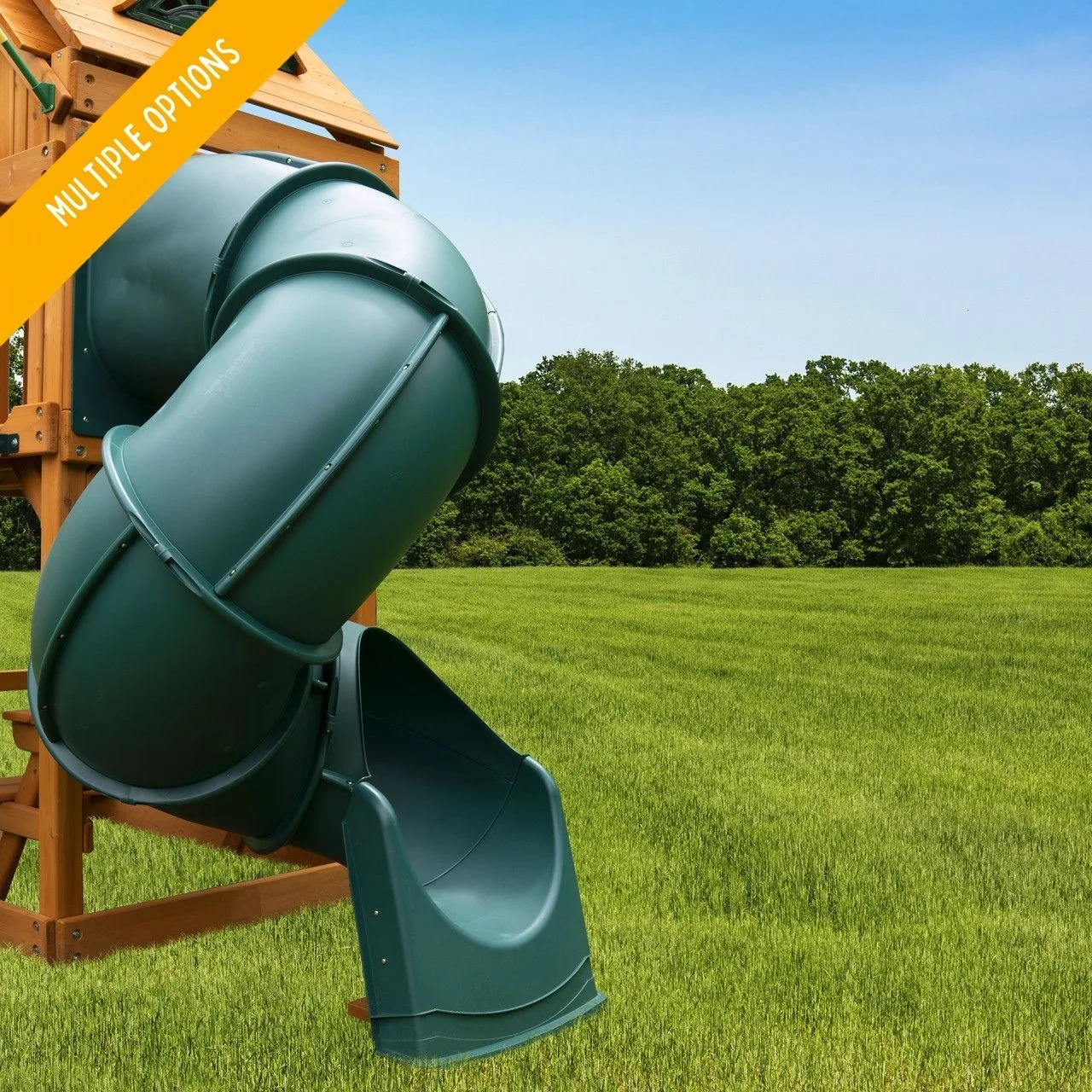
Quick Connect Turbo Tube Slide
- Stop if deck height cannot match the slide's mounting range.
- Stop if the mounting surface cannot be made solid and square.
- Choose a slide that matches your deck rather than modifying the deck to force a fit.
Mounting problem diagnosis
- Bracket will not sit flush: The mounting surface is uneven, out of square, or blocked by old hardware. Remove obstructions, shim only on sound wood, and repair or replace a twisted or soft board before re-fitting. If the surface is solid and square, the bracket should seat without force.
- Bolts spin or will not tighten: The pilot hole is too large, the hardware is mismatched, or a nut is cross-threaded. Back out the bolt, inspect threads, and relocate to a fresh mounting point with a correctly sized pilot hole. Never upsize hardware into a stripped hole — move the bracket.
- Slide shifts after tightening: The hardware was tightened out of sequence. Loosen, re-snug in stages (bracket to deck, then slide to bracket), and re-check after the first few uses. Persistent shifting means the joint is not fully seated — re-seat, do not over-tighten.
- Deck height cannot match the slide: The slide is designed for a specific deck elevation. If your deck cannot be brought into that range without structural changes, the slide is the wrong fit for your set. Stop here and choose a slide that matches your deck height.
Product facts that affect mounting
- Quick Connect Turbo Tube Slide: Compared to other tube slides, the Quick Connect uses 60% less hardware pieces that are more hidden, and it features an adjustable footer, ring joints, and pre-molded nuts with sturdy HDPE construction. Fewer hardware pieces means fewer joints that can strip, spin, or misalign during installation, and the adjustable footer helps you compensate for small ground-level differences.
- Great Skye II Swing Set: The Great Skye II includes a 14 ft. Super Scoop Slide, an Alpine Wave Slide, and a tube slide, creating three levels of play. If you are adding or replacing a tube slide on a multi-slide set, confirm which deck level the tube slide connects to before ordering hardware — the mounting height differs by level.
- Everest Elite Swing Set: The Everest Elite has three spacious play decks, two slides, a rock wall, monkey bars, a clatter bridge, and a tower. Multiple decks mean multiple possible tube slide mounting points; verifying the correct deck height and surface before installation prevents bracket fit problems.
Most turbo tube slide mounting hardware problems come down to the mounting surface and the installation sequence, not the hardware itself. Fix the surface, match the deck height, and tighten in stages. When the geometry simply will not align, stop and choose a slide that fits your set rather than forcing a joint that will not hold.