Quick answer
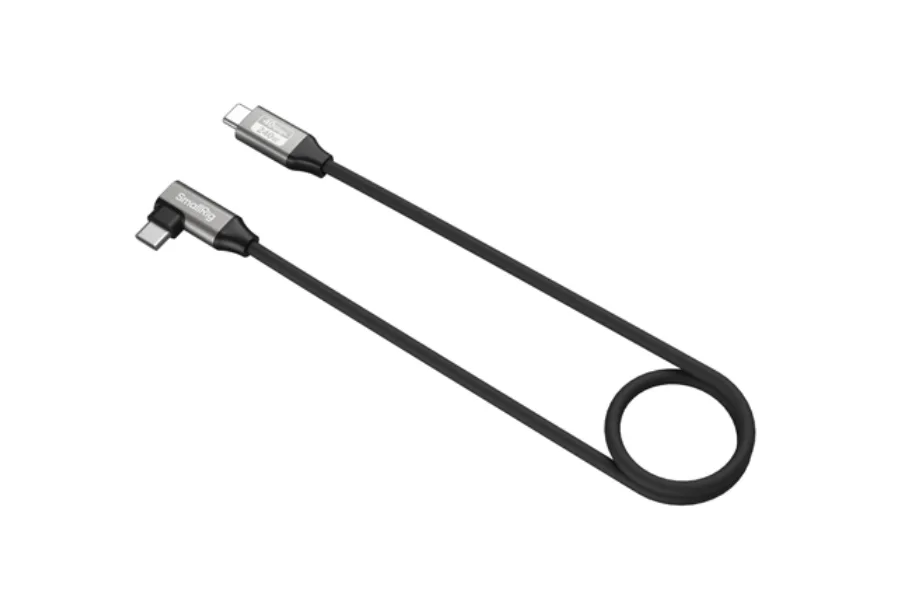
For most camera rigs, start with a short, angled USB-C cable that is rated for the data speed and power your devices actually need. If you offload cards or shoot 8K to an external SSD, choose a 40Gbps cable; if you power cameras or monitors, look for 240W USB-C charging support. The SmallRig USB-C Data Cable (Straight to Angled, 60cm) covers both jobs in one cable.
Why USB-C cable ratings matter on a camera rig
Not every USB-C cable does the same job. A cable that charges a phone may not carry 40Gbps data or 240W power, and a high-speed data cable may be too stiff or too long to route cleanly on a cage. On a camera rig, the cable is part of the build: it affects how you monitor, power, and offload footage.
The two ratings to check first are data speed and power delivery. Data speed determines how fast you can move files to an SSD or computer. Power delivery determines whether the cable can run a camera, monitor, or accessory from a battery or wall adapter. Length and connector angle then decide whether the cable actually fits your rig without strain.
Data speed: when 40Gbps is worth it
A 40Gbps USB-C cable is built for high-bandwidth tasks such as offloading large files or recording 8K video to a compatible external SSD. If your workflow is 4K or lower and you offload with a card reader, a standard USB-C cable is usually enough and costs less.
The trade-off is that high-speed cables can be thicker and less flexible. On a compact rig, that stiffness can pull on ports or make cable management harder. Measure the run you need and keep it short; a 60cm cable often covers a cage-mounted SSD or monitor without excess loop.
Power delivery: what 240W USB-C charging means for your rig
240W USB-C charging is the top end of the USB Power Delivery range. In practice, it means the cable can carry enough power for larger devices, not that every device will draw that much. Your camera, monitor, or battery still negotiates the wattage it needs.
If you power a camera or field monitor from a USB-C PD battery, choose a cable rated for the power your device draws. A cable rated for 240W gives you headroom for future gear, but it may be overkill for a small accessory. Match the cable to the device, and keep a spare short cable in your bag for charging.
Angled vs straight connectors: fit and strain relief
An angled USB-C cable is often the better choice on a camera rig because it keeps the connector close to the body and reduces the chance of snagging. A straight connector can work well when the port faces outward or when you need to plug into a computer.
Check the port orientation on your camera, monitor, and SSD before you buy. A straight-to-angled cable gives you one of each, so you can adapt to different devices. If your rig is tight, route the angled end into the camera and the straight end into the accessory, or vice versa, depending on clearance.
How to choose the right length and mounting hardware
Length is a fit decision, not a spec sheet number. A 60cm cable is a common middle ground for cage-mounted SSDs and monitors: long enough to reach, short enough to avoid a coil. If your devices are farther apart, consider a longer cable, but remember that longer runs can add clutter and may need a cable clamp.
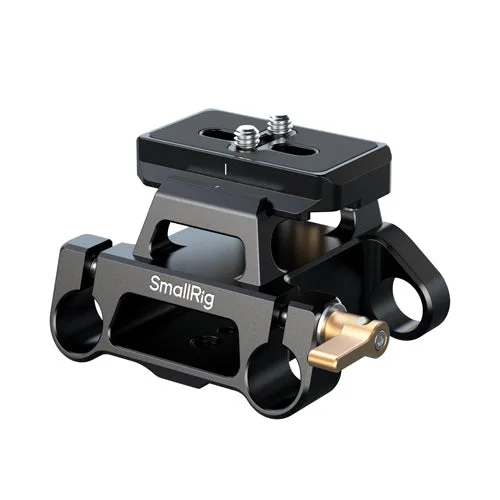
Mounting hardware keeps the cable from pulling on ports. An Arca-type mount plate kit with a 15mm dual rod clamp can add a stable point for accessories and cable routing on a rig. Combine it with hook-and-loop ties or cable clamps to fix the cable path.
Wind and audio accessories: a separate cable decision
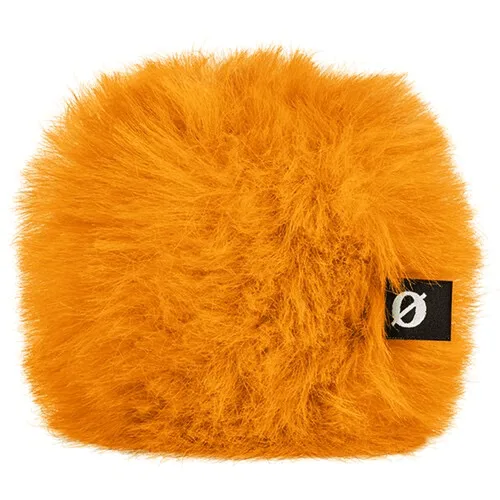
If you record audio on the same rig, wind protection is a different purchase from cables. The Rode WS9 Deluxe Windshield is designed for Rode VideoMicro and VideoMic Me series microphones and uses open-cell foam with synthetic fur to reduce wind noise. It does not affect your USB-C data or power path, but it is a common companion for run-and-gun rigs.
Keep audio cables and USB-C cables separated where possible. A tidy route reduces strain on microphone ports and makes it easier to swap a cable without disturbing the rest of the rig.
Decision rules for buying a USB-C camera cable
- If you offload to an SSD or shoot 8K: Choose a cable rated for 40Gbps data transfer and 8K support, such as the SmallRig USB-C Data Cable. Keep the run short to avoid signal loss and strain. Prioritize data speed over price.
- If you power a camera or monitor from USB-C PD: Check the wattage your device draws and pick a cable rated for at least that much. A 240W USB-C charging cable gives headroom for larger devices. Match the cable rating to the device, not the other way around.
- If your rig is compact or handheld: Use an angled USB-C cable at the camera end to reduce snagging. A straight-to-angled cable gives you flexibility for different port orientations. Fit and strain relief matter as much as specs.
- If you need to mount accessories and route cables: Add a mounting plate with a rod clamp and use cable ties or clamps to fix the cable path. This protects ports from constant pulling. A tidy route extends cable and port life.
Product facts to know
- SmallRig USB-C Data Cable (Straight to Angled, 60cm / 23.6in) (40Gbps + 240W + 8K): SmallRig USB-C Data Cable with a straight-to-angled connector design, offered in a 60cm / 23.6in length. It is listed with 40Gbps data transfer, 240W power delivery, and 8K support. One cable can handle high-speed offloads and power delivery while the angled end reduces strain on a camera or monitor port.
- SmallRig Arca-Type Mount Plate Kit with 15mm Dual Rod Clamp: SmallRig Arca-Type Mount Plate Kit with 15mm Dual Rod Clamp, combining an Arca-type mounting plate with a dual rod clamp for 15mm rods. Gives you a stable mounting point for accessories and cable routing on a rig, which helps prevent cable pull on ports.
- Rode WS9 Deluxe Windshield for Rode VideoMicro & VideoMic Me (Orange): Rode WS9 Deluxe Windshield designed for Rode VideoMicro, VideoMic Me, VideoMic Me-C, and VideoMic Me-L microphones, made of open-cell foam covered with synthetic fur. Useful if you record audio on the same rig and need to reduce wind noise without changing your cable setup.
Is this cable right for you?
Best for
- Hybrid shooters who need one cable for 8K offloads and 240W power delivery
- Compact rigs where an angled connector reduces port strain
- Cage builds that need a short, manageable cable run
Not for
- Users who only charge a phone or small accessory and do not need 40Gbps data
- Rigs that require a cable longer than 60cm between devices
- Setups where a straight connector at both ends is necessary for clearance