Quick answer
For reliable camera tethering and fast charging, choose a USB 3.1 cable with at least 10 Gbps speed and Power Delivery support. Length matters: 13' cables give you freedom, but shorter ones reduce voltage drop.
Why USB 3.1 speed matters for photography
USB 3.1 (Gen 2) supports up to 20 Gbps, which is essential for transferring large RAW files or 4K video quickly. Slower USB 2.0 cables (480 Mbps) will work for basic charging but create a bottleneck when you're importing hundreds of images from your camera card.
The trade-off: a USB 3.1 cable costs more than a basic charging cable. If you only need to charge your camera battery overnight, a USB 2.0 cable is sufficient and cheaper.
Cable length and tethering
Tethering your camera to a laptop or tablet for studio work demands a cable long enough to move freely. A 13' cable like the Promaster USB 3.1 Cable C to C 60W PD gives you room to work without being anchored to your desk.
Longer cables can introduce signal degradation and voltage drop. USB 3.1 cables are engineered to maintain signal integrity at longer lengths, but if you need 20+ feet, consider an active repeater cable or a USB-over-Ethernet solution.
Power Delivery (PD) for charging
Power Delivery allows a USB-C cable to deliver up to 240W, but 60W is the sweet spot for most mirrorless cameras and laptops. A 60W PD cable can charge your camera battery while you shoot tethered, saving you from swapping batteries mid-session.
Not all USB-C cables support PD. A cable rated for PD will have a marked wattage (e.g., 60W). If you plug a non-PD cable into a PD charger, you'll get standard 5V charging, which is much slower.
Decision rules: picking your USB cable
- Check your camera's USB port: Most modern mirrorless cameras use USB-C. If your camera has a Micro-USB port, you'll need a USB-A to Micro-USB cable or an adapter. USB-C to USB-C cables only work with USB-C devices. Confirm your camera's port type before buying.
- Match speed to your workflow: For tethering and RAW file transfer, choose a USB 3.1 (Gen 2) cable with at least 10 Gbps. For occasional charging only, USB 2.0 is fine. USB 3.1 saves time if you transfer files often.
- Choose length by your workspace: A 3-6' cable works for desk charging. For studio tethering, go with a 10-13' cable. Longer than 15' may need a signal booster. Measure your typical distance from camera to computer.
- Verify Power Delivery support: If you want fast charging while shooting, look for a cable explicitly rated for PD (e.g., 60W). The wattage should match or exceed your charger's output. PD cables are marked; non-PD cables charge slowly.
Product facts
-
Promaster USB 3.1 Cable C to C 60W PD - 13’: This 13' USB 3.1 C-C cable supports 20 Gbps transfer speed and 60 watt PD charging, with a braided sheath and metal ends. The extra length is ideal for tethering, while the 60W PD keeps your camera charged during long shoots—no need to stop and swap batteries.
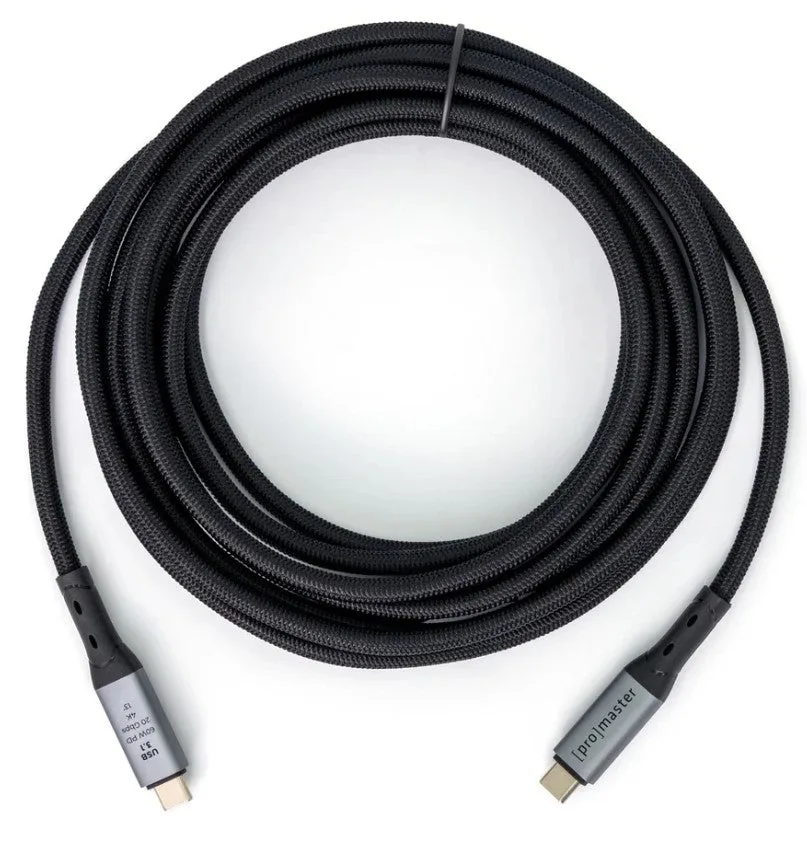
Promaster USB 3.1 Cable C to C 60W PD - 13’
Who should buy what
Best for
- Studio photographers who tether to a laptop or tablet
- Travel photographers who want one cable for camera and laptop charging
Not for
- Users with older cameras that have Micro-USB ports (need a different cable type)
- Budget-only buyers who never transfer files and only charge overnight