Quick answer
The ports that collect the most dust are USB-A, 3.5 mm headphone jacks, and micro-USB on phones, tablets, and laptops. A small silicone plug set is the easiest way to keep them clean and working reliably.
Why dust in ports is a real problem
Dust and lint gradually pack into open ports. Over time the debris can block a USB plug from seating fully, causing intermittent charging or data drops. In headphone jacks, compacted dust can muffle sound or trigger the 'headphone mode' bug that silences the speaker.
Cleaning a port is possible but risky — a metal tool or too much pressure can bend the delicate pins inside. Prevention with a simple plug is far safer and takes seconds.
Which ports benefit most from covers
USB-A ports on laptops and desktop PCs are large, open, and often unused for days or weeks. They are magnets for dust, especially on machines that sit on a desk or floor. 3.5 mm headphone jacks on phones and laptops collect lint from pockets and bags. Micro-USB and USB-C ports on phones and tablets also gather pocket lint, though USB-C is slightly less prone to blockage because of its tighter design.
A single mixed set like the 13-piece kit covers all these common port types, so you can protect every device in one go.
How to protect your ports in 4 steps
- Identify the ports that stay unused for hours or days: Look at your laptop, desktop PC, phone, and tablet. Common candidates: USB-A ports you rarely use, the headphone jack on a phone you charge wirelessly, and any micro-USB port on older devices. Common mistake: covering ports you use every few minutes — plugs can be annoying to remove repeatedly. Focus on ports that sit idle.
- Choose a plug that fits snugly without force: Silicone plugs are flexible and slightly oversized so they grip the port walls. Push the plug in gently until it sits flush. If it slides out easily, it is too loose; if you have to jam it, the plug shape is wrong for that port. Checkpoint: a good fit should stay in place when you shake the device gently.
- Remove and clean the plug occasionally: Every few weeks, pull out the plug and wipe it with a dry microfiber cloth. Dust trapped on the plug surface can transfer back into the port if left too long. Common mistake: forgetting to clean the plug itself — it becomes a dust applicator instead of a protector.
- Store unused plugs in the original case or a small bag: Loose plugs in a pocket or drawer pick up lint and lose their grip. Keep them together so you always have the right size when you need it. Checkpoint: a lost plug costs a few cents, but a damaged port costs much more.
Product that makes it easy
-
13 x Stof Plug Set USB Anti-Stof Covers voor Smartphones, Laptops | Past op USB-A Poorten, 3.5 mm Koptelefoonaansluitingen etc. Siliconen, Zwart: This set includes 13 silicone plugs that fit USB-A ports, 3.5 mm headphone jacks, and other common openings on phones, tablets, and laptops. Instead of buying separate covers for each port type, one kit protects all your frequently used devices and comes with a 3-year warranty.
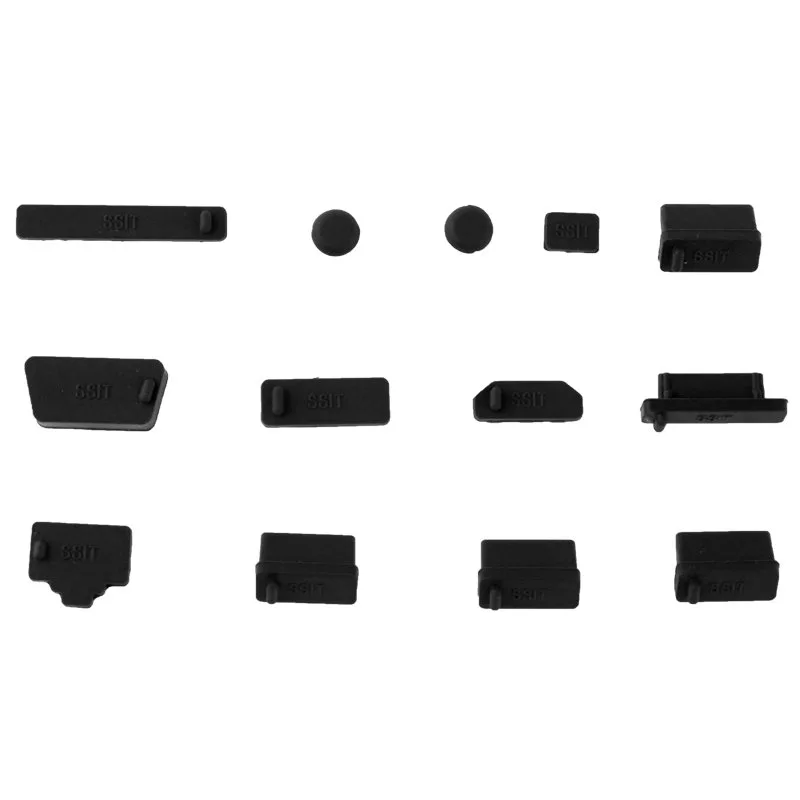
13 x Stof Plug Set USB Anti-Stof Covers voor Smartphones, Laptops | Past op USB-A Poorten, 3.5 mm Koptelefoonaansluitingen etc. Siliconen, Zwart


