Quick Answer
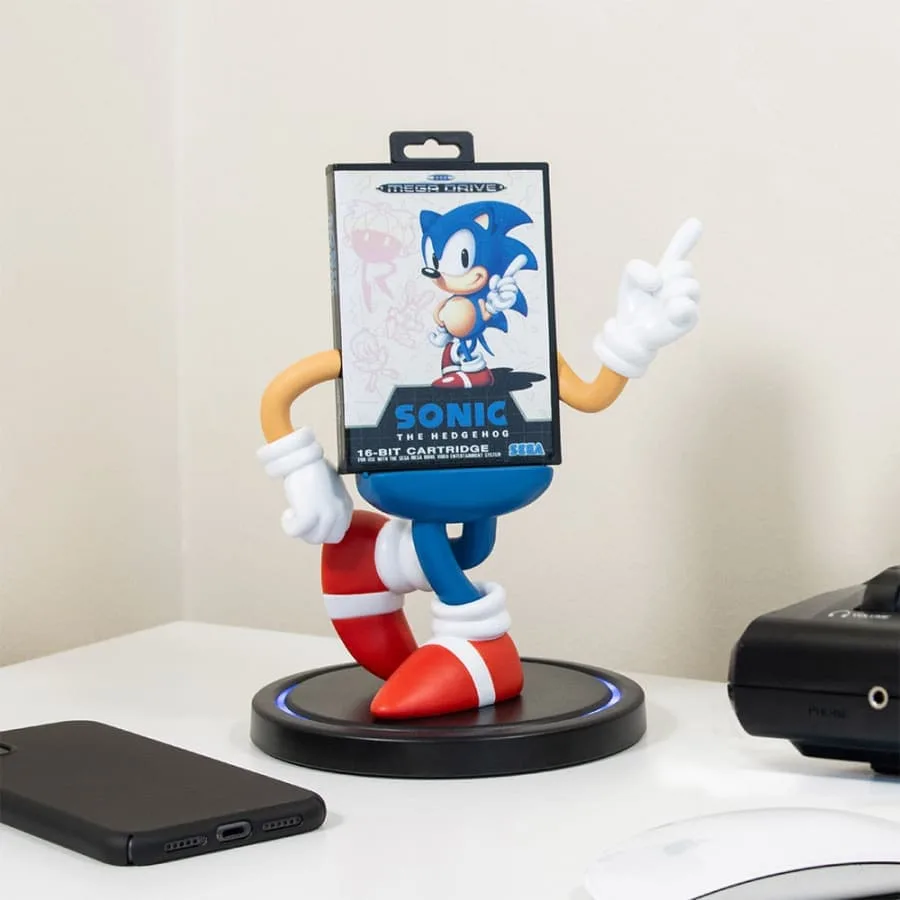
To charge your Sonic figure, place it on the Power Idolz Sonic the Hedgehog Wireless Charging Dock and ensure your device supports Qi wireless charging. For best results, position the figure so the charging coil aligns with your device's coil.
Why a Dedicated Charging Dock Makes Sense
A dedicated charging dock like the Power Idolz Sonic the Hedgehog Wireless Charging Dock combines nostalgia with function. It lets you display a beloved SEGA icon while keeping your phone or earbuds topped up. This avoids the clutter of cables and adds a retro gaming vibe to your desk or shelf.
The dock is designed with retro packaging inspired by classic games, so it doubles as a collectible. However, it's important to remember that the dock charges devices wirelessly, not the figure itself. The figure is a decorative piece that holds your device in place.
Trade-offs and Limitations
Wireless charging is convenient, but it works best when the device is centered on the charging pad. If your phone has a thick case or metal components, charging may be slower or may not work at all. Also, the dock requires a USB power source; it doesn't include a built-in battery.
Another consideration is that the Sonic figure is not removable for charging. The entire dock is a single piece, so you place your device on the figure's outstretched hands or base, depending on the design. Always check the product images or manual for the exact placement.
Common Questions About the Sonic Charging Dock
How do I set up the charging dock?
Connect the dock to a USB power adapter using the included cable. Plug the adapter into a wall outlet. The dock will be ready to charge when it's powered on (look for an LED indicator if available). Ensure you use a power adapter that provides sufficient wattage (typically 5W-10W) for reliable charging.
Which devices can I charge with this dock?
Any device that supports Qi wireless charging, such as recent iPhone models, Samsung Galaxy phones, and Qi-compatible earbuds cases. If your device doesn't support Qi, you won't be able to charge it wirelessly with this dock. Check your device's specifications for Qi compatibility before purchasing.
How should I position my device on the dock?
Place your device so that its charging coil aligns with the dock's charging area. Usually, this means centering the device on the designated pad or on the figure's base. Refer to the product manual for specific placement instructions. If charging is slow, adjust the position slightly until the charging indicator shows an optimal connection.
Can I charge my phone while it's in a case?
Yes, but only if the case is not too thick and does not contain metal. Cases thicker than 3mm or with metal components may interfere with wireless charging. Remove the case if you experience issues. Test with the case on first; if it doesn't charge, remove the case and try again.
How do I care for the dock and the figure?
Keep the dock away from liquids and extreme temperatures. Clean it with a soft, dry cloth. Do not use abrasive cleaners or submerge it in water. The figure is for display, so avoid bending or applying pressure. Regular dusting will keep the retro design looking sharp.
Product Facts
-
Power Idolz Sonic the Hedgehog Wireless Charging Dock: The Power Idolz Sonic the Hedgehog Wireless Charging Dock features designs inspired by retro packaging of your favourite films, video games and TV shows. This means the dock not only charges your device but also serves as a nostalgic collectible that fits well in a gaming setup.
Power Idolz Sonic the Hedgehog Wireless Charging Dock