Quick answer
G-Rework HG Light-Type Guncannon decals let you replace most of the kit's stickers with sharp, thin waterslides that look painted on. The key is to use setting and softening solutions, work from the manual's placement guide, and apply custom markings freely for a unique finish.
Why choose waterslides over stickers?
The standard HG Guncannon stickers can look thick and prone to peeling over time. G-Rework's waterslides are much thinner and conform better to curved surfaces, giving a painted-on appearance. They also include extra custom markings that let you personalize your build beyond the stock decal sheet.
One tradeoff: waterslides require more time and a few extra supplies (water, setting solution, softener). If you want a quick snap-build without painting, stickers are faster. But if you're aiming for a clean, realistic finish, these decals are worth the extra effort.
What you'll need before starting
You'll need the decal sheet, a shallow dish of room-temperature water, tweezers, a cotton swab or soft brush, and a hobby knife or scissors. Setting solution (like Mr. Mark Setter) helps the decal stick, and softening solution (like Mr. Mark Softer) helps it conform to panel lines and curves.
Work in a clean, well-lit area. Avoid touching the decal face with your fingers—oils can prevent adhesion. Patience is the main requirement; rushing often leads to torn or misaligned decals.
Step-by-step: Applying G-Rework HG Guncannon decals
- Prepare the surface: Make sure the plastic is clean and free of dust or oils. If you painted the kit, let the paint cure fully (at least 24 hours). A gloss clear coat before decals helps them slide into position and reduces silvering. Skipping surface prep is the most common cause of decal silvering or peeling.
- Cut out the decal: Use a hobby knife or scissors to cut the chosen decal from the sheet, leaving a small margin of clear film around the edge. This makes handling easier and prevents the decal from curling. Cutting too close to the printed area can cause the decal to tear when sliding off the backing.
- Soak the decal: Dip the decal in room-temperature water for about 10–15 seconds, or until the decal begins to loosen from the backing paper. Don't leave it in the water too long—it can float off and become unusable. If the decal doesn't slide after 20 seconds, dip it again briefly. Over-soaking makes the decal too fragile.
- Slide and position: Place the decal on the kit surface using tweezers. Slide it off the backing paper by gently pushing with a damp cotton swab. Adjust the position while the decal is still wet—once it dries, it's stuck. Use a drop of setting solution on the surface before placing the decal to improve adhesion and give you more working time.
- Remove excess water and air bubbles: Gently roll a damp cotton swab from the center of the decal outward to push out water and trapped air. Blot away excess moisture with a tissue. Avoid rubbing hard—the decal can tear or shift. If a bubble remains, prick it with a pin and re-roll the area. Do not try to push it out from the edge.
- Apply softening solution (optional but recommended): For curved surfaces or panel lines, dab a small amount of softening solution over the decal. Let it sit for 30 seconds, then gently press the decal into the detail with a cotton swab. The decal will soften and conform. Too much softener can make the decal wrinkle or disintegrate. Use it sparingly and only on areas that need it.
- Seal the decals: After all decals are dry (wait at least 12 hours), apply a clear topcoat—gloss, semi-gloss, or matte—to protect the decals from scratches and UV damage. This also hides the decal edges for a painted-on look. Skipping the topcoat leaves decals vulnerable to peeling when handling the model.
Product fact
-
G-Rework HG Light-Type Guncannon Decals: These water decals can replace the use of the stickers that are normally included with the model kit (except the eyes and head sensors) and feature the same placement/number. You can follow the manual's sticker placement exactly, making it easy to upgrade your Guncannon without guessing where each decal goes.
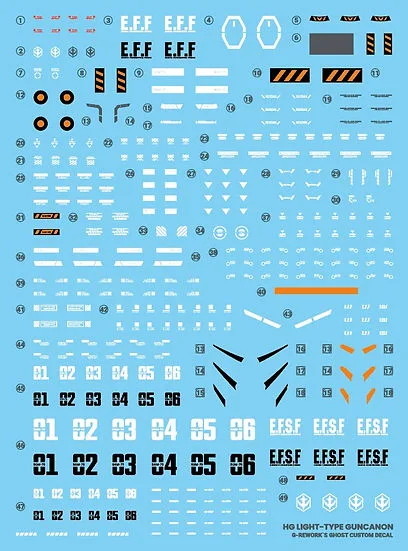
G-Rework HG Light-Type Guncannon Decals