Quick answer
The Mr. HOBBY Mr. Turntable L gives you a motorized rotating display stand with two speeds, making it easy to capture dynamic doll photos from every angle.
Why a turntable helps doll photography
A rotating display stand lets you shoot a doll from all sides without moving your camera or repositioning the doll. This keeps lighting and focus consistent, which is especially helpful for stop-motion or product-style shots.
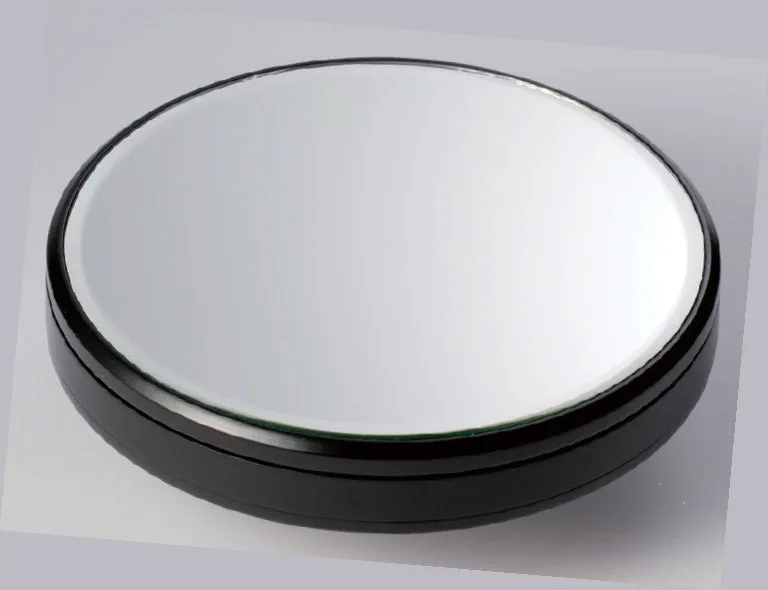
The Mr. HOBBY Mr. Turntable L has an 18.9cm mirrored surface that adds a subtle reflection beneath the doll, giving photos a polished look. The two rotation speeds (1 rpm and 2 rpm) let you choose a slow, steady spin for video or a faster rotation for quick previews.
Weight and battery considerations
The turntable supports up to 2 kilograms (4.4 pounds), which covers most 1/3-scale and smaller dolls. Heavier dolls may slow the rotation or stall it entirely. The rotation speed also varies with the weight on the platter, so expect a slight slowdown with heavier figures.
It requires three AAA batteries (not included). For long photo sessions, use fresh alkaline batteries to maintain consistent speed. Rechargeable batteries work but may have slightly lower voltage, which can affect rotation.
How to shoot doll photos with the Mr. HOBBY Turntable L
- 1. Set up the turntable on a stable surface: Place the turntable on a flat, level table. Press the power button to test rotation. If it wobbles, adjust the surface or add a non-slip pad underneath. Check that the turntable sits level before placing your doll on it.
- 2. Position your doll on the mirrored surface: Center the doll on the mirrored platter. For dolls with wide skirts or unstable poses, use a clear acrylic stand or a small base to prevent tipping during rotation. A centered doll spins more smoothly and reduces the chance of wobble.
- 3. Choose the rotation speed: Select 1 rpm for slow, cinematic pans or stop-motion sequences. Use 2 rpm for faster previews or when you need to see the doll from all sides quickly. Note that heavier dolls may rotate slower than the marked speed. Start with 1 rpm to avoid motion blur in video; switch to 2 rpm only for quick checks.
- 4. Set up your camera and lighting: Position your camera on a tripod facing the turntable. Use two softbox lights at 45-degree angles to the doll to reduce shadows. Avoid direct overhead lights that create harsh reflections on the mirrored surface. Soft, angled lighting prevents glare on the mirror and keeps the doll well-lit.
- 5. Start the rotation and capture: Press the power button to start the turntable. For photos, use a remote shutter or a fast shutter speed (1/125s or faster) to freeze motion. For video, set your camera to 24 or 30 fps and let the turntable do the movement. A fast shutter speed eliminates motion blur from the rotation; test a few shots first.
- 6. Review and adjust: Check your first few shots for focus, exposure, and reflections. If the doll appears blurry, increase shutter speed or lower the rotation speed. If the mirror creates unwanted reflections, tilt the lights slightly or add a polarizing filter. A quick test shot saves time; adjust lighting or speed before a full session.
Product facts
-
Mr. HOBBY Mr. Turntable L: Motorized turntable with 18.9cm mirrored surface and two rotation speeds (1 rpm or 2 rpm). Supports up to 2 kg. The mirrored base adds a clean reflection under your doll, and the two speeds let you choose a slow rotation for steady video or a faster one for quick angle checks.
Mr. HOBBY Mr. Turntable L