Quick answer
Choose a video baby monitor that gives you a clear, wide view of the crib, works reliably in low light, and fits your home layout. A model with pan & tilt and colour night vision, like the Leapfrog LF920HD, offers the most flexibility.
Display size and resolution trade-offs
A larger screen makes it easier to see details from across the room, but it also draws more power and can be bulkier to carry around. A 7-inch display is a good middle ground—big enough to check on your baby without squinting, yet still portable. Resolution matters too: 720p HD is sharp enough to see facial expressions and breathing movements, while lower resolutions may look grainy.
Camera range and viewing angle
Pan & tilt cameras let you move the view remotely, which is essential if the monitor is placed on a shelf or wall. A 360° pan and 80° vertical tilt covers the whole room without needing to reposition the camera physically. If your nursery is small or the camera sits directly above the crib, a fixed wide-angle lens may be simpler and cheaper.
Night vision and low-light performance
Standard infrared night vision shows everything in black and white, but colour night vision gives you more detail—you can see the colour of your baby’s skin or the pattern on their blanket. Colour night vision is especially useful if you use a dimmer night light or keep the room very dark. It often works by using ambient light, so check whether the monitor needs some light to switch to colour mode.
6 decision rules for choosing a video baby monitor
- Screen size: If you plan to keep the parent unit on a nightstand or desk, a 5-inch screen is compact. If you want to see details from across the room, go with 7 inches or larger.
- Camera movement: Choose pan & tilt if the camera will be mounted high or far from the crib. A fixed camera works fine when placed directly above or beside the baby.
- Night vision type: Standard infrared is sufficient for most parents. Colour night vision adds clarity but may require some ambient light—check the product specs before buying.
- Audio and two-way talk: If you want to soothe your baby without entering the room, look for two-way talk. For simple monitoring, one-way audio is enough.
- Range and interference: If your home has thick walls or multiple floors, choose a monitor with a rated range of at least 200 metres (open field). For a flat or small house, shorter range is usually fine.
- Extra features: Features like a built-in night light, temperature sensor, or lullabies are nice extras but not essential. Decide which ones matter to your daily routine and budget. Focus on the core features first—display, camera, and night vision—then add extras if they fit your budget.
Product highlights
-
Leapfrog Video Baby Monitor (LF920HD): 7-inch 720p HD display, 360° pan & tilt, colour night vision, and an adaptive dimmable colour night light. You get a clear wide view of the whole room, see your baby in colour even in very low light, and can use the built-in night light to create a calming sleep environment.
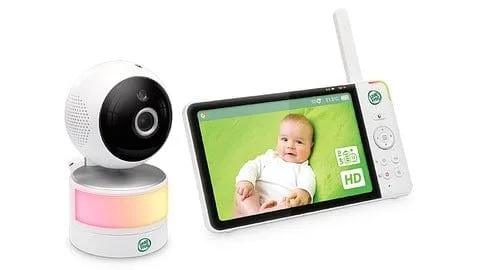
Leapfrog Video Baby Monitor (LF920HD)
Which video baby monitor is right for you?
Best for
- Parents who want a large, clear display and remote camera control for full room coverage
- Families with a nursery that has low light or who want colour night vision for better detail
Not for
- Parents who prefer a simple, fixed camera setup to save money or reduce complexity
- Those who need a monitor with Wi-Fi connectivity or smartphone app access (this model is a dedicated monitor only)