Quick answer
Start from the job the shield must do. If you need to switch a mains or high-current load from one digital pin, buy the WeMos V2 Relay Shield. If you need to build your own circuit on top of a WeMos D1 mini or mini Pro, buy the WeMos D1 mini Prototyping Shield. Buy both only if you plan to stack them and accept that headers must be soldered.
The two D1 mini shields worth comparing first
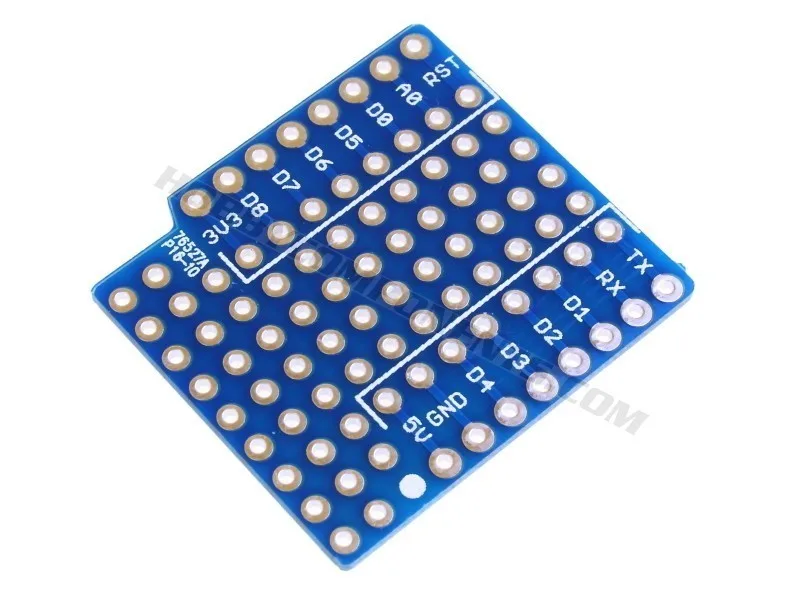
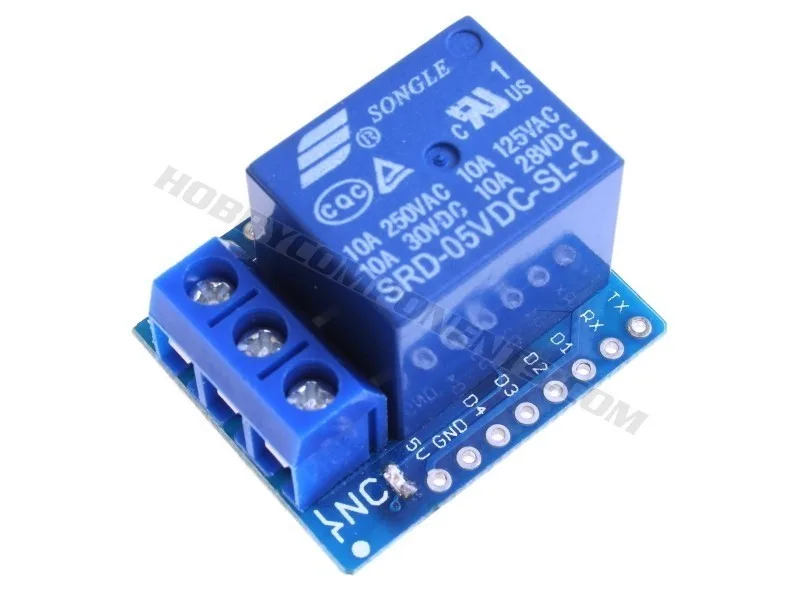
The WeMos D1 mini ecosystem is small, so the buying decision usually comes down to two boards. The WeMos D1 mini Prototyping Shield is a bare PCB with three sets of headers included; you solder the headers and then build your own custom shield circuit that plugs directly into the WeMos mini. The WeMos V2 Relay Shield is a finished relay board that adds one relay output to a WeMos mini or mini Pro, letting a single digital pin switch a high-voltage or high-power device.
That difference matters more than the price gap. A prototyping shield is a platform for your own design, so it has no fixed function until you add components. A relay shield has one fixed function and saves you the work of designing a driver stage, but it cannot become something else later.
Check compatibility before you buy
Both shields are specified for the WeMos D1 mini and mini Pro ESP8266-based development boards. If you are using a different ESP8266 board, do not assume the pinout or physical footprint will match. The catalog does not list a pin map for either shield, so the safe approach is to confirm your board is a WeMos mini or mini Pro before ordering.
The prototyping shield is supplied with three sets of headers and requires soldering. That is not a defect, it is the design: the extra header sets are what let you stack multiple shields on top of each other. If you want a shield you can use the moment it arrives, the relay shield is the closer fit, though it also includes a set of headers in the box.
How to decide between prototyping and relay
Choose the prototyping shield when your project is still changing. Because you supply the components, you can build sensor breakouts, level shifting, or custom connectors on the same footprint and revise the board later. Choose the relay shield when the requirement is already fixed: one digital pin, one switched load, no custom circuitry.
If you need both behaviors, plan the stack order before soldering. The prototyping shield's included headers are what allow multiple shields to sit on top of each other, so a relay shield can be added above or below a prototyping shield as long as the pins you need are not reused by your own circuit.
Where a motor driver fits instead
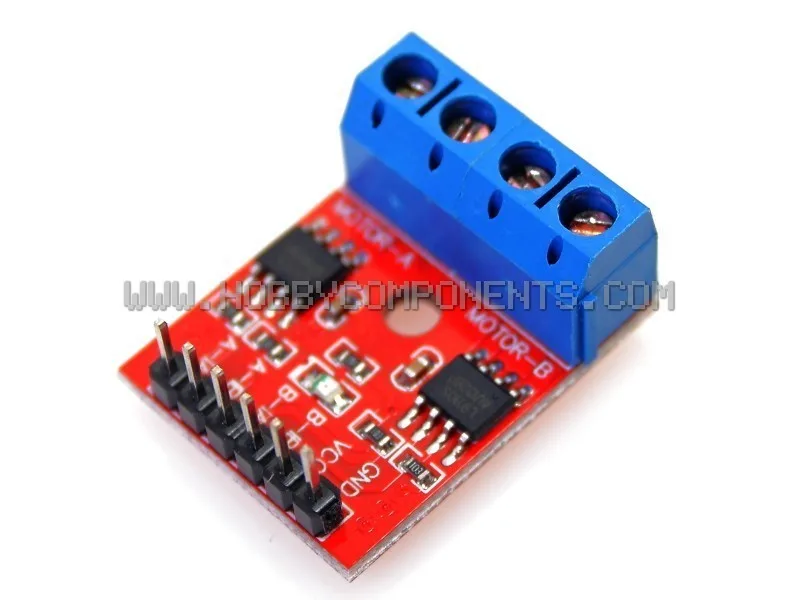
Neither D1 mini shield above drives a motor directly. If your project turns a wheel or moves a stepper, you need a motor driver module rather than a shield. The L9110S DC Stepper Motor Driver H-Bridge is a compact dual-channel module built around two L9110S H-bridge ICs; it can drive either one stepper or two DC motors independently, and it accepts a supply voltage from 2.5 to 12V. That range is the number to check against your motor before buying.
The L9110S is not a D1 mini shield, so treat it as a separate module you wire to your board rather than something that plugs into the mini footprint. If your build also needs a custom carrier for that wiring, the prototyping shield is the part that gives you the space.
Decision rules for buying a D1 mini shield
- Rule 1: Name the output first: If the output is a mains or high-power load switched from one pin, the WeMos V2 Relay Shield is the match. If the output is your own circuit, the WeMos D1 mini Prototyping Shield is the match. One fixed function points to the relay shield; an undefined function points to the prototyping shield.
- Rule 2: Confirm the board, not just the name: Both shields are specified for the WeMos D1 mini and mini Pro. If your board is a different ESP8266 design, verify the footprint and pinout yourself because the catalog does not publish a pin map. No pin map means no assumption.
- Rule 3: Budget for soldering and headers: The prototyping shield includes three sets of headers and requires soldering. The relay shield also includes a set of headers. Factor in an iron and time, or choose a different approach. If you cannot solder, the prototyping shield is the wrong first purchase.
- Rule 4: Keep motors off the shield list: A D1 mini shield will not drive a motor. Add a dedicated driver such as the L9110S module and check its 2.5 to 12V supply range against your motor before ordering. Shield for logic and switching, driver for motion.
Shield and module facts that affect your choice
- WeMos D1 mini Prototyping Shield: Designed for the WeMos D1 mini and mini Pro development boards, and supplied with three sets of headers that require soldering. You get a custom-shield platform and stacking capability, but you must be able to solder before the board is usable.
- WeMos V2 Relay Shield: Adds the ability to switch high-voltage or high-power devices from a single digital pin on a WeMos mini or mini Pro. This is the shortest path to controlling a load that your board's pins cannot drive on their own, with no custom circuit design needed.
- L9110S DC Stepper Motor Driver H-Bridge: Dual-channel H-bridge module using two L9110S ICs, accepting 2.5 to 12V and controlling one stepper or two DC motors independently. If your project moves something, this is the module to budget for instead of expecting a D1 mini shield to drive the motor.
Who should buy which D1 mini shield
Best for
- Makers building a custom circuit on a WeMos D1 mini or mini Pro who are comfortable soldering headers
- Projects that need to stack more than one shield and want the header sets to do it
- Builds that must switch a high-voltage or high-power load from a single digital pin using the relay shield
Not for
- Anyone who cannot solder and wants a plug-and-play board, since the prototyping shield requires soldering
- Motor-driven projects, which need a dedicated driver module such as the L9110S rather than a D1 mini shield
- Boards outside the WeMos D1 mini and mini Pro family, where footprint and pinout are not confirmed