Quick answer
Start the FJ800 at a low-to-mid power fraction, set your aperture for the look you want, then raise power only until the key light reaches that aperture at your working distance. Build the key first, add fill and background lights at lower fractions, and adjust one light at a time. The FJ PRO AC/DC battery lets you keep that same workflow on location, so you are not rebuilding power settings when you move.
Set the camera before you touch the strobe
Power fractions only mean something once the camera is fixed. Choose your aperture for the depth of field you want on the face, set the shutter to your camera's sync speed or below, and set ISO to its base value or the lowest setting you can accept for the final image. If you change any of those three later, every strobe setting you dialed in becomes a starting point again, not a finished one.
- Aperture controls how much strobe light reaches the sensor, so it is the number you match the key light to.
- Shutter speed controls ambient light, not strobe exposure, so use it to decide how much room light or window light mixes in.
- Write your starting aperture, shutter, and ISO on a note card or phone so you can return to them after a test.
Build the key light first, then fill and background
Place the key light where it shapes the face, then raise its power until the skin reads correctly at your chosen aperture. Only after the key is set should you add a fill light or reflector at a lower fraction, and only after that should you bring up a background or hair light. Changing two lights at once makes it impossible to know which change fixed or broke the exposure. With an 800Ws strobe, most portrait work sits well below full power, which leaves headroom for larger modifiers, greater distances, or a deeper aperture when you need it.
- Key light: the main exposure source, set to your working aperture.
- Fill: usually one to two stops below the key, or replaced by a reflector.
- Background or hair light: set last, and keep it from spilling onto the face.
Match modifiers and distance before chasing more power
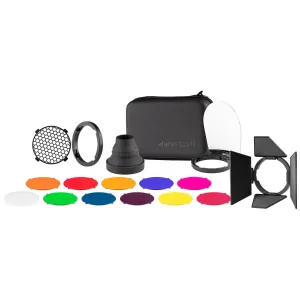
A softbox, umbrella, or beauty dish changes how much light reaches the subject far more than a small power adjustment does. If the key light is too dim, first move the modifier closer or remove a diffusion layer before jumping to a higher power fraction. If it is too bright, add diffusion, feather the light, or move it back. The Westcott FJ80 Creative Pack (Twist Lock) is a practical example of how stacking modifiers changes the light's character and output without changing the strobe's power setting, which is why modifier choice belongs in your setup routine, not in your troubleshooting.
- Move the light before you move the power dial; distance is the fastest exposure control.
- Add or remove diffusion to fine-tune brightness and softness together.
- Recheck exposure after any modifier change, because output will shift.
Use the FJ PRO AC/DC battery as part of the workflow
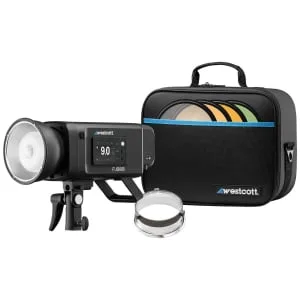
The FJ800 ships with the FJ PRO AC/DC battery, which means the same strobe can run on battery power on location or on AC in the studio. Treat that as a workflow decision rather than an afterthought: charge and carry the battery for location portraits, and switch to AC for long studio sessions where you do not want to think about runtime. Because the battery is part of the FJ800 kit rather than a separate accessory, your power settings and modifier setup carry over between studio and location without a second lighting system.
- Charge the battery before a shoot and confirm it is seated correctly before you raise the strobe on a stand.
- For long studio days, run on AC so battery state never becomes a variable in your exposure.
- Keep your power notes consistent between battery and AC use so you can rebuild a look quickly.
Portrait power-setting steps
- Lock the camera settings: Choose aperture for depth of field, shutter at or below sync speed, and base ISO. These three numbers define what the key light has to match. Checkpoint: if you change any of the three later, treat your strobe settings as a new starting point.
- Set the key light at a low fraction: Begin below the middle of the power range and raise it gradually until the skin reads correctly at your chosen aperture. This avoids overshooting and having to rebuild the look. Common mistake: starting at full power and trying to pull the exposure down with the camera instead of the strobe.
- Add fill at a lower fraction: Bring in a fill light or reflector one to two stops below the key, or replace it entirely with a reflector. Keep the key untouched while you do this. Checkpoint: the shadow side should show detail without flattening the face.
- Set the background or hair light last: Raise the background or hair light only after the key and fill are settled, and watch for spill onto the face or shoulders. Common mistake: adjusting background power before the key is final, which makes the whole setup harder to repeat.
- Adjust modifiers before adding power: If the image is too dark, move the modifier closer or remove diffusion first. If it is too bright, add diffusion or feather the light. Checkpoint: only raise the power fraction after modifier and distance changes have been exhausted.
- Decide battery or AC before the session: Use the FJ PRO AC/DC battery for location work and AC for long studio days. Confirm the battery is charged and seated before the strobe goes on a stand. Next step: record your final power fractions so you can rebuild the same portrait lighting with strobes on the next shoot.
Product facts
- WESTCOTT FJ800 Touchscreen Strobe with FJ PRO AC/DC Battery (800Ws): The Westcott FJ800 Touchscreen Strobe is designed for photographers to conquer the toughest lighting conditions with industry-leading speed, performance, and reliability. That positioning is why it works as a portrait key light: you can push it for difficult conditions and still have headroom left for fill and background lights.
- WESTCOTT FJ80 Creative Pack (Twist Lock): Westcott has taken the idea of stacking modifiers to another level with the Westcott FJ80 Speedlight Creative Pack (Twist Lock). Stacking modifiers changes the quality and quantity of light, so it is a useful reminder to adjust modifiers before reaching for a higher power fraction.