Quick answer
Fingerprints and smudges appear on acrylic desk prints because natural skin oils bond to the plastic surface, and dry dusting pushes grit that can scratch it. Clean with a soft microfiber cloth and a mild soap-and-water solution, never a dry paper towel or ammonia glass cleaner. If the acrylic already has cloudy scratches in the viewing area, stop polishing and replace the piece rather than risk making it worse.
Symptom: oily marks that return after every wipe
A fresh smudge usually looks like a faint rainbow or gray film under angled light. If the mark reappears in the same spot within a day or two, the cause is almost always transferred skin oil from handling the edges or face, not a defect in the print itself. Acrylic holds oil more visibly than glass because the surface is slightly softer, so even a light touch can leave a print that catches light.
Likely cause: dry dusting and the wrong cloth
The most common mistake is grabbing a paper towel, tissue, or dry cotton rag. Those fibers drag dust across the acrylic and leave fine scratches that scatter light, which reads as a permanent smudge. Household glass cleaners with ammonia or alcohol can also haze acrylic over time. If your desk print sits near a window or an air vent, dust settles faster and the problem compounds.
Corrective action: a two-cloth method that protects the surface
Start by lifting the print off its stand and holding it by the edges only. Rinse the acrylic under lukewarm water to float dust away, then apply a drop of mild dish soap with your fingertips. Rinse again, shake off excess water, and blot dry with a clean microfiber cloth. For a final pass, use a second dry microfiber cloth in one direction rather than circles. This keeps acrylic prints clear without introducing new scratches.
When to stop cleaning and choose a different surface
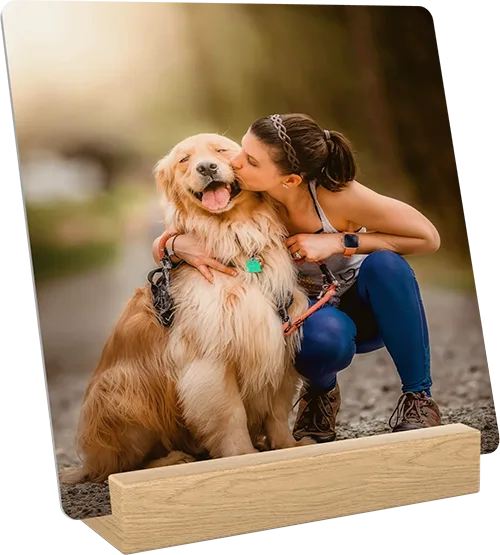
If the acrylic has a deep gouge or a cloudy patch that does not lift after two gentle cleanings, further polishing will likely spread the damage. At that point, either move the print to a low-touch spot or switch to a metal desk print, which resists fingerprints and does not scratch the same way. Metal panels are printed directly and arrive with a wooden stand, so they suit desks where people point, lean, and handle items often.
Diagnosis: match the mark to the fix
- Fresh fingerprint or oily film: Clean with lukewarm water, a drop of mild dish soap, and a soft microfiber cloth. Hold the acrylic by the edges and blot dry with a second cloth. If the mark lifts easily, the surface is fine and you can keep the print on display.
- Dull haze or fine spider scratches: These come from dry dusting with paper or cotton. Stop using dry cloths and switch to the two-cloth wet method. Do not use ammonia or alcohol cleaners. If the haze remains after two gentle cleanings, the damage is in the surface and polishing will not restore clarity.
- Deep gouge or cloudy patch in the viewing area: A gouge cannot be polished out safely at home. Move the print to a low-touch location or replace it with a metal desk print that resists fingerprints and surface wear. Stop cleaning once the mark is clearly a scratch, not a smudge.
Product facts that matter for smudge-prone desks
- Metal Desk Print: Your favorite photo is printed directly on a metal panel so you can enjoy your photo for years to come, and it arrives with a wooden stand for a modern and contemporary look. A metal surface does not show skin oils the way acrylic does, making it a practical alternative if fingerprints are a recurring problem.